VectorStyler
    • Categories
    • Unread
    • Recent
    • Tags
    • Popular
    • Register
    • Login

    update 1.1.070

    Scheduled Pinned Locked Moved Release notes of past builds
    15 Posts 8 Posters 2.5k Views 7 Watching
    Loading More Posts
    • Oldest to Newest
    • Newest to Oldest
    • Most Votes
    Reply
    • Reply as topic
    Log in to reply
    This topic has been deleted. Only users with topic management privileges can see it.
    • b77B Offline
      b77 @Jayanta Das
      last edited by

      @Jayanta-Das Confirmed here.
      This means that if I want to select two objects for a Combine operation, only box select with click-and-drag works.

      MacBook Pro (Intel) running Monterey 12.6.4

      encartE 1 Reply Last reply Reply Quote 2
      • encartE Offline
        encart @b77
        last edited by

        Same here. Selecting multiple objects with Shift is possible when Node tool is active.

        MacBook Air M4 24Gb, Tahoe 26.3.1

        1 Reply Last reply Reply Quote 2
        • VectorStylerV Offline
          VectorStyler @Jayanta Das
          last edited by

          @Jayanta-Das @b77 @encart The issue has been identified. Fix will be up tomorrow.

          1 Reply Last reply Reply Quote 3
          • IngolfI Offline
            Ingolf @VectorStyler
            last edited by

            @VectorStyler said in update 1.1.070:

            Added shortcut and action for view centering to the location under the cursor

            Re-assigned M for this - brilliant! Looking forward to numeric keyboard support for shortcurs as well in macOS, but M is perfect too. So helpful!

            🍏 macOS Sequoia Apple Silicon

            1 Reply Last reply Reply Quote 0
            • VectorStylerV Offline
              VectorStyler
              last edited by

              Uploaded a new build (1.1.071). This should fix a few regressions.

              H 1 Reply Last reply Reply Quote 3
              • BoldlineB Offline
                Boldline
                last edited by

                Thank you @VectorStyler for the new build and all the fixes. Your hard work is much appreciated. It still amazes me to see how quickly VS improves from month to month

                🍎 macOS Tahoe 26.2, Mac mini (M1, 2020), Chip Apple M1, Memory 16 GB
                Cintiq 27QHD Display and LG Ultra HD Display

                1 Reply Last reply Reply Quote 0
                • H Online
                  Harry @VectorStyler
                  last edited by

                  @VectorStyler Thank you for this build! it has a lot of improvements!

                  After upgrading to 071 I have problem. After I close document (blank or not), some panels (Color, Stroke, Brush) are closing as well. - Recordit

                  Win 11, XP Pen Deco 01 V2 graphic tablet

                  VectorStylerV 1 Reply Last reply Reply Quote 0
                  • VectorStylerV Offline
                    VectorStyler @Harry
                    last edited by

                    @Harry This might be related to some configuration / option.
                    One thing to try is to do a settings and workspace reset, on Windows that is:

                    • for settings: Edit -> Preference Files -> Restore Default
                    • for workspace: View -> Workspaces -> Restore Default

                    If this issue persists afterwards, I will try to replicate it.

                    1 Reply Last reply Reply Quote 0
                    • H Online
                      Harry @VectorStyler
                      last edited by

                      @VectorStyler Restoring Defaults did not help. I think this issue might be related to Palette panel. After closing it, issue don't persist, but after changing its position - problem still exists - Recordit

                      @VectorStyler said in update 1.1.070:

                      Improved font detection when importing PDF files.

                      I have also problems with opening PDFs - Dimensions are ok, but fonts recognition not always works. Here is Documentation section of VS website created by Opera browser:
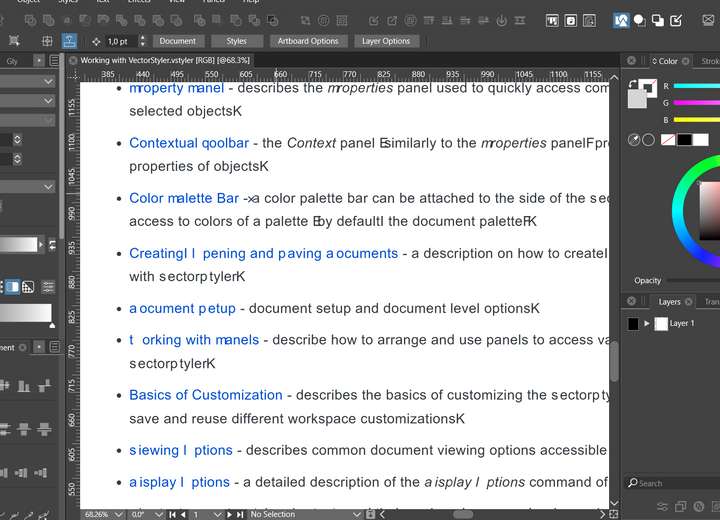
                      0_1671531272482_c4637cd9-8632-4148-b39b-0f1795c715ce-image.png

                      And I'm afraid those are one of the best results I got 😞

                      Win 11, XP Pen Deco 01 V2 graphic tablet

                      VectorStylerV 1 Reply Last reply Reply Quote 0
                      • VectorStylerV Offline
                        VectorStyler @Harry
                        last edited by

                        @Harry Importing text from PDF still has some issues.

                        1 Reply Last reply Reply Quote 0
                        • R Offline
                          Raven
                          last edited by

                          @VectorStyler said in update 1.1.070:

                          Added selection commands to select parent or member objects.

                          Where have selection commands been added?

                          They're not showing up for me in build 70 or 71, in the Select menu or in the available Application Actions in preferences. I would like to able to add them to the Context panel or add keyboard shortcuts.

                          VectorStylerV 1 Reply Last reply Reply Quote 0
                          • VectorStylerV Offline
                            VectorStyler @Raven
                            last edited by

                            @Raven These should be in the Select menu.
                            If the main menu was customized, then these will not show up, so the workspace must be reset.

                            Will be added into the customization list ASAP.

                            1 Reply Last reply Reply Quote 0
                            • R Offline
                              Raven
                              last edited by

                              @VectorStyler said in update 1.1.070:

                              the workspace must be reset

                              Thanks, setting Workspaces >> Restore Default has worked, to show the new Parent and Member selection commands.

                              I can't speak for others, but for myself, a "Select All Members" would be more usefull than "Select First Member" and "Select Last Member", especially if it selects all members of multiple selected groups.

                              1 Reply Last reply Reply Quote 1
                              • First post
                                Last post