VectorStyler
    • Categories
    • Unread
    • Recent
    • Tags
    • Popular
    • Register
    • Login

    3 colour-related bugs

    Scheduled Pinned Locked Moved VectorStyler 1.1 Bugs
    10 Posts 3 Posters 8.9k Views 3 Watching
    Loading More Posts
    • Oldest to Newest
    • Newest to Oldest
    • Most Votes
    Reply
    • Reply as topic
    Log in to reply
    This topic has been deleted. Only users with topic management privileges can see it.
    • encartE Offline
      encart
      last edited by

      I have encountered a few problems with the colours.

      1. The colours selected from the palette are not applied correctly to the object.
        The problem only affects objects in the project. In the rest of the interface, they are displayed correctly.
      2. When using the colour picker, the fill colour preview refresh does not work.
      3. Ability to highlight multiple colours in the Color Bar by holding Shift.

      https://recordit.co/A8SyEUvpM0

      MacBook Air M4 24Gb, Tahoe 26.2

      b77B VectorStylerV 3 Replies Last reply Reply Quote 0
      • b77B Offline
        b77 @encart
        last edited by

        @encart Regarding Issue 1: Can you confirm the color mode of the document is not CMYK?

        If it's CMYK, using the RGB sliders and color wheel to pick/adjust a color will result in duller colors and pale black because of the more limited color space.

        Changing the color mode can be done from File > Document Setup.

        MacBook Pro (Intel) running Monterey 12.6.4

        encartE 1 Reply Last reply Reply Quote 0
        • encartE Offline
          encart @b77
          last edited by

          @b77 Yes, before I wrote the post I tried to solve it myself. I set the Default RGB.

          MacBook Air M4 24Gb, Tahoe 26.2

          1 Reply Last reply Reply Quote 0
          • VectorStylerV Offline
            VectorStyler @encart
            last edited by

            @encart said in 3 colour-related bugs:

            The colours selected from the palette are not applied correctly to the object.

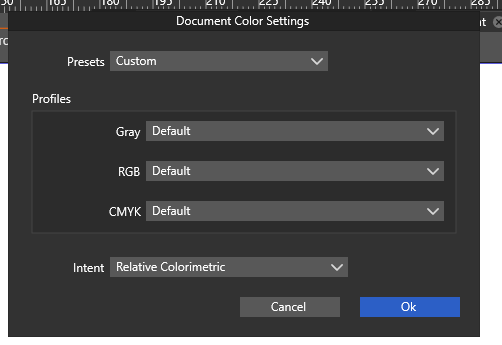
            In the Styles -> Color Settings (and Document Colors), there are some global / document color profile choices.
            What is selected here.

            Also: on Windows, by default the document display may use some color profile.

            1 Reply Last reply Reply Quote 0
            • VectorStylerV Offline
              VectorStyler @encart
              last edited by

              @encart said in 3 colour-related bugs:

              When using the colour picker, the fill colour preview refresh does not work.

              Cannot replicate (2), tried on both Mac and Windows. What tool is used?

              encartE 1 Reply Last reply Reply Quote 0
              • encartE Offline
                encart @VectorStyler
                last edited by

                @VectorStyler 0_1670484181427_screenshot_20221208_082228.png
                Changing profiles does not trigger any change.
                In addition, I had the problem to restore the default settings. They would not save. I tried several times.

                MacBook Air M4 24Gb, Tahoe 26.2

                VectorStylerV 1 Reply Last reply Reply Quote 0
                • VectorStylerV Offline
                  VectorStyler @encart
                  last edited by

                  @encart The document view is displayed using the color profile selected in Windows for the monitor.
                  I will add a display option to enable/disable this (it is enabled now).

                  One thing to try until then is to find the Windows color calibration options for the monitor and try changing that.

                  1 Reply Last reply Reply Quote 0
                  • encartE Offline
                    encart
                    last edited by

                    Unfortunately, I still haven't managed to solve the problem with the faded colours. I have tried various settings. In the meantime I have updated the system to windows 11, but it has no effect.
                    I don't remember if I sent you the files? I have projects created with a version older than 1.068 and when opened display the colours correctly, but when copied to a new file they lose the colours.
                    It would appear that this is not a problem with my hardware?

                    MacBook Air M4 24Gb, Tahoe 26.2

                    VectorStylerV 2 Replies Last reply Reply Quote 1
                    • VectorStylerV Offline
                      VectorStyler @encart
                      last edited by

                      @encart I will reopen this issue in the backlog.

                      1 Reply Last reply Reply Quote 0
                      • VectorStylerV Offline
                        VectorStyler @encart
                        last edited by

                        @encart Send me an example file with the color issues. I will try to replicate it here.

                        1 Reply Last reply Reply Quote 0
                        • First post
                          Last post