VectorStyler
    • Categories
    • Unread
    • Recent
    • Tags
    • Popular
    • Register
    • Login

    Inserting Nodes with the "+" Key Behavior
    Scheduled Pinned Locked Moved Features and Ideas
    11 Posts 3 Posters 9.9k Views 3 Watching
    Loading More Posts
    • Oldest to Newest
    • Newest to Oldest
    • Most Votes
    Reply
    • Reply as topic
    Log in to reply
    This topic has been deleted. Only users with topic management privileges can see it.
    • b77B Offline
      b77 @Subpath
      last edited by b77

      @Subpath If you want to edit the newly added nodes in Corel, selecting them out of
      all the nodes is needed, which in this case and others is not easy.

      So it looks like Corel's behavior is "optimized" just for the adding of nodes, while
      the VS behavior is optimized for quick editing of the newly added node(s) without
      having to re-select them.

      MacBook Pro (Intel) running Monterey 12.6.4

      S 1 Reply Last reply Reply Quote 0
      • S Offline
        Subpath @b77
        last edited by Subpath

        @b77 said in Inserting Nodes with the "+" Key Behavior:

        while
        the VS behavior is optimized for quick editing of the newly added node(s) without
        having to re-select them.

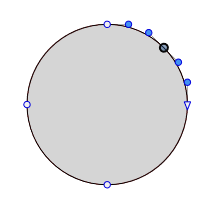
        Understand such a behaviour in this case.
        0_1677487903734_Node-1.png

        But not really in this case.
        0_1677487940356_Node-2.png

        I use inserting nodes with the "+" key mainly because
        I want to divide a path (into several subpaths,
        in a whole or at a Part.)
        So the Corel method suits better to my needs and wishes.

        Would be nice if VS would also offer a way like this.

        Win 11
        CPU: AMD Ryzen 5 9600X, 6-core.
        GPU: Nvidia Geforce RTX 5070.

        b77B 1 Reply Last reply Reply Quote 0
        • b77B Offline
          b77 @Subpath
          last edited by b77

          @Subpath If the user's needs are just adding new nodes but not move/scale/rotate them, Corel's behaviour is
          indeed faster (you don't need to press Cmd-A to select all the nodes for successive additions of nodes).

          If you want to edit the added nodes afterwards, VS auto-selecting them is much better especially if they alternate
          with nodes you don't want to edit (your second image), and having to hit Cmd-A before each new addition
          is a minor effort.

          MacBook Pro (Intel) running Monterey 12.6.4

          S 1 Reply Last reply Reply Quote 0
          • S Offline
            Subpath @b77
            last edited by Subpath

            @b77

            i know "you can always get what you want" as the
            Rolling stones once have sung πŸ™‚

            But i may wish πŸ™‚

            I stumble often upon this case and it annoys me a little,
            that's the reason why I wrote this post.

            One can see Cmd-A as a minor thing
            but "+", "Cmd-A, "+", "Cmd-A" ect. is not really so much fun.
            And if you want to divide only a part of a curve,
            Cmd-A is not helpful.

            Win 11
            CPU: AMD Ryzen 5 9600X, 6-core.
            GPU: Nvidia Geforce RTX 5070.

            b77B 1 Reply Last reply Reply Quote 0
            • b77B Offline
              b77 @Subpath
              last edited by b77

              @Subpath Sure, for just a part of the nodes drag-to-select is needed.
              I prefer having to drag-to-select / Cmd-A at the adding nodes stage
              instead of tedious selection of alternate nodes afterwards.

              In any case, this behaviour can be relegated to a Prefs setting β€” I'm just
              wondering if it's not overkill or just "pushing" for a reorganizing of the
              Preferences where most tools or commands have their individual checkboxes
              for settings and behaviors. Which… might be a good thing after all? πŸ€”

              MacBook Pro (Intel) running Monterey 12.6.4

              S 1 Reply Last reply Reply Quote 0
              • S Offline
                Subpath @b77
                last edited by Subpath

                @b77

                Drag-to-select is way i do it in VS already in both cases.

                Dont know if this does need an additional setting in the preferences.
                Because a Shift-"+" could also enable this kind of divide.

                Win 11
                CPU: AMD Ryzen 5 9600X, 6-core.
                GPU: Nvidia Geforce RTX 5070.

                b77B 1 Reply Last reply Reply Quote 0
                • b77B Offline
                  b77 @Subpath
                  last edited by b77

                  @Subpath Do you mean Shift-+ should add nodes and select the new and the old node(s)?
                  If so, that could be an alternative solution.

                  MacBook Pro (Intel) running Monterey 12.6.4

                  S 1 Reply Last reply Reply Quote 0
                  • S Offline
                    Subpath @b77
                    last edited by Subpath

                    @b77 said in Inserting Nodes with the "+" Key Behavior:

                    Do you mean Shift-+ should add nodes and select the new and the old node(s)

                    yes, Shift-+ could inserting nodes the corel way
                    as shown in the video above
                    (keeping Nodes selected)

                    Win 11
                    CPU: AMD Ryzen 5 9600X, 6-core.
                    GPU: Nvidia Geforce RTX 5070.

                    1 Reply Last reply Reply Quote 0
                    • VectorStylerV Offline
                      VectorStyler @Subpath
                      last edited by

                      @Subpath Yes, there is a difference here.
                      In VS, only the new nodes are selected (by design), and there can be multiple uses of this (@b77).

                      Do you need to select all nodes for this case? that is possible.

                      I can add this to the backlog, to have a settings to keep the original nodes also selected.

                      S 1 Reply Last reply Reply Quote 1
                      • S Offline
                        Subpath @VectorStyler
                        last edited by Subpath

                        @VectorStyler said in Inserting Nodes with the "+" Key Behavior:

                        Do you need to select all nodes for this case? that is possible.

                        yes, because i often use it for divide parts of path
                        and also to divide a whole Shape
                        i like this kind of behaviour from CorelDraw
                        and have no really needs for the VS way to do this

                        I can add this to the backlog, to have a settings to keep the original nodes also selected.

                        this would be nice and helpful
                        if the old selected nodes and the newly
                        created nodes remained selected

                        Win 11
                        CPU: AMD Ryzen 5 9600X, 6-core.
                        GPU: Nvidia Geforce RTX 5070.

                        1 Reply Last reply Reply Quote 1
                        • First post
                          Last post