Issues with bleeds

-
I cannot figure out how bleeds are supposed to be working in VS.
I have specified 3mm bleeds on all edges of an A4 canvas that uses the same size Artboard. Then I have drawn objects at edges so that the extend beyound the edges varying amounts but always more than 3mm:
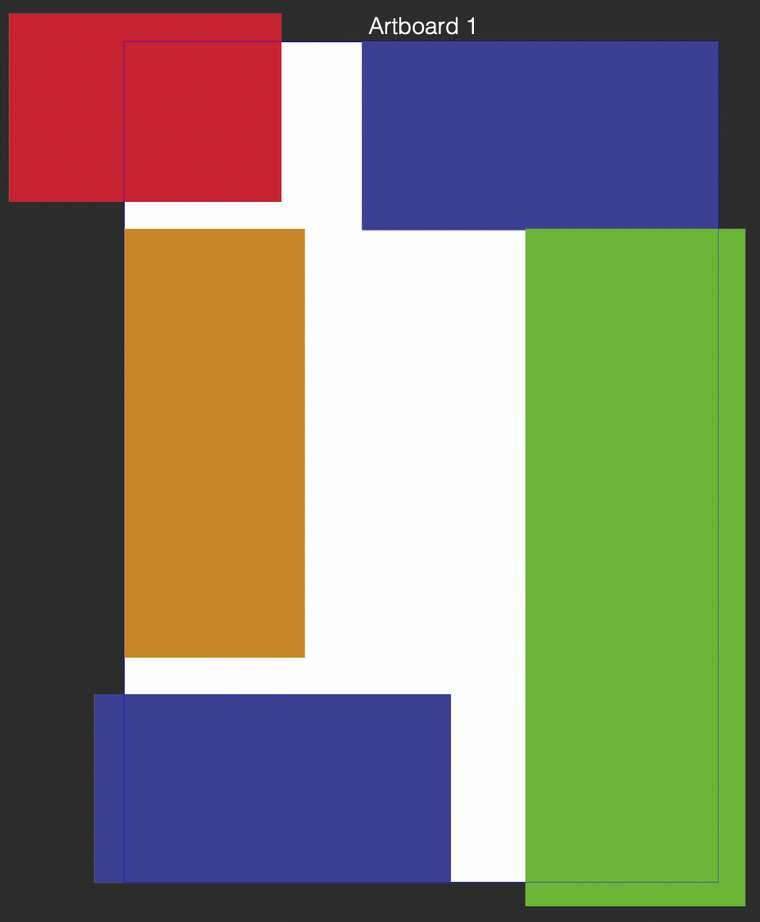 .
.When I export this artboard to PDF, I get a 210 x 297mm page where no visible bleeds are shown, and where objects are not trimmed at bleed limit, but actually extend to their full width and height beyond the bleed limits. No bleed marks are included, either.
If I export the canvas, I get a canvas (white background) that is the bounding box of all objects placed on the canvas, so not a 210 x 297mm area (as shown in the document), nor an area with trimmed objects at the specified bleed area.
(Note: in the screenshot above the blue at the bottom is intentionally aligned to bottom edge of the A4 sheet; the ocra rectangle is aligned to the left edge of the A4 sheet, and the blue at the top is aligned to the top and right edges of the A4 sheet, so the objects with bleeds are the red and green rectanbles on both edges, and the bottom blue on the left edge).)
I have not tested other export formats than PDF so far.
-
@Arde Bleed marks are not included when exporting (only when printing) to PDF or PS.
The trimming issue could be a bug. I added it to the backlog. -
@vectoradmin said in Issues with bleeds:
Bleed marks are not included when exporting (only when printing) to PDF or PS
I see. I tested this and they still seem to print erroneously. Crop marks do not mark the document format, and bleeds are not truncated. I am not sure if bleed marks are drawn, at all (though they are not so important; but crop marks are). It would also be nice if PDF paper size could be automatically enlargened to fit everything that gets printed similarly when creating a PDF from e.g. InDesign; you just specify what to export/print, and do not need to specify format + extra paper sizes just to get the bleed, slug and print marks fitted on the print sheet; but that's not so crucial, either. I am not sure, however, if custom page sizes work correctly, either, so the only way I have been able to check all print marks has been using a bigger standard page size, e.g using A3 for an A4 format job .
-
@Arde I will look into these issues, for the next build.
-
@vectoradmin
What is printed (previewed) is incorrect.
In Print> Print Marks.
a) Crop Marks -----> Slug
b) Bleed Marks -----> Center register marks
c) Registration Marks -----> gray Bars
d) Color Bars -----> Positive
e) Page Info -----> Positive"Bleed" should be displayed (printed) with a) + b).
-
@861475_VctSt Got it!

