Opacity in Color panel has effect on both fill and stroke
-
Shouldn't the opacity slider have effect only on either the stroke or fill, similarly as the color sliders?
(I know that opacity can be separately specified by using e.g. the Appearance panel.)
-
@Arde Yes I think it should be the same as the color. I add this to the backlog.
-
@Arde and @vectoradmin
I don't know… to me the current behavior seems better because usually you need to quickly adjust the opacity per object, for both the fill(s) and the stroke(s). The separate opacity sliders in the Appearance panel would cover the rest. My vote would be for leaving this unchanged.
-
@vectoradmin and @Arde
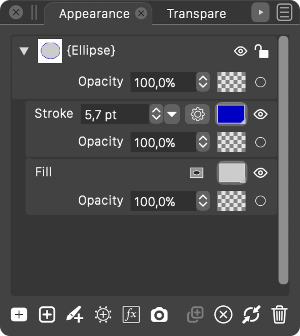
A possible improvement regarding all this would be to have the T̶r̶a̶n̶s̶p̶a̶r̶e̶n̶c̶y̶ Opacity sliders for each stroke and fill always visible under their name instead of having to expand the attributes of the fill or the stroke to access it. And better visual separation between fill and strokes wouldn't hurt. Something like this:
-
@b77 said in Opacity in Color panel has effect on both fill and stroke:
The separate opacity sliders in the Appearance panel would cover the rest.
I do not mean this. I mean that there is already "focus" control that activates the stroke or the fill. This way you now indicate whether you define color for the stroke or the fill. Accordingly, one opacity slider is enough, it just shows the opacity value of either the stroke or the fill, depending on which mode is active.
-
@Arde OK, I agree — can't say it doesn't make sense to be that way.
However, I would still move the Transparency slider from being the last in the list/stack in the Appearance panel to be at the top, "glued" under the name of the object, so the user makes the connection that it changes the opacity of the object, not of the fill.

