Selection Intersecting / Containing toggle
-
Object Selection by Box, Lasso or Polygon doesn't honor the Intersecting / Containing toggle.
Checkmark updates in Menu and Panel, but selection is by "Intersecting" rule regardless..VS 1.1.079 Win10
/BR Lars
-
@larsherold Not sure which is the Intersecting/Containing toggle you mean?
Is 'Intersecting Selection' enabled or disabled in Preferences > Editing Options 2?
-
@larsherold I tried with Select -> Option -> Intersecting Selection option and it seems to be working here.
Was this done with some other option? -
@b77
 Removing the checkmark in the preference panel, changes the behaviour from Intersecting to "Contained".
But I expected the checkmarks in
- Preferences : Editing2
- Select : Options menu
- Selection Panel options
to be in sync - updating checkmark graphics is in sync but behaviour is not.
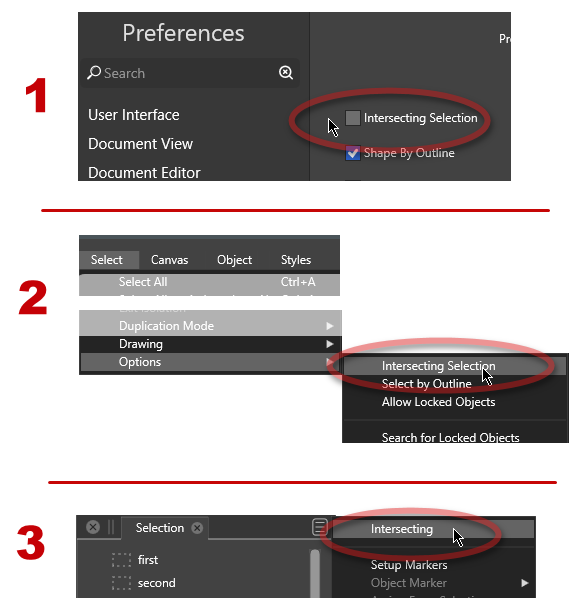
What I experience is
a) "Intersecting" checked in Prefs
b) "Intersecting" checked in Selection Panel option
c) Remove checkmark in Selection Panel option
d) Selection is still "Intersecting" behaviour
e) Visit Preferences to see chk removed, Ok to exit will make the behavior fall into place.../Lars
-
@VectorStyler - will try on a Mac later.
What I see here on a PC is that:
- All set to select "Intersecting" in Prefs, SelectPanel and SelectMenu
- Remove the Intersecting chkmark on the SelectPanel, to get "Contained" behaviour
- Selecting is still "Intersecting"
Going to the Prefs panel and out, forces the right behaviour through..
/Lars
-
@larsherold Found the bug, it affects the Selection panel only.
The option is activated, but it is only taken into use after opening a document (or closing and reopening the current one).

