Symmetrical sketching in Vectorstyler - Tip
-
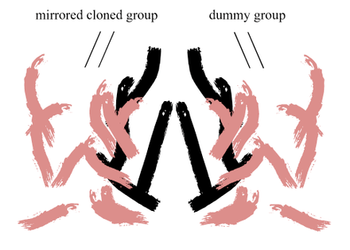
Creating symmetrical Designs with shapes is easy to do in VS.
With Clones and Symbols.But did you know that you can also sketch symmetrically?
Note:
This works only with a cloned group, but it works.
.
.
This Video shows how it works, re-upload
.First create a kind of dummy Group. Place this Group
anywhere on the Canvas.Then clone that Group and mirror it to create a simple
symmetrie. Of course, you can sketch with any symmetrie
you like.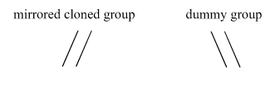
Select your original group then select the "Draw Inside" Tool.
Select your sketching Tool and up then you can start sketching.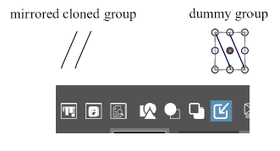
As your original and the "Draw Inside" Tool is selected all Strokes,
Objects will be placed "inside" of your group and appears also in your clone too.
.
.Note about vector Brushes:
To sketch with the vector Brushes, one additional Step is needed.
Open the Document Setup ( Menu > File > Document Setup )
and set the "Transformed Stroke" Flag. This enable that the Brush
Shapes will be mirrored correctly.At least if your clones will loose there link to the original.
Delete just that unlinked clone Side. Select your original group
Side and create a new clone from it and continue sketching.It is also possible to create other symmetries with the same Sketch.
Select your original choose Transform "Rotate" or "Transform" and
set your repeats. ( Menu > Object > Transform ...)
Select your orignal and the "Draw inside" Tool and continue sketching.Btw. the "Select and transform Members of a Group" Tool is helpful
if you like to move one or more strokes. -
@Subpath Thanks for this interesting tutorial

I stopped using VS with clones because it systematically crashes more or less early in the process.
I'm looking forward to updating VS.@VectorStyler I do remember an AstuteGraphics plugin/feature allowing symmetry of different orders (I can't recall now its name) but would it be possible to add this in VS ? Maybe, it is already in the roadmap but I didn't check.
W11 Pro 25H2 - 12th Gen Intel(R) i7-12700K 3.61 GHz - RAM 64 Go - NVIDIA GF GTX 4070 Ti - Intuos - Dell UP3216Q / Eizo ColorEdge
W11 Pro 25H2 - 12th Gen Intel(R) i7-12700KF 3.60 GHz -RAM 64 Go - NVIDIA GF GTX 3080 - IntuosPro- ProArt PA329C -
@Pat said in Symmetrical sketching in Vectorstyler - Tip:
I do remember an AstuteGraphics plugin/feature allowing symmetry of different orders
I think this is doable in VS using references (or clones also), but with a bit more steps.
-
@VectorStyler said in Symmetrical sketching in Vectorstyler - Tip:
@Pat said in Symmetrical sketching in Vectorstyler - Tip:
I think this is doable in VS using references (or clones also), but with a bit more steps.
As I wrote, I don't use VS and clones anymore because I only have artefacts and crashes.
-
@Pat said in Symmetrical sketching in Vectorstyler - Tip:
Thanks for this interesting tutorial
I stopped using VS with clones because it systematically crashes more or less early in the process.
I'm looking forward to updating VS.Thank you, your always welcome
I wonder why you have so many crashes, maybe because you are
work with many more objects than I do? I can hardly say that I have a crash when I use use clones.Unfortunately, symmetric sketching only works with clones.
-
@Subpath Yes, it could be. VS crashes every time I use "clones" and all crash reports have been forwarded, hopefully they helped identify the issues. The AG is MirrorMe & there is a feature in Affinity Photo (pixel-based obviously).
-
Thanks for sharing your tutorial @Subpath. A built-in option for symmetry like what Astute has with MirrorMe would be a great addition to VS. I know I would use it frequently if it were added as an option. I know the topic has been brought up in the VS forum a few times over the last couple years. Hopefully when @VectorStyler gets past the intensive workload involved in the upcoming builds and version 1.2 additions it can be added
-
I agree that a built-in option for symmetry, like Astute has with "MirrorMe" would be
a great addition to VS. Because this will add some comfort tools for creating
symmetries. But aside from that, I think VS does already a pretty good job.Btw. Coreldraw has a symmetry tool that similar to Astutes "MirrorMe".

