VectorStyler
    • Categories
    • Unread
    • Recent
    • Tags
    • Popular
    • Register
    • Login

    Problems with "Stroke Width" Tool to set a new Node near an previous one

    Scheduled Pinned Locked Moved VectorStyler 1.1 Bugs
    8 Posts 4 Posters 7.3k Views 4 Watching
    Loading More Posts
    • Oldest to Newest
    • Newest to Oldest
    • Most Votes
    Reply
    • Reply as topic
    Log in to reply
    This topic has been deleted. Only users with topic management privileges can see it.
    • S Offline
      Subpath
      last edited by

      Find it almost impossible to place a new Node with
      the "Stroke Width " Tool near another a previous Node.

      Because the old Nodes always catch the "Stroke Width" Tool
      and make it impossible this way to place a new node.

      Sometimes it works, but its a kind of trial and error.

      see video here

      Win 11
      CPU: AMD Ryzen 5 9600X, 6-core.
      GPU: Nvidia Geforce RTX 5070.

      b77B VectorStylerV 2 Replies Last reply Reply Quote 1
      • b77B Offline
        b77 @Subpath
        last edited by b77

        @VectorStyler
        Can this be adjusted in Prefs > Tolerance?
        Or is it some value in the 'Stroke Width' panel?

        MacBook Pro (Intel) running Monterey 12.6.4

        1 Reply Last reply Reply Quote 1
        • S Offline
          Subpath
          last edited by Subpath

          @b77, @VectorStyler

          Have looked in both, but have not found any Setting that would help.

          Btw. i record the Gif-Animation with "ScreentoGif" (Win only)
          so in the Video the Cursor is on the same place as in VectorStyler
          (and not displaced like in Recordit) i re-record this Gif-Animation
          then with Recordit.

          Win 11
          CPU: AMD Ryzen 5 9600X, 6-core.
          GPU: Nvidia Geforce RTX 5070.

          1 Reply Last reply Reply Quote 0
          • VectorStylerV Offline
            VectorStyler @Subpath
            last edited by VectorStyler

            @Subpath @Subpath @b77 This seems to be a bug. Will be fixed ASAP.

            A workaround: create the new node further away and then drag it from the center point, to where it supposed to be

            B 1 Reply Last reply Reply Quote 1
            • B Offline
              B-Vs-V @VectorStyler
              last edited by B-Vs-V

              @VectorStyler if I may get into this thread ☺
              with the Stroke width tool selected, it would be nice to be able to see the nodes that already exist in a curve/stroke. I haven't found a way to see them simultaneously ("normal" & stroke width nodes).

              W11 Pro 25H2 - 12th Gen Intel(R) i7-12700K 3.61 GHz - RAM 64 Go - NVIDIA GF GTX 4070 Ti - Intuos - Dell UP3216Q / Eizo ColorEdge
              W11 Pro 25H2 - 12th Gen Intel(R) i7-12700KF 3.60 GHz -RAM 64 Go - NVIDIA GF GTX 3080 - IntuosPro- ProArt PA329C

              VectorStylerV 1 Reply Last reply Reply Quote 3
              • VectorStylerV Offline
                VectorStyler @B-Vs-V
                last edited by

                @Pat Should only the center nodes be visible only along the path (spine) or the width nodes also?

                B 1 Reply Last reply Reply Quote 0
                • B Offline
                  B-Vs-V @VectorStyler
                  last edited by

                  @VectorStyler I would say that I would like to be able to change the nodes of a stroke/curve when I select the "Stroke width" tool. The reverse (e.g., seeing the stroke width nodes with the "Shape editor" tool) seems less essential to me...
                  However, I don't know if I have understood the question correctly and therefore if I have given a valid point of view ☺

                  W11 Pro 25H2 - 12th Gen Intel(R) i7-12700K 3.61 GHz - RAM 64 Go - NVIDIA GF GTX 4070 Ti - Intuos - Dell UP3216Q / Eizo ColorEdge
                  W11 Pro 25H2 - 12th Gen Intel(R) i7-12700KF 3.60 GHz -RAM 64 Go - NVIDIA GF GTX 3080 - IntuosPro- ProArt PA329C

                  1 Reply Last reply Reply Quote 1
                  • S Offline
                    Subpath
                    last edited by

                    @Pat , @VectorStyler

                    Dont know if seeing the regular Nodes too
                    would irritate users.

                    But i second the Wish from @Pat, was in the same need
                    to see the regular Nodes with the Width Nodes and though
                    that this would be useful.

                    I think the way the Nodes are shown when i hoover
                    with the Transform Tool over a Curve would be enough for me.
                    Here a Picture
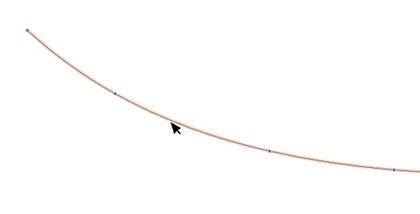
                    0_1683881817089_Nodes shown.png

                    Win 11
                    CPU: AMD Ryzen 5 9600X, 6-core.
                    GPU: Nvidia Geforce RTX 5070.

                    1 Reply Last reply Reply Quote 2
                    • First post
                      Last post
