VectorStyler
    • Categories
    • Unread
    • Recent
    • Tags
    • Popular
    • Register
    • Login

    Eraser and Knife Tool bugs.

    Scheduled Pinned Locked Moved VectorStyler 1.1 Bugs
    16 Posts 5 Posters 13.3k Views 5 Watching
    Loading More Posts
    • Oldest to Newest
    • Newest to Oldest
    • Most Votes
    Reply
    • Reply as topic
    Log in to reply
    This topic has been deleted. Only users with topic management privileges can see it.
    • encartE Offline
      encart
      last edited by encart

      Since the release of the last two builds, the Eraser and Knife Tool have returned unpredictable results for me.
      https://recordit.co/rf3VE9zrPy

      MacBook Air M4 24Gb, Tahoe 26.2

      S VectorStylerV 2 Replies Last reply Reply Quote 0
      • S Offline
        Subpath @encart
        last edited by

        @encart

        it looks like it looses combining when using eraser
        combining it again fix it in my tries

        Win 11
        CPU: AMD Ryzen 5 9600X, 6-core.
        GPU: Nvidia Geforce RTX 5070.

        1 Reply Last reply Reply Quote 0
        • VectorStylerV Offline
          VectorStyler @encart
          last edited by

          @encart Disable the "Separate Path with Knife Tool" (and Eraser Tool) option in Preferences -> Editing Options 2 (bottom left checkboxes).

          1 Reply Last reply Reply Quote 1
          • IgullI Offline
            Igull
            last edited by

            Sadly I'm also getting changed results with the eraser tool 😞

            Previously, you didn't need to select the object that you wished to erase a part from - now you do and it just adds another level of work.

            You could just work your way through all the objects without selecting anything - this is with the 'separate path with eraser tool' option selected of course.

            This is one of the most important tools for me.

            Neil

            iMac 27" 2015 Catalina 32Gb, MacBook Pro 13" 2016 Monterey 8Gb, Mac Mini M2 2023 8Gb

            VectorStylerV 1 Reply Last reply Reply Quote 0
            • VectorStylerV Offline
              VectorStyler @Igull
              last edited by

              @Igull What is selected when the eraser tool is activated?
              If no object is selected, then the eraser tool should work on all objects.

              IgullI 1 Reply Last reply Reply Quote 0
              • IgullI Offline
                Igull @VectorStyler
                last edited by

                @VectorStyler said in Eraser and Knife Tool bugs.:

                @Igull What is selected when the eraser tool is activated?
                If no object is selected, then the eraser tool should work on all objects.

                With no objects selected, the eraser tool works ok on the first object and any other part of the first object. However, when moving to the next object, the first object remains selected and you can't erase any part of the next (unselected) object.

                Previously, it didn't matter, you could continue to any object without selecting it. I think I actually mentioned that this was a feature that I really liked with eraser tool 🙂

                Neil

                iMac 27" 2015 Catalina 32Gb, MacBook Pro 13" 2016 Monterey 8Gb, Mac Mini M2 2023 8Gb

                VectorStylerV 1 Reply Last reply Reply Quote 0
                • VectorStylerV Offline
                  VectorStyler @Igull
                  last edited by

                  @Igull Seems to be working here for other objects also (not just the first, where the eraser was used).
                  In the context panel, there is a "Source" drop down, try selecting a different option.

                  IgullI 2 Replies Last reply Reply Quote 0
                  • IgullI Offline
                    Igull @VectorStyler
                    last edited by

                    @VectorStyler said in Eraser and Knife Tool bugs.:

                    @Igull Seems to be working here for other objects also (not just the first, where the eraser was used).
                    In the context panel, there is a "Source" drop down, try selecting a different option.

                    Mmm, still not working, tried a fresh file and changing the source selection/layer/canvas ?
                    Neil

                    PS, I'll reboot VS and see if that matters.

                    iMac 27" 2015 Catalina 32Gb, MacBook Pro 13" 2016 Monterey 8Gb, Mac Mini M2 2023 8Gb

                    1 Reply Last reply Reply Quote 0
                    • IgullI Offline
                      Igull @VectorStyler
                      last edited by

                      @VectorStyler

                      Just tried rebooting VS with a new file, same issue, first object ok - successive objects no. Source makes no difference either.

                      Neil

                      iMac 27" 2015 Catalina 32Gb, MacBook Pro 13" 2016 Monterey 8Gb, Mac Mini M2 2023 8Gb

                      IgullI 1 Reply Last reply Reply Quote 0
                      • IgullI Offline
                        Igull @Igull
                        last edited by

                        @Igull

                        Seems that if an object is selected, then the eraser tool won't work on subsequent (unselected) objects. The eraser tool automatically selects the first object when you attempt to erase of course 🙂
                        It works ok (on the next object) if you deselect the first object.

                        Neil

                        iMac 27" 2015 Catalina 32Gb, MacBook Pro 13" 2016 Monterey 8Gb, Mac Mini M2 2023 8Gb

                        b77B VectorStylerV 2 Replies Last reply Reply Quote 0
                        • b77B Offline
                          b77 @Igull
                          last edited by b77

                          @Igull Same here: https://recordit.co/6p6vInXuJk

                          The workaround is to press the Escape key, which deselects
                          the current object and lets you "jump" to any other.

                          MacBook Pro (Intel) running Monterey 12.6.4

                          IgullI 1 Reply Last reply Reply Quote 0
                          • VectorStylerV Offline
                            VectorStyler @Igull
                            last edited by

                            @Igull I will have to replicate this somehow.

                            1 Reply Last reply Reply Quote 0
                            • IgullI Offline
                              Igull @b77
                              last edited by

                              @b77
                              Yes, I've been using the escape key 🙂

                              Neil

                              iMac 27" 2015 Catalina 32Gb, MacBook Pro 13" 2016 Monterey 8Gb, Mac Mini M2 2023 8Gb

                              1 Reply Last reply Reply Quote 1
                              • S Offline
                                Subpath
                                last edited by Subpath

                                @Igull , @b77

                                Perhaps a "select all" or select all parts that should
                                be edited with the Eraser might be helpful
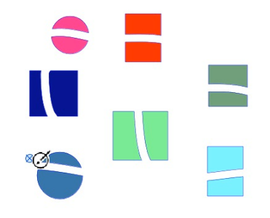
                                Here a Video

                                0_1684681570714_Eraser.png

                                Win 11
                                CPU: AMD Ryzen 5 9600X, 6-core.
                                GPU: Nvidia Geforce RTX 5070.

                                IgullI 1 Reply Last reply Reply Quote 0
                                • IgullI Offline
                                  Igull @Subpath
                                  last edited by

                                  @Subpath said in Eraser and Knife Tool bugs.:

                                  Perhaps a "select all" or select all parts that should
                                  be edited with the Eraser might be helpful

                                  I don't see the point in that, it's just more work ? Selecting all can lead to other unintentional bad things happening 🙂

                                  Selecting the parts that you need to erase is yet another minefield of work 🙂

                                  Why not just have it work correctly - pick erase tool - erase part - simples - that's how the thing on the end of your pencil works 🙂

                                  A 'workaround' would be to have VS automatically deselect after each erase operation - then the problem would simply disappear 🙂

                                  Neil

                                  iMac 27" 2015 Catalina 32Gb, MacBook Pro 13" 2016 Monterey 8Gb, Mac Mini M2 2023 8Gb

                                  S 1 Reply Last reply Reply Quote 2
                                  • S Offline
                                    Subpath @Igull
                                    last edited by

                                    @Igull

                                    was just a though of mine 🙂
                                    i think i often have lesser Objects to handle

                                    Win 11
                                    CPU: AMD Ryzen 5 9600X, 6-core.
                                    GPU: Nvidia Geforce RTX 5070.

                                    1 Reply Last reply Reply Quote 0
                                    • First post
                                      Last post
