VectorStyler
    • Categories
    • Unread
    • Recent
    • Tags
    • Popular
    • Register
    • Login

    Transform vs Shape Sizes Not Syncing

    Scheduled Pinned Locked Moved VectorStyler 1.1 Bugs
    3 Posts 2 Posters 4.0k Views 1 Watching
    Loading More Posts
    • Oldest to Newest
    • Newest to Oldest
    • Most Votes
    Reply
    • Reply as topic
    Log in to reply
    This topic has been deleted. Only users with topic management privileges can see it.
    • W Offline
      William Kansepa
      last edited by

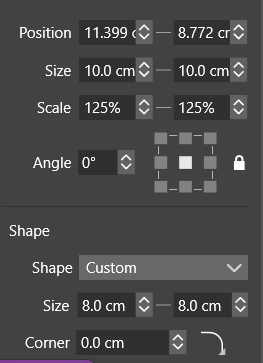
      The size of artwork in the Transform panel is not matching with the one in the Shape panel. If I restore the preferences to default, the sizes will match. But as soon as I do the slightest of tweaks to the preferences the synchronization corrupts.

      VectorStyler 1.1.086

      See attached image.
      0_1686385304728_transform vs shape panel size.png

      HP•Windows 11 Pro•11th Gen Intel(R) Core(TM) i7-1165G7 @ 2.80GHz 2.70 GHz• RAM: 16.0 GB (DDR4)

      VectorStylerV 1 Reply Last reply Reply Quote 0
      • VectorStylerV Offline
        VectorStyler @William Kansepa
        last edited by

        @William-Kansepa These sizes have different meaning.
        The Shape size is before all nondestructive transformation / effects. The size in the Transform panel is the size of the object (after transforms / effects).

        This can be a bit confusing, but showing the transformed size in the Shape panel might result in other problems.

        W 1 Reply Last reply Reply Quote 0
        • W Offline
          William Kansepa @VectorStyler
          last edited by

          @VectorStyler said in Transform vs Shape Sizes Not Syncing:

          @William-Kansepa These sizes have different meaning.
          The Shape size is before all nondestructive transformation / effects. The size in the Transform panel is the size of the object (after transforms / effects).
          This can be a bit confusing, but showing the transformed size in the Shape panel might result in other problems.

          @VectorStyler Thank you.
          Indeed, I am confused. I guess I will have to relearn the difference between the two panels.

          HP•Windows 11 Pro•11th Gen Intel(R) Core(TM) i7-1165G7 @ 2.80GHz 2.70 GHz• RAM: 16.0 GB (DDR4)

          1 Reply Last reply Reply Quote 0
          • First post
            Last post