update 1.1.091
-
VectorStyler 1.1.091 release notes
- Fixed regression when calculating shape effects inside symbol references.
- Exporting (local) opacity masks to SVG.
- Exporting symbol references from outside the artboard to SVG.
- Expand stroke and convert to curve to keep opacity transformations.
- Highlighting spot colors in pop-over palette panels.
- Use copy and paste of objects while in the shape editor (no nodes are selected).
- General stability improvements.
-
Great release

-
@VectorStyler said in update 1.1.091:
VectorStyler 1.1.091 release notes
- Use copy and paste of objects while in the shape editor (no nodes are selected)
@VectorStyler Works great, thanks

-
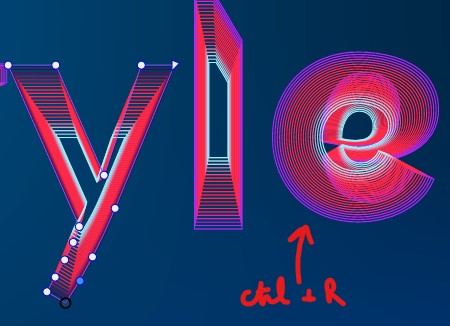
@VectorStyler v1.091: when I'm dealing with blended shapes, I have to refresh (Ctrl+R) after each change (whatever it is) because some shapes disappear, are displaced, etc . Can this be improved ? Thanks
W11 Pro 25H2 - 12th Gen Intel(R) i7-12700K 3.61 GHz - RAM 64 Go - NVIDIA GF GTX 4070 Ti - Intuos - Dell UP3216Q / Eizo ColorEdge
W11 Pro 25H2 - 12th Gen Intel(R) i7-12700KF 3.60 GHz -RAM 64 Go - NVIDIA GF GTX 3080 - IntuosPro- ProArt PA329C -
@Pat said in update 1.1.091:
when I'm dealing with blended shapes, I have to refresh (Ctrl+R) after each change (whatever it is) because some shapes disappear
I will try to replicate and fix this ASAP.
-
@Pat said in update 1.1.091:
when I'm dealing with blended shapes, I have to refresh (Ctrl+R) after each change (whatever it is) because some shapes disappear
I cannot replicate this issue. Can you send me an example? Thanks!
-
@VectorStyler I can send you the file I'm working on right now (see here). The issue occurred when I was dealing with Artboard 2.
-
@VectorStyler file sent (with 5 artboards so far)
-
@Pat I tried moving / changing objects on artboard 2, and in all cases the blend is updating for me.
Maybe a short recording might help. -
@VectorStyler I get the issue just by changing the colour of one stroke or the size etc.
but Ctlr+R just solves the "issue" every time (well, not a real issue):
After Ctrl+R: