VectorStyler
    • Categories
    • Unread
    • Recent
    • Tags
    • Popular
    • Register
    • Login

    Addition copies of spot color being added to palette
    Scheduled Pinned Locked Moved VectorStyler 1.1 Bugs
    5 Posts 2 Posters 5.3k Views 1 Watching
    Loading More Posts
    • Oldest to Newest
    • Newest to Oldest
    • Most Votes
    Reply
    • Reply as topic
    Log in to reply
    This topic has been deleted. Only users with topic management privileges can see it.
    • BoldlineB Offline
      Boldline
      last edited by

      I'm using build 91 but still running into a duplication problem when pasting something that has a spot color into a new file that has the same custom palette where that spot color already exists.

      So in this case, referencing the image pasted below in this post, I pasted text into a new file that was previously created in another file using a spot color that is shared in both custom palettes. The text I pasted was pantone 2767. (#1) After pasting, it made a new spot color of the same name (pantone 2767) as if it were a different color. I have arrows pointed at the old and new "pantone 2767" (#2) The only import setting I have for the palette is "register by similarity" . I also noticed the palette bar recognizes the same color in it's palette set (it's the same palette file as the one used in the palette panel) (#3)

      This same thing has happened in other files in build 91 where I've pasted from other sources.

      I attached the file to this post:

      0_1688079038697_extra spot color added issue.vstyler
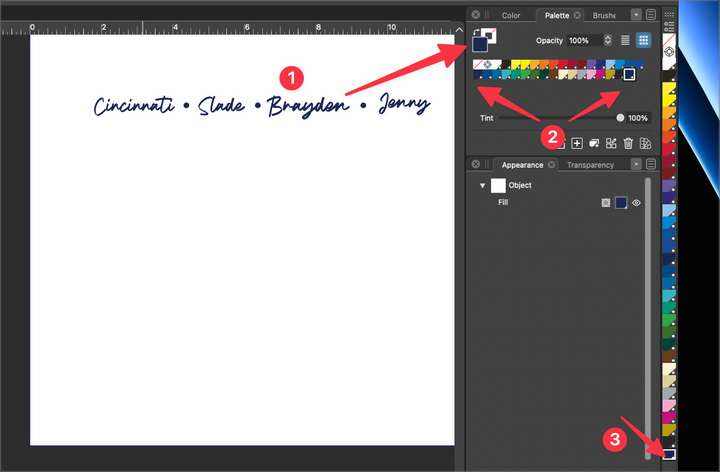
      0_1688078881385_8df77eaf-a15a-4ae1-82cd-e2e21e0153f2-BLD 2023-06-29 at 18.40.11@2x.png

      🍎 macOS Tahoe 26.2, Mac mini (M1, 2020), Chip Apple M1, Memory 16 GB
      Cintiq 27QHD Display and LG Ultra HD Display

      VectorStylerV 1 Reply Last reply Reply Quote 0
      • VectorStylerV Offline
        VectorStyler @Boldline
        last edited by

        @Boldline Do these colors have a different name?
        I will try to fix this issue ASAP.

        BoldlineB 1 Reply Last reply Reply Quote 0
        • BoldlineB Offline
          Boldline @VectorStyler
          last edited by

          @VectorStyler

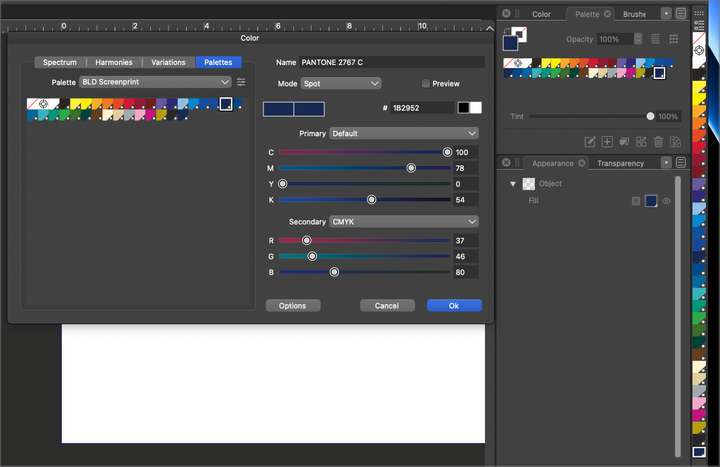
          They are both labeled the same name and their information seems to be the same in both color info panels when double clicked upon. I attached both images to this post.

          Also, I had uploaded the file to the first post in this thread if you wanted to open it and check anything
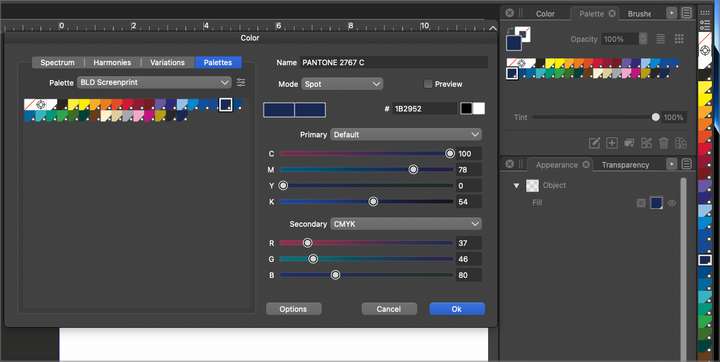
          0_1688131579180_7814b11e-9341-4b6b-990a-294fe40e5c74-BLD 2023-06-30 at 09.25.23@2x.png

          0_1688131604442_5c00a079-9217-4d86-b287-ac745d0412f9-BLD 2023-06-30 at 09.25.43@2x.png

          🍎 macOS Tahoe 26.2, Mac mini (M1, 2020), Chip Apple M1, Memory 16 GB
          Cintiq 27QHD Display and LG Ultra HD Display

          VectorStylerV 1 Reply Last reply Reply Quote 1
          • VectorStylerV Offline
            VectorStyler @Boldline
            last edited by

            @Boldline I will try to fix this for the next build.

            BoldlineB 1 Reply Last reply Reply Quote 1
            • BoldlineB Offline
              Boldline @VectorStyler
              last edited by

              @VectorStyler if you need anything from me, let me know

              🍎 macOS Tahoe 26.2, Mac mini (M1, 2020), Chip Apple M1, Memory 16 GB
              Cintiq 27QHD Display and LG Ultra HD Display

              1 Reply Last reply Reply Quote 1
              • First post
                Last post
