Problem with interface while using graphic tablet.
-
Today I charged my cheap graphic tablet (Huion Inspiroy Q620M) to see if it works with VS. I have problem with some UI elements. I can't press anything placed on list.
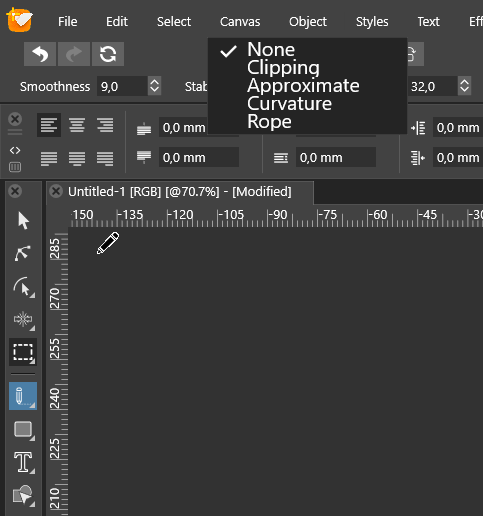
Sliders works fine, but using select lists is impossible. Values highlights while I'm moving a pointer, but that's all. No action. Have no problem with mouse. Toogle Windows Ink or Mouse Mode doesn't help.
It happens that clicking on anything on the top panel it sticks to the cursor highlighted and it's hard to get rid of it.
https://streamable.com/se4einI forgot to ask. Is it possible to block the interface?
MacBook Air M4 24Gb, Tahoe 26.3.1
-
@encart said in Problem with interface while using graphic tablet.:
Is it possible to block the interface?
Yes, this issue can be replicated on Windows with a Wacom tablet also. It seems to occur in popup menus. There will be a fix in the next build.
What do you mean by blocking the interface?
-
Sorry. I meant to lock all panels and toolbars at the place.
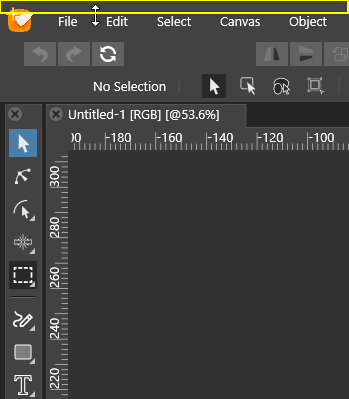
For example, there is a wide area right above the top menu, from the top edge of the screen and I often aciddentaly press it and resize the whole app window. Maybe it would be better if this option was active only when the window is not in full screen mode( as it is usually in windows apps).
-
@encart This should be fixed in the new build (1.0.022).
-
@vectoradmin
In 1.0.023 :
Top menu is fully usable by stylus.
Clicking empty area in top menu cause the same error as before. Whole panel moving with the pointer.
Still possible to resize the window.
Doesn't recognize pressure sensitivity (i had same problem on previous version)MacBook Air M4 24Gb, Tahoe 26.3.1
-
@encart I add these to the backlog. The fix in 1.0.023 was on the use of popup menus with the stylus

Interface locking is also open in the backlog. -
@encart I tested the drawing used pressure sensitivity. With the pencil tool, the context panel contains a "Pressure" drop down (on the left side), here the "Pressure" mode must be selected to use the table pressure. I used a Wacom Intuos tablet on Windows.

