VectorStyler
    • Categories
    • Unread
    • Recent
    • Tags
    • Popular
    • Register
    • Login

    Stroke Width tool not working?

    Scheduled Pinned Locked Moved VectorStyler 1.1 Bugs
    5 Posts 3 Posters 5.6k Views 2 Watching
    Loading More Posts
    • Oldest to Newest
    • Newest to Oldest
    • Most Votes
    Reply
    • Reply as topic
    Log in to reply
    This topic has been deleted. Only users with topic management privileges can see it.
    • BoldlineB Offline
      Boldline
      last edited by

      Is anyone else having problems with the stroke width tool in build 93? It won't work at all for me now. I cannot get it to do anything.
      I tried quitting and restarting VS

      🍎 macOS Tahoe 26.2, Mac mini (M1, 2020), Chip Apple M1, Memory 16 GB
      Cintiq 27QHD Display and LG Ultra HD Display

      BoldlineB 1 Reply Last reply Reply Quote 0
      • BoldlineB Offline
        Boldline @Boldline
        last edited by Boldline

        UPDATE: Its just not working correctly for me with these strokes. THe path pulsates some as I attempt to pull the path width handles

        I attached the file to this post : 0_1690037540267_stroke width issue.vstyler
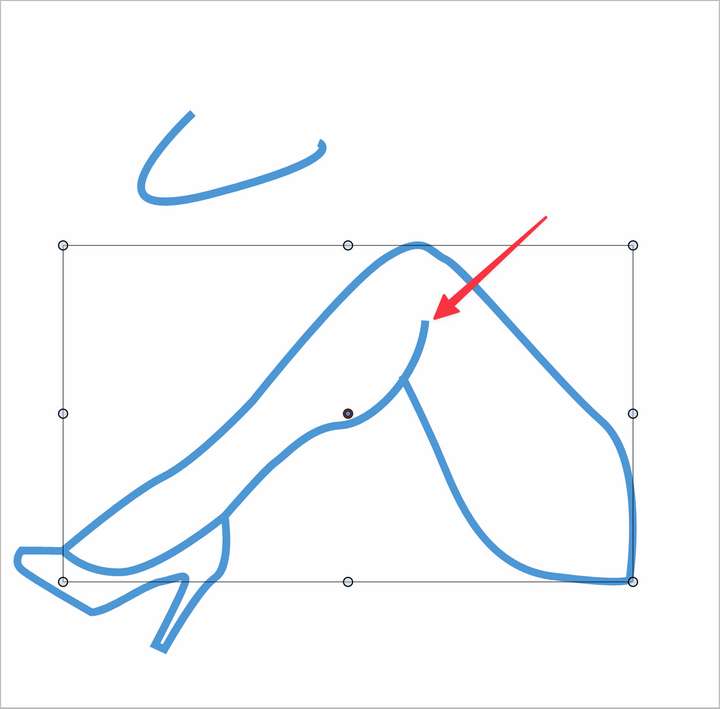
        0_1690037390905_0e3f1b62-96b3-450c-beab-d52546757070-BLD 2023-07-22 at 10.49.10@2x.png

        🍎 macOS Tahoe 26.2, Mac mini (M1, 2020), Chip Apple M1, Memory 16 GB
        Cintiq 27QHD Display and LG Ultra HD Display

        S VectorStylerV 3 Replies Last reply Reply Quote 0
        • S Offline
          Subpath @Boldline
          last edited by Subpath

          @Boldline

          according to my tries and observations
          VS stroke width tool has problems when zooming in close
          resp. with small objects (where you need zooming in of course)

          so it might help to temporarily upscale your object

          Win 11
          CPU: AMD Ryzen 5 9600X, 6-core.
          GPU: Nvidia Geforce RTX 5070.

          1 Reply Last reply Reply Quote 1
          • S Offline
            Subpath @Boldline
            last edited by Subpath

            @Boldline

            Here a video with your file

            seems to be a catch range problem
            with small objects and deep close zooming

            another alternativ are via the
            Stroke Width Panel Menu >Edit Profil

            Win 11
            CPU: AMD Ryzen 5 9600X, 6-core.
            GPU: Nvidia Geforce RTX 5070.

            1 Reply Last reply Reply Quote 1
            • VectorStylerV Offline
              VectorStyler @Boldline
              last edited by

              @Boldline Seems to be sensitive to zoom level. I added this to the backlog as a bug.

              It works here at around 300% zoom level.

              1 Reply Last reply Reply Quote 3
              • First post
                Last post
