VectorStyler
    • Categories
    • Unread
    • Recent
    • Tags
    • Popular
    • Register
    • Login

    Grid Editor: Cannot remove grid color
    Scheduled Pinned Locked Moved VectorStyler 1.1 Bugs
    6 Posts 3 Posters 6.6k Views 3 Watching
    Loading More Posts
    • Oldest to Newest
    • Newest to Oldest
    • Most Votes
    Reply
    • Reply as topic
    Log in to reply
    This topic has been deleted. Only users with topic management privileges can see it.
    • P Offline
      pentool
      last edited by pentool

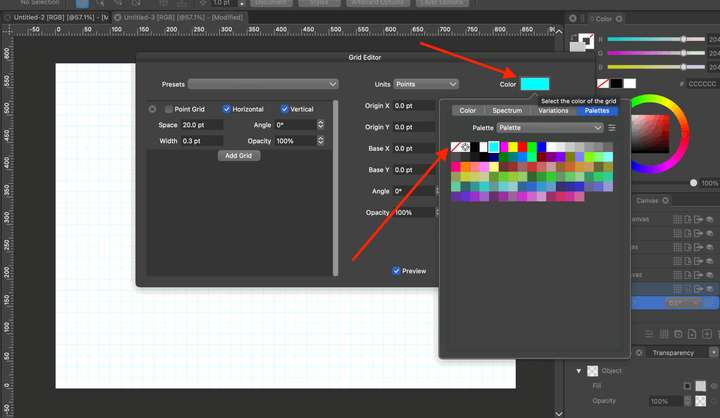
      Once you assign a color to the grid in the Grid Editor you cannot remove it.

      By default the grid color in the grid editor is transparent (aka no color) so you will see the grid color assigned to the grid in the Document Setup dialog.

      When you click on the color swatch in the Grid Editor and switch to the Palettes tab in the popup, there's a "no color" swatch but even if you click that the grid color won't be removed.

      VS 1.1.097
      0_1691112430256_Screen Shot 2023-08-04 at 3.23.13 AM.png

      MacBook Pro 13" early 2015 8G | Intel Iris Graphics 6100 1536 MB | macOS Monterey 12.7.6

      b77B 1 Reply Last reply Reply Quote 1
      • b77B Offline
        b77 @pentool
        last edited by

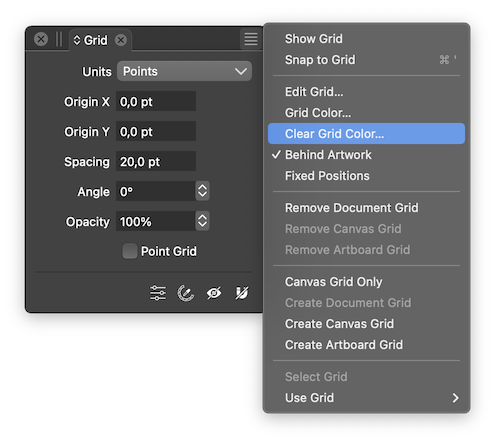
        @pentool There is a 'Clear Grid Color' command in the menu of the Grid panel:
        0_1691136283776_Screenshot 2023-08-04 at 11.02.46.png

        MacBook Pro (Intel) running Monterey 12.6.4

        P 1 Reply Last reply Reply Quote 1
        • P Offline
          pentool @b77
          last edited by

          @b77 Well, that’s very user friendly that in order to clear a swatch color one has to close the dialog, bring up a panel, open it’s menu and select a command. How come I didn’t think of that! LOL

          MacBook Pro 13" early 2015 8G | Intel Iris Graphics 6100 1536 MB | macOS Monterey 12.7.6

          VectorStylerV 1 Reply Last reply Reply Quote 1
          • VectorStylerV Offline
            VectorStyler @pentool
            last edited by

            @pentool Will fix this.

            b77B 1 Reply Last reply Reply Quote 0
            • b77B Offline
              b77 @VectorStyler
              last edited by b77

              @VectorStyler I hope the 'Clear Grid Color' command in the Grid panel's
              menu will still be available. It's faster to do it from the panel.

              MacBook Pro (Intel) running Monterey 12.6.4

              VectorStylerV 1 Reply Last reply Reply Quote 1
              • VectorStylerV Offline
                VectorStyler @b77
                last edited by

                @b77 said in Grid Editor: Cannot remove grid color:

                I hope the 'Clear Grid Color' command in the Grid panel's menu will still be available. It's faster to do it from the panel

                Yes, it will stay there.

                The only bug here is that selecting the No color in the palette drop down should work.

                1 Reply Last reply Reply Quote 0
                • First post
                  Last post
