Issues when Resizing Panels
-
- Each time I visit and exit the Preferences dialog, panels which I have docked on my left side always expand sideways and I always have to resize them.
- It’s actually a hit-and-miss process to resize docked panels with the double arrow (floating ones are fine).
- When you have three or more panels grouped together and you resize sideways to make the panel group smaller, you notice that the names of some of the panels tend to disappear. I am suggesting that a minimum panel shrink limit should be set such that the names' visibility is maintained (for inspiration check out Illustrator’s).
HP•Windows 11 Pro•11th Gen Intel(R) Core(TM) i7-1165G7 @ 2.80GHz 2.70 GHz• RAM: 16.0 GB (DDR4)
-
@William-Kansepa I added this to the backlog as a bug.
-
Yup, works on mine, too. Docking on the right seems fine, but when the panels are on the left, every time you open/close the Preferences the panels are growing slowly towards the right.
-
@William-Kansepa said in Issues when Resizing Panels:
It’s actually a hit-and-miss process to resize docked panels with the double arrow (floating ones are fine).
When you have three or more panels grouped together and you resize sideways to make the panel group smaller, you notice that the names of some of the panels tend to disappear. I am suggesting that a minimum panel shrink limit should be set such that the names' visibility is maintained (for inspiration check out Illustrator’s).@VectorStyler thank you for the response.
What's your response to the second and third issues?HP•Windows 11 Pro•11th Gen Intel(R) Core(TM) i7-1165G7 @ 2.80GHz 2.70 GHz• RAM: 16.0 GB (DDR4)
-
@William-Kansepa He probably didn't test on Windows just yet.
-
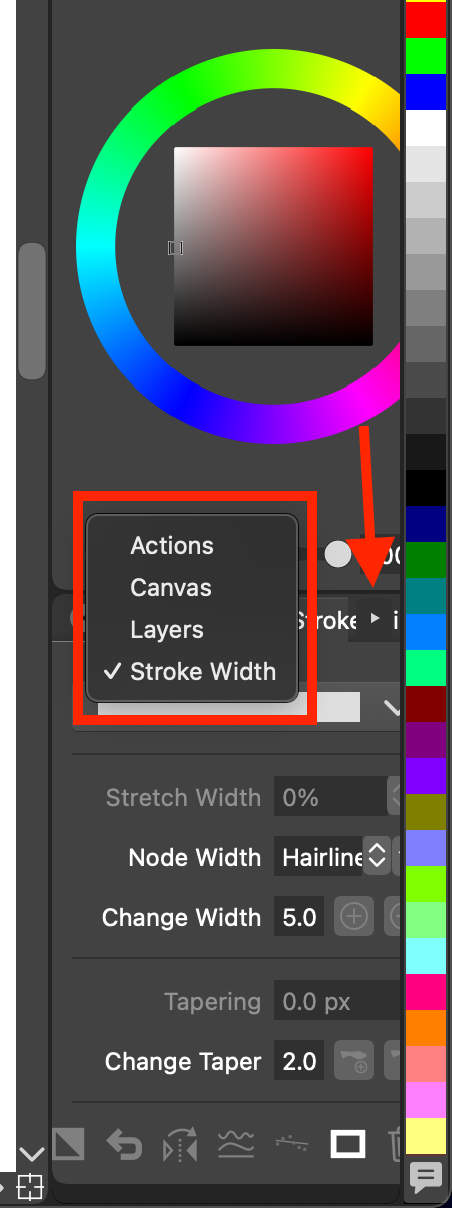
@William-Kansepa Yes, I think there should be a min panel group limit. Currently you can select the little arrow to the right of the names which will show a popup of the names of the panels in the group. And you can select from there. Not necessarily ideal, but it works for now.
-
-
I cannot replicate this, but I suspect it might have to do with some settings that is changed. Does this occur when confirming the Preferences?
-
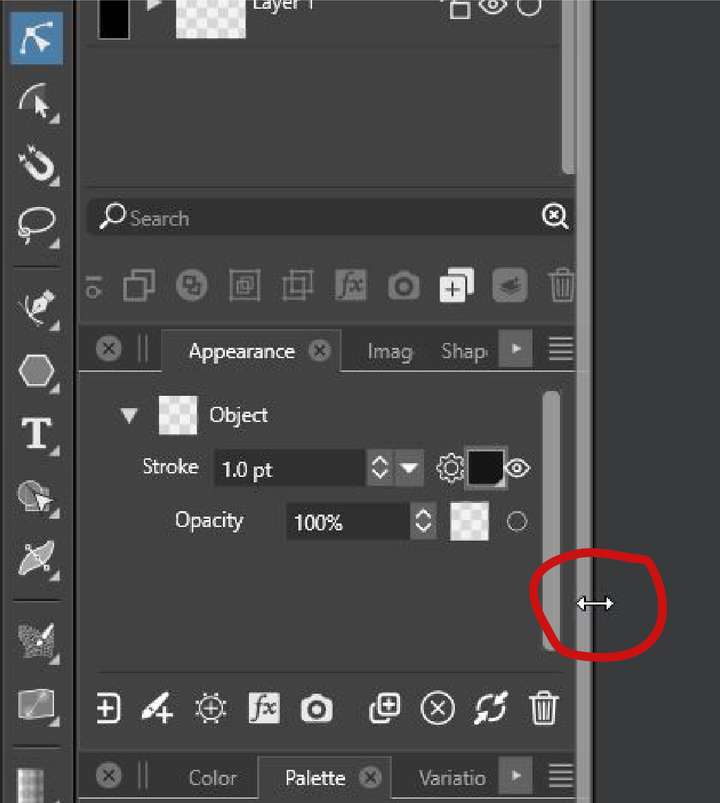
Does this refer to the double arrow just before the title text of the panel? Again cannot replicate here, but the panels may move when this is clicked. Maybe it depends on what panels are open, a screenshot would help.
-
Yes, this is an issue I will set up some minimum sizes.
-
-
@VectorStyler said in Issues when Resizing Panels:
- I cannot replicate this, but I suspect it might have to do with some settings that is changed. Does this occur when confirming the Preferences?
Here is how to do it:
- Dock your panels to the left. The issue is best seen if you have the swatches panel open so you can see the color swatches.
- Open Preferences.
- Click OK to close the Preferences. Now the entire panel section's width (docked on the left) has increased. You can see this effect well if you have the color swatches panel open, because in the rightmost column the color are now different.
- Repeat this process a few times one after another and the panels right side will start crawling toward the middle of the screen.
Video:
https://www.youtube.com/watch?v=upoiAQpaG1QVS 1.1.099
-
@William-Kansepa said in Issues when Resizing Panels:
- Each time I visit and exit the Preferences dialog, panels which I have docked on my left side always expand sideways and I always have to resize them.
- It’s actually a hit-and-miss process to resize docked panels with the double arrow (floating ones are fine).
- When you have three or more panels grouped together and you resize sideways to make the panel group smaller, you notice that the names of some of the panels tend to disappear. I am suggesting that a minimum panel shrink limit should be set such that the names' visibility is maintained (for inspiration check out Illustrator’s).
@VectorStyler All three issues are still outstanding even after updating to VectorStyler 1.1.100.
For issue number 2, please refer to attached image.
-
@William-Kansepa yes, only the minimum size was added for now. I will try to fix the others as well.
-
In VectorStyler 1.1.101 update, resizing the panels is now easier. Thank you @VectorStyler .

