Palette > Edit Color... (there's nothing to edit)
-
When you open the Color Palette (Panels > Color Palette), in the panel menu "Edit Color..." is enabled even when no color is selected. So when you select the menu item, nothing will happen.
- Open the Color Palette
- Draw a shape
- Click on the artboard to deselect the shape
- Go to the Color Panel's menu and you'll see Edit Color is enabled. Select it. Nothing will happen since no color is selected.
Now...
- Select a color in the Color Palette. Notice the Edit Color item gets enabled in the panel menu.
- Click in the empty area of the Color Palette. Now the Edit Color menu item will be correctly deselected.
To continue...
- Select the shape on the artboard
- Click in the empty area of the Color Palette. Now the Edit Color menu item gets disabled again even though the shape is selected in the artboard so you should be able to edit its color.
I also noticed that the Color Palette is called "Color Palette" in the Panel menu, but the Color Panel's title only says "Palette" (seems like the "Color" is missing in front of it)
VS 1.1.100
MacBook Pro 13" early 2015 8G | Intel Iris Graphics 6100 1536 MB | macOS Monterey 12.7.6
-
My color panel menu shows item labels cut off: e.g. (D)ocument
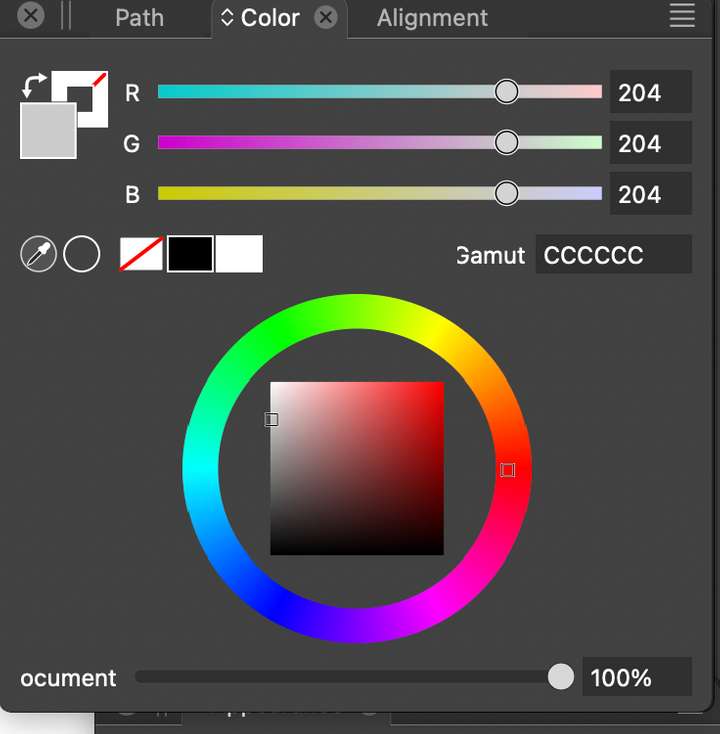
Also, Panels -> Color Panel opens the "Options" Panel.
This is what I get after a reinstallation and deleting the VS cache folder.
macOS Sonoma 14.5 - MacBook Pro 16" - Apple Silicon M2 Max
-
@_NM_ Ok, this is a different issue, so you should open a separate post for it - I'd think.
-
@_NM_ This is the same issue as the other. Seems that there is something broken with the install.
-
@pentool I added this to the backlog and will try to replicate.
