VectorStyler
    • Categories
    • Unread
    • Recent
    • Tags
    • Popular
    • Register
    • Login

    Appearance Out of Order?
    Scheduled Pinned Locked Moved VectorStyler 1.1 Bugs
    4 Posts 3 Posters 4.9k Views 3 Watching
    Loading More Posts
    • Oldest to Newest
    • Newest to Oldest
    • Most Votes
    Reply
    • Reply as topic
    Log in to reply
    This topic has been deleted. Only users with topic management privileges can see it.
    • F Offline
      fde101 Global Moderator
      last edited by

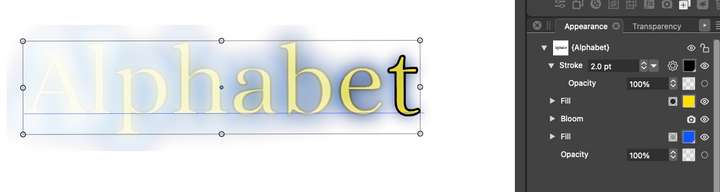
      It seems the stroke which has 100% capacity is impacted by the Bloom FX which is below it in the Appearance panel?

      That doesn't seem right to me.
      0_1692442104709_Screenshot 2023-08-19 at 06.47.12.png

      VectorStylerV 1 Reply Last reply Reply Quote 0
      • VectorStylerV Offline
        VectorStyler @fde101
        last edited by

        @fde101 Can you upload that example as a vstyler file?

        F 1 Reply Last reply Reply Quote 0
        • P Offline
          pentool
          last edited by pentool

          It seems if you convert the text to curves, the FX will work correctly. But yes, I noticed as if the FX would gradually "fade out" towards the right in case of a live text.

          MacBook Pro 13" early 2015 8G | Intel Iris Graphics 6100 1536 MB | macOS Monterey 12.7.6

          1 Reply Last reply Reply Quote 0
          • F Offline
            fde101 Global Moderator @VectorStyler
            last edited by

            @VectorStyler 0_1692444757710_Alphabet.vstyler

            I have also discovered that it does not export to PDF correctly. I do get the effect if I export to PNG, but if I export to PDF, I only get the yellow fill and the stroke, even if I choose the "Vector Text" option.

            Rasterizing does not seem to help, but a "Convert To Curves" operation gives me something closer to what I would have expected.

            1 Reply Last reply Reply Quote 1
            • First post
              Last post