Ghost (offset) bounding boxes
-
VS still seems to suffer from a bug that appears to be somehow related to sleep mode, or an app gaining the focus after having been minimized or non-active for a while:
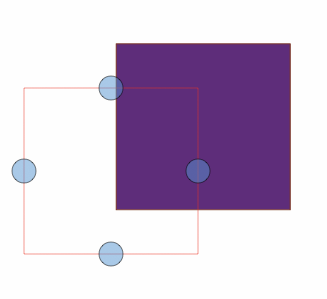
This happens both on macOS and Windows, and the offset always seems to be down and left, but not the same amount each time it happens (e.g., the offset could be left by several hundred pixels).
This might be related to multi-desktop or multi-display environment, as I am regularly switching between macOS and Windows using Remote Desktop app (normally on a single-display system, though).
The problem cannot be saved in a file, and it can typically be resolved by closing and relaunching VS, and I think that sometimes also by closing and reopening a document, or creating a new document (but not always). I do not experience the problem with other apps so it seems to be somehow related only to VS.
When the error is active, the selection boxes are actually in the offset locations so if I want to select an object, I'd need to click on the ghost position (which would not of course be shown until selected), rather than within the boundaries of the object that is rendered on the canvas.
-
@Arde I open a bug on this one. Will try to replicate it.
-
@vectoradmin said in Ghost (offset) bounding boxes:
@Arde I open a bug on this one. Will try to replicate it.
I might have found the reason for this: the Toolbox is detached from the main window possibly as a result of going in sleep mode or for another reason. But when it is manually redocked, the offset error seems most often be fixed.
I have experienced similar errors with e.g. QuarkXPress, and there, too, related to docked controls losing their docking state as a result of the system going asleep or for some other reason that results in in-app-controls losing awareness of their docking state related to the main document window.
UPDATE: The situations where offsets to the left are hundreds of pixels seem to be related to having additional docked controls on the left side of the canvas.
