VectorStyler
    • Categories
    • Unread
    • Recent
    • Tags
    • Popular
    • Register
    • Login

    beta update 1.2.002

    Scheduled Pinned Locked Moved VectorStyler 1.2 beta
    21 Posts 5 Posters 39.8k Views 4 Watching
    Loading More Posts
    • Oldest to Newest
    • Newest to Oldest
    • Most Votes
    Reply
    • Reply as topic
    Log in to reply
    This topic has been deleted. Only users with topic management privileges can see it.
    • L Offline
      Li Xiao @Boldline
      last edited by

      @Boldline No problem for me

      1 Reply Last reply Reply Quote 1
      • VectorStylerV Offline
        VectorStyler @Boldline
        last edited by VectorStyler

        @Boldline said in beta update 1.2.002:

        Anyone else having issues getting the update to download? I've been trying on and off all day and the update crawls and then cancels out. I tested other sites and downloads and had no issues. I guess I'll try again tomorrow

        Tested the download here and it worked. Could have been some temporary congestion issue.

        1 Reply Last reply Reply Quote 1
        • B Offline
          B-Vs-V @VectorStyler
          last edited by

          @VectorStyler Sorry to come back to this point, but it's not very clear to me: do the two v.1.1 and beta 1.2 install independently this time, and can they both be used on the same computer? Thanks ☺

          W11 Pro 25H2 - 12th Gen Intel(R) i7-12700K 3.61 GHz - RAM 64 Go - NVIDIA GF GTX 4070 Ti - Intuos - Dell UP3216Q / Eizo ColorEdge
          W11 Pro 25H2 - 12th Gen Intel(R) i7-12700KF 3.60 GHz -RAM 64 Go - NVIDIA GF GTX 3080 - IntuosPro- ProArt PA329C

          VectorStylerV 2 Replies Last reply Reply Quote 0
          • VectorStylerV Offline
            VectorStyler @B-Vs-V
            last edited by

            @Pat said in beta update 1.2.002:

            Sorry to come back to this point, but it's not very clear to me: do the two v.1.1 and beta 1.2 install independently this time, and can they both be used on the same computer? Thanks

            Partially solved. The MSI installer will try to install over the existing one (try renaming the app folder in Program Files).
            But the user folders are separate now.

            1 Reply Last reply Reply Quote 1
            • VectorStylerV Offline
              VectorStyler @B-Vs-V
              last edited by

              @Pat I will try to find a solution for the MS Installer issue by tomorrow.

              B 1 Reply Last reply Reply Quote 1
              • B Offline
                B-Vs-V @VectorStyler
                last edited by B-Vs-V

                @VectorStyler said in beta update 1.2.002:

                @Pat I will try to find a solution for the MS Installer issue by tomorrow.

                @VectorStyler Thank you. I'm hesitant to install the beta to test it as long as it overwrites v. 1.1 but there's no hurry as far as I'm concerned ☺

                W11 Pro 25H2 - 12th Gen Intel(R) i7-12700K 3.61 GHz - RAM 64 Go - NVIDIA GF GTX 4070 Ti - Intuos - Dell UP3216Q / Eizo ColorEdge
                W11 Pro 25H2 - 12th Gen Intel(R) i7-12700KF 3.60 GHz -RAM 64 Go - NVIDIA GF GTX 3080 - IntuosPro- ProArt PA329C

                1 Reply Last reply Reply Quote 0
                • BoldlineB Offline
                  Boldline @VectorStyler
                  last edited by

                  @VectorStyler said in beta update 1.2.002:

                  Iconified panels in docked mode.

                  This is working so much better now and I love the ability to reduce the panels down to just icons when more screen space is preferred. Very slick! Would it make sense to have tooltips on the icons to allow for quick reference for newer users?

                  🍎 macOS Sequoia 15.3, Mac mini (M1, 2020), Chip Apple M1, Memory 16 GB
                  Cintiq 27QHD Display and LG Ultra HD Display

                  J 1 Reply Last reply Reply Quote 0
                  • J Offline
                    Jayanta Das @Boldline
                    last edited by

                    @Boldline Is it showing just the icons in Mac? In windows there is still icon with the title.

                    Mac Mini M4 Pro | 24Gb
                    WIndows 11 | Intel i5 11Gen
                    Wacom Intuos Pro

                    BoldlineB 1 Reply Last reply Reply Quote 0
                    • BoldlineB Offline
                      Boldline @Jayanta Das
                      last edited by Boldline

                      @Jayanta-Das Yes, clicking on the arrow shrinks it to icons only now. no titles are shown at all. Here is a video
                      The canvas/artboard jolts some each time you shrink or expand the panels, but I assume that could be fixed in time.

                      🍎 macOS Sequoia 15.3, Mac mini (M1, 2020), Chip Apple M1, Memory 16 GB
                      Cintiq 27QHD Display and LG Ultra HD Display

                      J 1 Reply Last reply Reply Quote 1
                      • J Offline
                        Jayanta Das @Boldline
                        last edited by

                        @Boldline In Windows it still shows the tile.
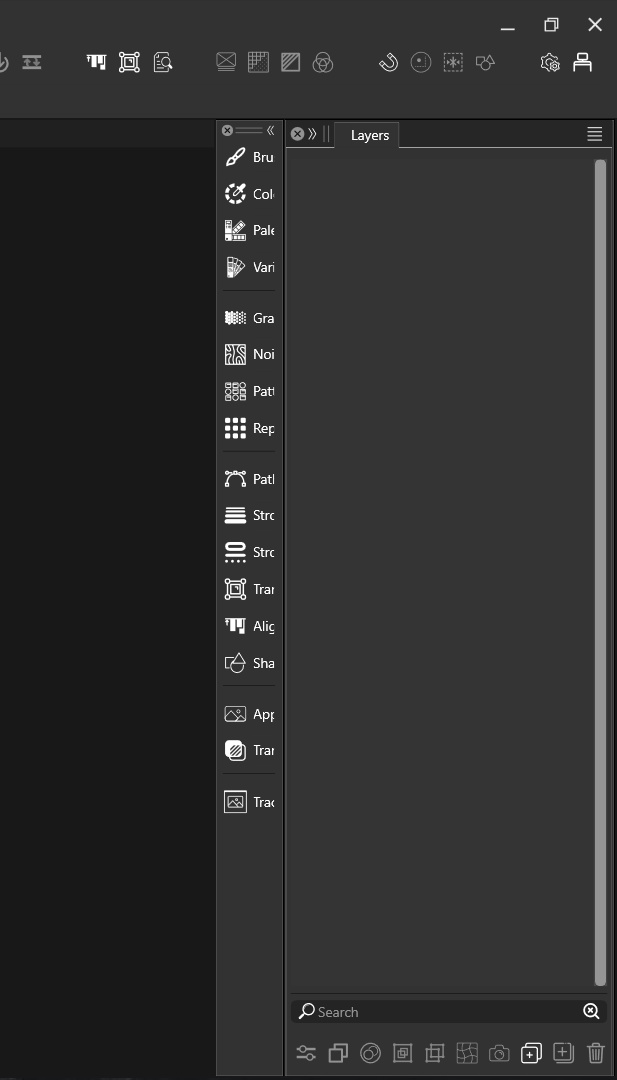
                        0_1696820679914_Screenshot 2023-10-09 083249.png

                        Mac Mini M4 Pro | 24Gb
                        WIndows 11 | Intel i5 11Gen
                        Wacom Intuos Pro

                        VectorStylerV 1 Reply Last reply Reply Quote 0
                        • VectorStylerV Offline
                          VectorStyler @Jayanta Das
                          last edited by

                          @Jayanta-Das Can it be resized to smaller size?

                          J 1 Reply Last reply Reply Quote 0
                          • J Offline
                            Jayanta Das @VectorStyler
                            last edited by Jayanta Das

                            @VectorStyler Can't resize to smaller size. You can see that when I drag to right to shrink it become more broader.
                            here is the Recording: link

                            Mac Mini M4 Pro | 24Gb
                            WIndows 11 | Intel i5 11Gen
                            Wacom Intuos Pro

                            1 Reply Last reply Reply Quote 1
                            • J Offline
                              Jayanta Das
                              last edited by

                              @VectorStyler Can you put the limit to minimum size of panel till the icons on the bottom get cropped. To understand what I mean here is the recording Link

                              Mac Mini M4 Pro | 24Gb
                              WIndows 11 | Intel i5 11Gen
                              Wacom Intuos Pro

                              VectorStylerV 1 Reply Last reply Reply Quote 0
                              • VectorStylerV Offline
                                VectorStyler @Jayanta Das
                                last edited by

                                @Jayanta-Das said in beta update 1.2.002:

                                @VectorStyler Can you put the limit to minimum size of panel till the icons on the bottom get cropped. To understand what I mean here is the recording Link

                                The video link is not working from here.

                                There seems to be a bug when trying to resize the docked iconified panels.

                                J 1 Reply Last reply Reply Quote 0
                                • J Offline
                                  Jayanta Das @VectorStyler
                                  last edited by

                                  @VectorStyler I mistakenly set the video private. It is now for public viewing. Please check.

                                  Mac Mini M4 Pro | 24Gb
                                  WIndows 11 | Intel i5 11Gen
                                  Wacom Intuos Pro

                                  1 Reply Last reply Reply Quote 1
                                  • First post
                                    Last post