VectorStyler
    • Categories
    • Unread
    • Recent
    • Tags
    • Popular
    • Register
    • Login

    Adding a Anchor Point After Path Reversal
    Scheduled Pinned Locked Moved VectorStyler 1.1 Bugs
    6 Posts 4 Posters 7.6k Views 3 Watching
    Loading More Posts
    • Oldest to Newest
    • Newest to Oldest
    • Most Votes
    Reply
    • Reply as topic
    Log in to reply
    This topic has been deleted. Only users with topic management privileges can see it.
    • O Offline
      oleGraf
      last edited by

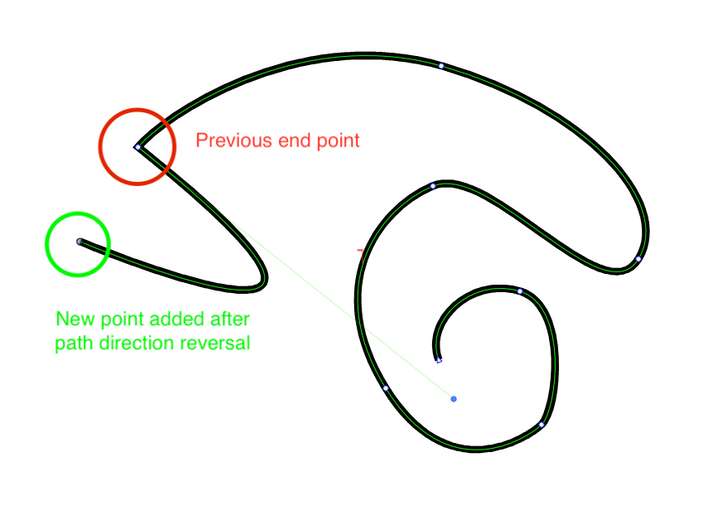
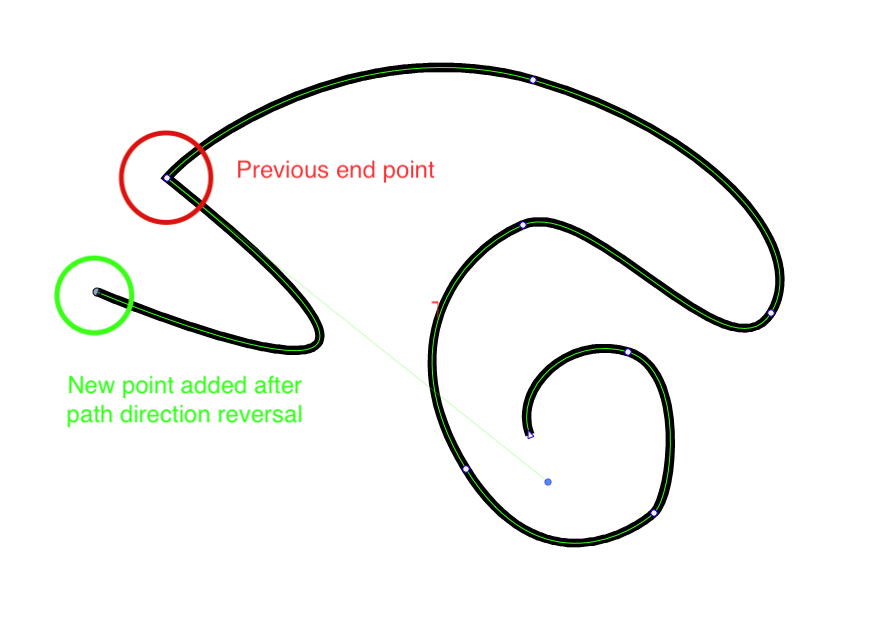
      After reversing a path’s direction( control - I ) on my Mac, then adding a new anchor the resulting segment is extremely bowed and erratic. The control node on the previous end point now has a strange long control arm. It’s necessary to select the previous end point and adjust. Can this be less erratic?0_1696894010614_Reversed end point work.png

      Mac Mini M2 Pro 2023, Samsung 32" Display, OS Sequoia 15.7.3

      b77B VectorStylerV 3 Replies Last reply Reply Quote 1
      • b77B Offline
        b77 @oleGraf
        last edited by

        @oleGraf You're reversing the path's direction mid-drawing?

        MacBook Pro (Intel) running Monterey 12.6.4

        1 Reply Last reply Reply Quote 0
        • VectorStylerV Offline
          VectorStyler @oleGraf
          last edited by

          @oleGraf The Pen tool will always append the new anchor point at the end of the path (not the start).
          It is possible to add to the start also (by selecting it with the Node tool first), but it will reverse the path direction to make that node the ending node.

          BoldlineB 1 Reply Last reply Reply Quote 0
          • BoldlineB Offline
            Boldline @VectorStyler
            last edited by

            @VectorStyler @b77 If I understand @oleGraf 's post properly, they were asking why when you use the pen tool to add on to the path after first reversing the direction of a path, does it bow out even when making a straight line segment.

            I made a video imitating the scenario @oleGraf presented:

            🍎 macOS Tahoe 26.2, Mac mini (M1, 2020), Chip Apple M1, Memory 16 GB
            Cintiq 27QHD Display and LG Ultra HD Display

            O 1 Reply Last reply Reply Quote 2
            • VectorStylerV Offline
              VectorStyler @oleGraf
              last edited by

              @oleGraf @Boldline I open a bug on this one.

              1 Reply Last reply Reply Quote 1
              • O Offline
                oleGraf @Boldline
                last edited by

                @Boldline Thank you for your video. It does a good job of illustrating my original post. Appreciatively.


                Mac Mini M2 Pro 2023, Samsung 32" Display, OS Sequoia 15.7.3

                1 Reply Last reply Reply Quote 2
                • First post
                  Last post