VectorStyler
    • Categories
    • Unread
    • Recent
    • Tags
    • Popular
    • Register
    • Login

    Impossible to trace with Pen tool

    Scheduled Pinned Locked Moved VectorStyler 1.2 beta
    11 Posts 4 Posters 11.2k Views 4 Watching
    Loading More Posts
    • Oldest to Newest
    • Newest to Oldest
    • Most Votes
    Reply
    • Reply as topic
    Log in to reply
    This topic has been deleted. Only users with topic management privileges can see it.
    • B Offline
      B-Vs-V
      last edited by

      I can use shapes, the pencil and the brush, but nothing can be traced with the Pen tool... Never happened before.
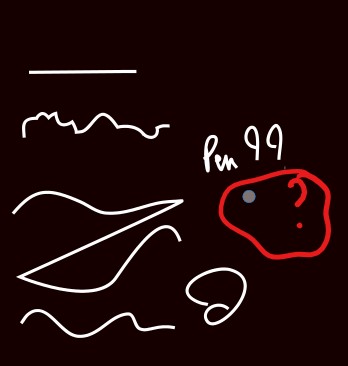
      0_1698424714713_pen.jpg

      W11 Pro 25H2 - 12th Gen Intel(R) i7-12700K 3.61 GHz - RAM 64 Go - NVIDIA GF GTX 4070 Ti - Intuos - Dell UP3216Q / Eizo ColorEdge
      W11 Pro 25H2 - 12th Gen Intel(R) i7-12700KF 3.60 GHz -RAM 64 Go - NVIDIA GF GTX 3080 - IntuosPro- ProArt PA329C

      B 1 Reply Last reply Reply Quote 0
      • B Offline
        B-Vs-V @B-Vs-V
        last edited by

        I can continue a drawing with the Pen tool but no tracing when I start a new one.

        W11 Pro 25H2 - 12th Gen Intel(R) i7-12700K 3.61 GHz - RAM 64 Go - NVIDIA GF GTX 4070 Ti - Intuos - Dell UP3216Q / Eizo ColorEdge
        W11 Pro 25H2 - 12th Gen Intel(R) i7-12700KF 3.60 GHz -RAM 64 Go - NVIDIA GF GTX 3080 - IntuosPro- ProArt PA329C

        L 1 Reply Last reply Reply Quote 1
        • L Online
          Li Xiao @B-Vs-V
          last edited by

          @Pat I encountered this issue in both versions 1.1 and 1.2. It occurred on two different computers as well. After restoring defaults, the issue was resolved. I always thought it was a problem with my own settings, but I couldn't find the cause. That's why I never reported this issue. It turns out that it's not just my problem.

          b77B B 2 Replies Last reply Reply Quote 1
          • b77B Offline
            b77 @Li Xiao
            last edited by

            @Pat and @Li-Xiao Version 1.2 has a 'Reveal Workspace Folder' command in the Help menu.

            Before resetting the app, use that command to get to this folder, zip it and send it to the developer.

            MacBook Pro (Intel) running Monterey 12.6.4

            L 1 Reply Last reply Reply Quote 0
            • L Online
              Li Xiao @b77
              last edited by

              @b77 Thank you! I know where the Workspace Folder is located, but the 'Reveal Workspace Folder' command in the Help menu is not working.

              B VectorStylerV 2 Replies Last reply Reply Quote 0
              • B Offline
                B-Vs-V @Li Xiao
                last edited by

                @Li-Xiao I confirm, nothing happens.

                W11 Pro 25H2 - 12th Gen Intel(R) i7-12700K 3.61 GHz - RAM 64 Go - NVIDIA GF GTX 4070 Ti - Intuos - Dell UP3216Q / Eizo ColorEdge
                W11 Pro 25H2 - 12th Gen Intel(R) i7-12700KF 3.60 GHz -RAM 64 Go - NVIDIA GF GTX 3080 - IntuosPro- ProArt PA329C

                1 Reply Last reply Reply Quote 0
                • B Offline
                  B-Vs-V @Li Xiao
                  last edited by B-Vs-V

                  @Li-Xiao It is fine after resetting but the issue is indeed tied to my saved former workspace. It is there again after WS loading.

                  W11 Pro 25H2 - 12th Gen Intel(R) i7-12700K 3.61 GHz - RAM 64 Go - NVIDIA GF GTX 4070 Ti - Intuos - Dell UP3216Q / Eizo ColorEdge
                  W11 Pro 25H2 - 12th Gen Intel(R) i7-12700KF 3.60 GHz -RAM 64 Go - NVIDIA GF GTX 3080 - IntuosPro- ProArt PA329C

                  1 Reply Last reply Reply Quote 0
                  • VectorStylerV Offline
                    VectorStyler @Li Xiao
                    last edited by

                    @Li-Xiao said in Impossible to trace with Pen tool:

                    but the 'Reveal Workspace Folder' command in the Help menu is not working.

                    'Reveal Workspace Folder' might still have problems on Windows.

                    As for the Pen toll problem, I could not replicate this issue with a simple test on an image.
                    Could you describe step by step (or a short recording) this issue. Thanks!

                    B L 2 Replies Last reply Reply Quote 0
                    • B Offline
                      B-Vs-V @VectorStyler
                      last edited by

                      @VectorStyler I've sent you the ".vswork" that are involved in this issue ☺

                      W11 Pro 25H2 - 12th Gen Intel(R) i7-12700K 3.61 GHz - RAM 64 Go - NVIDIA GF GTX 4070 Ti - Intuos - Dell UP3216Q / Eizo ColorEdge
                      W11 Pro 25H2 - 12th Gen Intel(R) i7-12700KF 3.60 GHz -RAM 64 Go - NVIDIA GF GTX 3080 - IntuosPro- ProArt PA329C

                      1 Reply Last reply Reply Quote 3
                      • L Online
                        Li Xiao @VectorStyler
                        last edited by

                        @VectorStyler If the issue occurs again, I will record it.

                        VectorStylerV 1 Reply Last reply Reply Quote 1
                        • VectorStylerV Offline
                          VectorStyler @Li Xiao
                          last edited by

                          @Li-Xiao I managed to replicate this issue. The fix will be in the next build.

                          1 Reply Last reply Reply Quote 1
                          • First post
                            Last post
