VectorStyler
    • Categories
    • Unread
    • Recent
    • Tags
    • Popular
    • Register
    • Login

    Issue with grid design and its parameters
    Scheduled Pinned Locked Moved Questions and Support
    11 Posts 2 Posters 9.2k Views 2 Watching
    Loading More Posts
    • Oldest to Newest
    • Newest to Oldest
    • Most Votes
    Reply
    • Reply as topic
    Log in to reply
    This topic has been deleted. Only users with topic management privileges can see it.
    • B Offline
      B-Vs-V
      last edited by

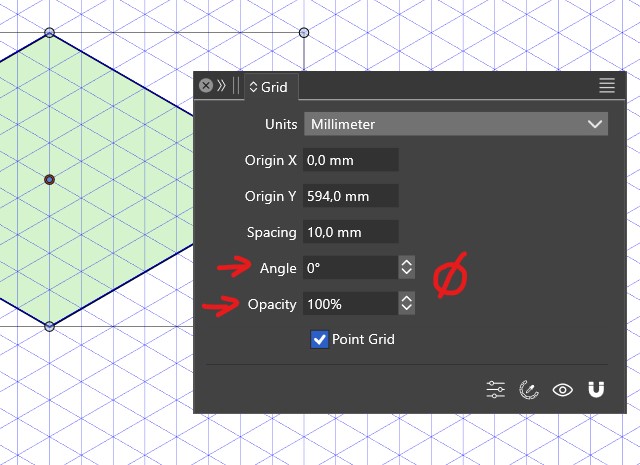
      I designed a grid to test an isometric design again. When I open the 'Grid' panel I can decide to show it or not, change its settings or not... but I can't change the colour or opacity.

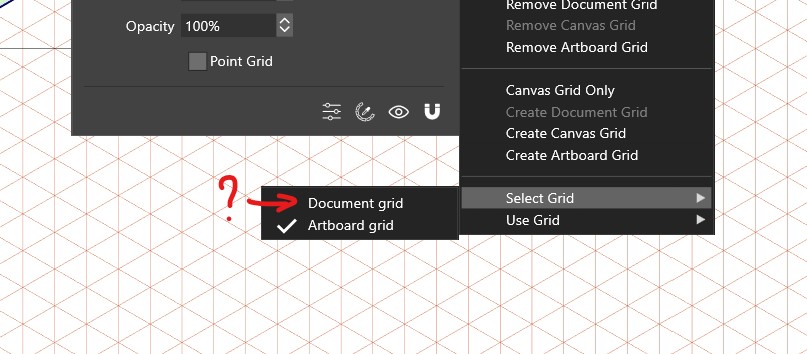
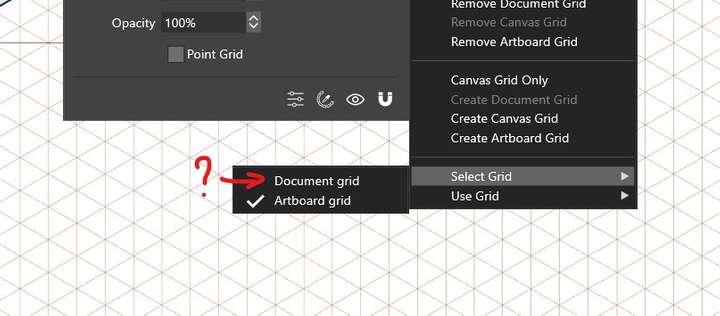
      By testing the various options in the panel, I see that there are apparently two grids, one for the document (?) and one for the artboard (the one I've defined). Why are some options functional and others not for the grid I designed?
      0_1701093475399_g2.jpg

      0_1701093464311_g1.jpg

      W11 Pro 25H2 - 12th Gen Intel(R) i7-12700K 3.61 GHz - RAM 64 Go - NVIDIA GF GTX 4070 Ti - Intuos - Dell UP3216Q / Eizo ColorEdge
      W11 Pro 25H2 - 12th Gen Intel(R) i7-12700KF 3.60 GHz -RAM 64 Go - NVIDIA GF GTX 3080 - IntuosPro- ProArt PA329C

      VectorStylerV 1 Reply Last reply Reply Quote 0
      • B Offline
        B-Vs-V
        last edited by B-Vs-V

        EDIT: I may have inadvertently created a grid for the document from the panel... but what's the difference? what are these two grids for ?

        W11 Pro 25H2 - 12th Gen Intel(R) i7-12700K 3.61 GHz - RAM 64 Go - NVIDIA GF GTX 4070 Ti - Intuos - Dell UP3216Q / Eizo ColorEdge
        W11 Pro 25H2 - 12th Gen Intel(R) i7-12700KF 3.60 GHz -RAM 64 Go - NVIDIA GF GTX 3080 - IntuosPro- ProArt PA329C

        1 Reply Last reply Reply Quote 0
        • VectorStylerV Offline
          VectorStyler @B-Vs-V
          last edited by

          @Pat All options should be editable for all grid types, if not that is an error. I will try to replicate this part.

          So, there are 3 types of grids:

          • document wide, shown on all canvases, to set up a single - common grid for the whole document.
          • canvas grid, separate for each canvas.
          • artboard grid, separate for each artboard.
            The options can also be editor with the Grid panel menu Edit Grid command.
          B 1 Reply Last reply Reply Quote 0
          • B Offline
            B-Vs-V @VectorStyler
            last edited by

            @VectorStyler Ok, thanks. It would be nice to test all these. Furthermore, when I selected the document grid, I did not see any difference with the artboard grid and was only displayed ont the first artboard (document with 4 artboards).

            W11 Pro 25H2 - 12th Gen Intel(R) i7-12700K 3.61 GHz - RAM 64 Go - NVIDIA GF GTX 4070 Ti - Intuos - Dell UP3216Q / Eizo ColorEdge
            W11 Pro 25H2 - 12th Gen Intel(R) i7-12700KF 3.60 GHz -RAM 64 Go - NVIDIA GF GTX 3080 - IntuosPro- ProArt PA329C

            VectorStylerV 1 Reply Last reply Reply Quote 0
            • VectorStylerV Offline
              VectorStyler @B-Vs-V
              last edited by

              @Pat The document grid should also be visible outside of the artboards.

              B 1 Reply Last reply Reply Quote 0
              • B Offline
                B-Vs-V @VectorStyler
                last edited by

                @VectorStyler I guess there are some bugs

                W11 Pro 25H2 - 12th Gen Intel(R) i7-12700K 3.61 GHz - RAM 64 Go - NVIDIA GF GTX 4070 Ti - Intuos - Dell UP3216Q / Eizo ColorEdge
                W11 Pro 25H2 - 12th Gen Intel(R) i7-12700KF 3.60 GHz -RAM 64 Go - NVIDIA GF GTX 3080 - IntuosPro- ProArt PA329C

                VectorStylerV 1 Reply Last reply Reply Quote 1
                • VectorStylerV Offline
                  VectorStyler @B-Vs-V
                  last edited by

                  @Pat said in Issue with grid design and its parameters:

                  @VectorStyler I guess there are some bugs

                  Could not replicate this bug.

                  When editing the grid, the artboard grids will be created only for the current artboard (pageup/down to select).

                  B 2 Replies Last reply Reply Quote 0
                  • B Offline
                    B-Vs-V @VectorStyler
                    last edited by

                    @VectorStyler I've tried to reproduce this and got a crash. You should have received the crash report ☺

                    W11 Pro 25H2 - 12th Gen Intel(R) i7-12700K 3.61 GHz - RAM 64 Go - NVIDIA GF GTX 4070 Ti - Intuos - Dell UP3216Q / Eizo ColorEdge
                    W11 Pro 25H2 - 12th Gen Intel(R) i7-12700KF 3.60 GHz -RAM 64 Go - NVIDIA GF GTX 3080 - IntuosPro- ProArt PA329C

                    1 Reply Last reply Reply Quote 0
                    • B Offline
                      B-Vs-V @VectorStyler
                      last edited by

                      @VectorStyler I'm going to delete the isometric grid I saved... where can I found this preset ? Thanks

                      W11 Pro 25H2 - 12th Gen Intel(R) i7-12700K 3.61 GHz - RAM 64 Go - NVIDIA GF GTX 4070 Ti - Intuos - Dell UP3216Q / Eizo ColorEdge
                      W11 Pro 25H2 - 12th Gen Intel(R) i7-12700KF 3.60 GHz -RAM 64 Go - NVIDIA GF GTX 3080 - IntuosPro- ProArt PA329C

                      VectorStylerV 1 Reply Last reply Reply Quote 0
                      • VectorStylerV Offline
                        VectorStyler @B-Vs-V
                        last edited by

                        @Pat Styles -> Preset Manager, in Preset drop down select Grids, then it is listed.
                        Select what you want to remove, and "Remove Items"

                        1 Reply Last reply Reply Quote 0
                        • VectorStylerV Offline
                          VectorStyler
                          last edited by

                          This post is deleted!
                          1 Reply Last reply Reply Quote 0
                          • First post
                            Last post
