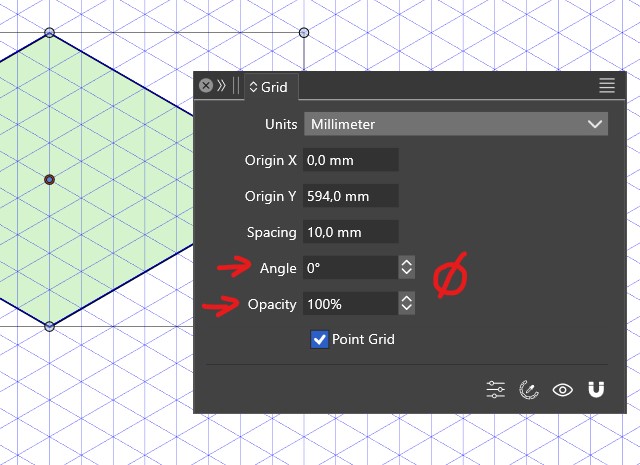
Issue with grid design and its parameters
-
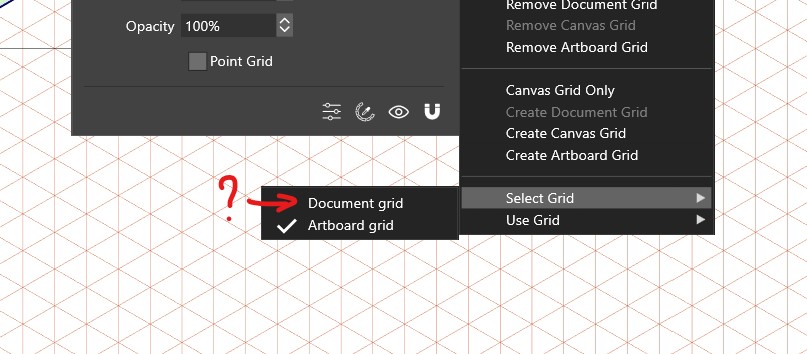
EDIT: I may have inadvertently created a grid for the document from the panel... but what's the difference? what are these two grids for ?
-
@Pat All options should be editable for all grid types, if not that is an error. I will try to replicate this part.
So, there are 3 types of grids:
- document wide, shown on all canvases, to set up a single - common grid for the whole document.
- canvas grid, separate for each canvas.
- artboard grid, separate for each artboard.
The options can also be editor with the Grid panel menu Edit Grid command.
-
@VectorStyler Ok, thanks. It would be nice to test all these. Furthermore, when I selected the document grid, I did not see any difference with the artboard grid and was only displayed ont the first artboard (document with 4 artboards).
-
@Pat The document grid should also be visible outside of the artboards.
-
@VectorStyler I guess there are some bugs
-
@Pat said in Issue with grid design and its parameters:
@VectorStyler I guess there are some bugs
Could not replicate this bug.
When editing the grid, the artboard grids will be created only for the current artboard (pageup/down to select).
-
@VectorStyler I've tried to reproduce this and got a crash. You should have received the crash report

-
@VectorStyler I'm going to delete the isometric grid I saved... where can I found this preset ? Thanks
-
@Pat Styles -> Preset Manager, in Preset drop down select Grids, then it is listed.
Select what you want to remove, and "Remove Items" -
This post is deleted!
