VectorStyler
    • Categories
    • Unread
    • Recent
    • Tags
    • Popular
    • Register
    • Login

    UI Display Issues 1.1
    Scheduled Pinned Locked Moved VectorStyler 1.1 Bugs
    5 Posts 2 Posters 5.6k Views 2 Watching
    Loading More Posts
    • Oldest to Newest
    • Newest to Oldest
    • Most Votes
    Reply
    • Reply as topic
    Log in to reply
    This topic has been deleted. Only users with topic management privileges can see it.
    • F Offline
      FastVector
      last edited by

      When opening vectorstyler the statusbar and the toolbox are partly cut off at the bottom.

      And the workspaces have text from the panels behind the hamburger menus.

      This problems seems only to occur in the normal version (1.1.116) and not in the betá version.
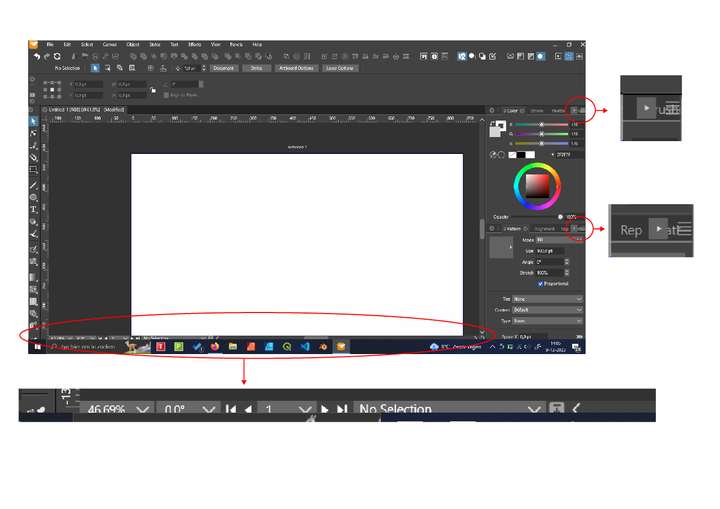
      0_1702127934888_UI Vectorstyler.jpg

      Windows 10 | 1920x1080 | 125%

      VectorStylerV 1 Reply Last reply Reply Quote 0
      • VectorStylerV Offline
        VectorStyler @FastVector
        last edited by

        @FastVector This looks like a bug. Some similar issues have been reported before (problems with the task bar on Windows). I will try to replicate and find a fix for this.

        When VectorStyler is opened, is it maximized from start or it is normal size and then maximized?

        1 Reply Last reply Reply Quote 0
        • F Offline
          FastVector
          last edited by

          Sorry can't replicate the problem with the statuspanel and taskbar.

          I reopend Vectorstyler and it is maximised but the problem disappeared.

          Windows 10 | 1920x1080 | 125%

          1 Reply Last reply Reply Quote 1
          • F Offline
            FastVector
            last edited by FastVector

            I tried some other things. And now I can replicate the problem again. It seems when I resize the size of window and want to maximize the window again, there isn't an issue when I use the maximize button of vectorstyler.

            But you can also maximize a window by draging them to the top of Windows, and then the problem occurs. (And now I can replicate this problem also in the Betá version)

            Windows 10 | 1920x1080 | 125%

            VectorStylerV 1 Reply Last reply Reply Quote 0
            • VectorStylerV Offline
              VectorStyler @FastVector
              last edited by

              @FastVector said in UI Display Issues 1.1:

              But you can also maximize a window by draging them to the top of Windows, and then the problem occurs.

              Yes, this can be replicated here also. I will try to fix it as soon as possible.

              1 Reply Last reply Reply Quote 0
              • First post
                Last post