VectorStyler
    • Categories
    • Unread
    • Recent
    • Tags
    • Popular
    • Register
    • Login

    Delete Custom Created Presets Style in Image Trace Tool/Panel

    Scheduled Pinned Locked Moved Questions and Support
    6 Posts 3 Posters 5.7k Views 3 Watching
    Loading More Posts
    • Oldest to Newest
    • Newest to Oldest
    • Most Votes
    Reply
    • Reply as topic
    Log in to reply
    This topic has been deleted. Only users with topic management privileges can see it.
    • O Offline
      oleGraf
      last edited by oleGraf

      After hours of experimenting with the Image Trace Tool, I did save a few custom Styles settings. After arriving at one preferred Styles preset, I wish to delete the others. I have tried for a couple of hours searching a path to delete the unwanted custom Styles presets I created. Preset Manager is not showing any options for the Image Trace settings. The Image Trace panel seems to only offering the option of creating a new preset, not a removal/delete option. I welcome any information or solution. Thank you for your consideration.

      Mac Mini M2 Pro 2023, Samsung 32" Display, OS Sequoia 15.7

      b77B 1 Reply Last reply Reply Quote 1
      • b77B Offline
        b77 @oleGraf
        last edited by b77

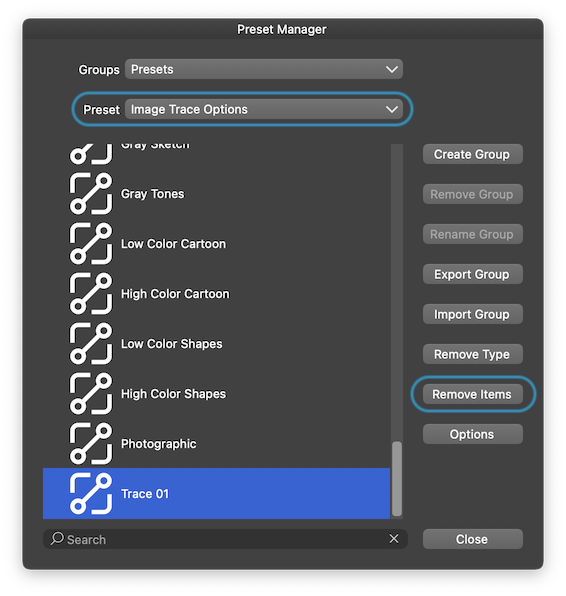
        @oleGraf In the Preset Manager you need to choose the 'Image Trace Options' category
        from the second menu, then select the preset and delete it with 'Remove Items':
        0_1705621770000_Screenshot 2024-01-19 at 01.47.15.png

        MacBook Pro (Intel) running Monterey 12.6.4

        O 1 Reply Last reply Reply Quote 2
        • O Offline
          oleGraf @b77
          last edited by oleGraf

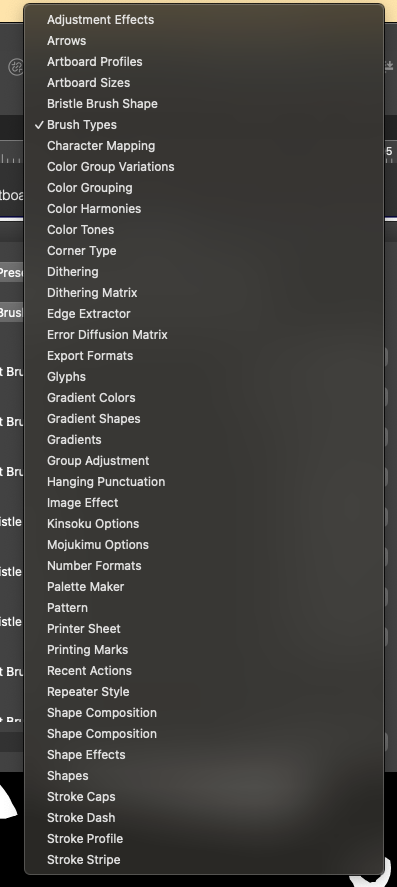
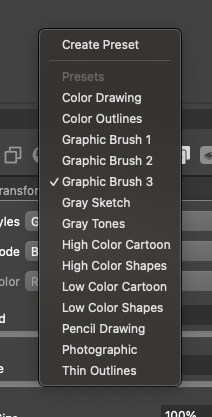
          @b77 First thank you for replying. I followed your instructions, but there is no Option in the list presented to me. I've attached a screen grab of the list in my Preset Manager window, plus a list of the presets in my Image Trace panel. The Graphic Brush versions 1-3 are ones I created. I still cannot find a path to delete any of them. Is there something I am missing?
          0_1705711878563_Screenshot 2024-01-19 at 4.40.05 PM.png 0_1705711883156_Screenshot 2024-01-19 at 4.44.29 PM.png

          Mac Mini M2 Pro 2023, Samsung 32" Display, OS Sequoia 15.7

          b77B 1 Reply Last reply Reply Quote 0
          • b77B Offline
            b77 @oleGraf
            last edited by b77

            @oleGraf Apologies, it looks like you're running version 1.1, where I don't think deleting
            image tracing presets is implemented. It works however in version 1.2 Beta.

            MacBook Pro (Intel) running Monterey 12.6.4

            O 1 Reply Last reply Reply Quote 0
            • O Offline
              oleGraf @b77
              last edited by

              @b77 Yes I am working with version 1.1.118 for Mac. Hmmm.... beta version. Testing and stability issues? Something to think about. Thank you again for responding so quickly.

              Mac Mini M2 Pro 2023, Samsung 32" Display, OS Sequoia 15.7

              VectorStylerV 1 Reply Last reply Reply Quote 1
              • VectorStylerV Offline
                VectorStyler @oleGraf
                last edited by

                @oleGraf said in Delete Custom Created Presets Style in Image Trace Tool/Panel:

                Yes I am working with version 1.1.118 for Mac

                I will add the trace preset listing to 1.1 also.

                1 Reply Last reply Reply Quote 0
                • First post
                  Last post
