Organizing VS for easier understanding and use of styles and presets

-
I've been trying to understand more about the way styles and presets are organized and accessed in VS.
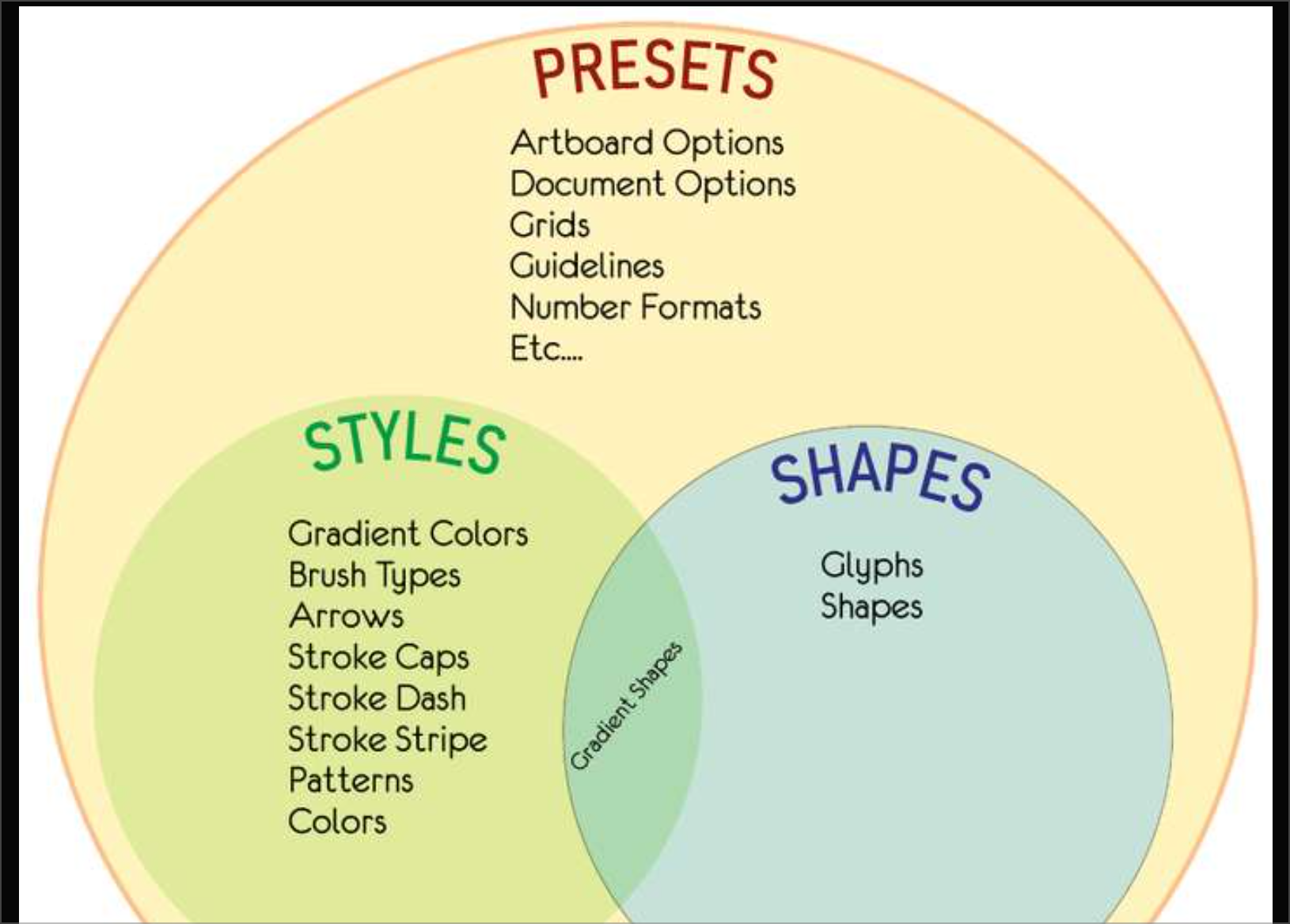
In an earlier post, @Victor-Vector laid out a helpful Venn diagram that helps visualize the hierarchy and organization.
Would it make sense to give "Presets" it's own top level Folder the way "Styles" already does? I'd even suggest moving "Styles" inside of a main "Presets" folder but that might get complex and busy.

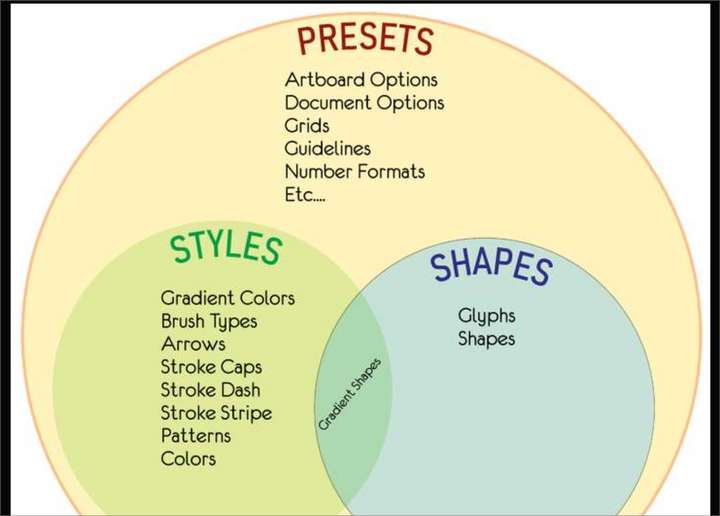
As I posted this image in another post, it gets confusing quickly
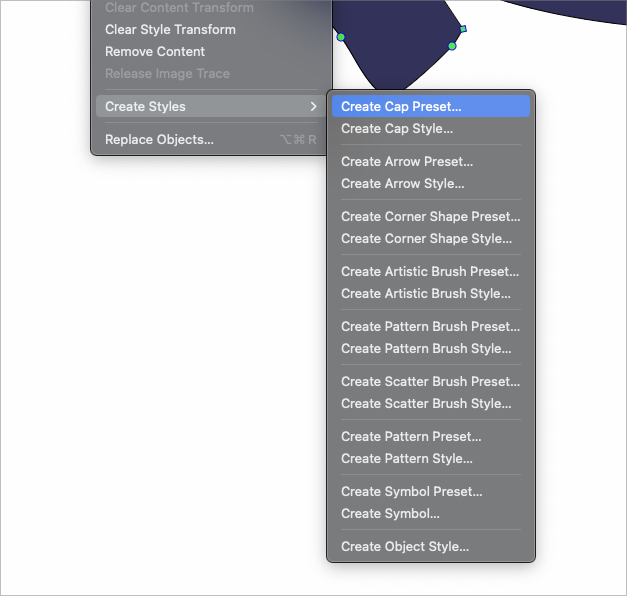
Read a post response from @b77 today talking about editing presets in the "Preset Manager". https://www.vectorstyler.com/forum/topic/3900/delete-custom-created-presets-style-in-image-trace-tool-panel/2 It was not obvious to me where to find this panel and typing it into the "Help" search box on Mac did not pull anything up. I found it by doing a search for it in the forum. (Styles > Preset Manager)Presets can be managed (renamed, deleted, organized) using the Styles -> Preset Manager action, but this does not seem intuitive to look under "Styles"
There is a Style menu, under which you find the Preset Manager. If Presets and Styles are two different entities then why is the Preset Manager is under Styles?
Why is there a "preset manager" as well as a "presets folder"? Would it not make more sense to have these be combined into one panel?
-
@Boldline said in Organizing VS for easier understanding and use of styles and presets:
If Presets and Styles are two different entities then why is the Preset Manager is under Styles?
I think is is mainly a naming issue, as the word "style" is used in multiple way. It can be the "style" of something like a fill or color, or can be a "linked attribute" that is called a "style".
-
@VectorStyler said in Organizing VS for easier understanding and use of styles and presets:
I think is is mainly a naming issue, as the word "style" is used in multiple way.
I agree with you that "style" is used in different ways. I can understand now why you have everything under "Styles" rather than split between that and "Presets" as main top level categories.
I think it has to do in part with the way each person categorizes styles - are they thinking first in terms of "style" vs. "preset" or in terms of say, "I need a gradient"- now I decide if that gradient is going to be a local "style" or system "preset".
There's probably not a good answer for how to solve this
What about having a "Preset Styles" option under the main "Styles" category?
Or where it currently has the option for "Create Styles" - a option to view "styles" or "preset styles"I'm not claiming I know best at all as to what the organization needs to be. All I know is there ends up being a lot of confusion, especially for new users and it gets a little overwhelming trying to understand the differences and find what is needed
-
@Boldline, @VectorStyler
I agree with @Boldline, there is a lot of confusion of not only terms but also where to find the settings to edit these things; it does need some clarity.@Boldline has brought up a number of points with questions, so I will focus on one to start with.
Regarding the nomenclature, I would like to make a suggestion:
Currently one of the meanings of Style is a preset that is "local" to the document, and Preset is considered to be a preset that is "global" to the app.
I look to other apps and noticed this as a distinction:
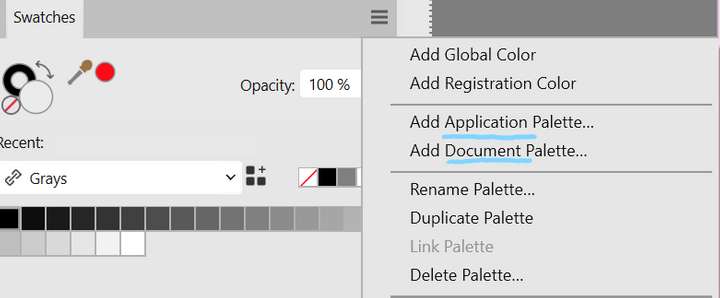
So in the above case, the user can add/save a palette to the document, or add/save a palette to the application, making it available to all documents.Back to VS. Consider these terms:
- change Style to Doc Preset or Preset-Doc
- change Preset to App Preset or Preset-App
Also consider pairing these terms in the UI with related icons (as much as possible). Here is an example below where the "gear" is for App and the "luggage" is for Doc:
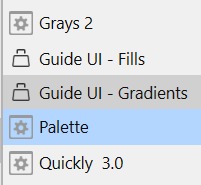
Using icons as much as possible will help cement the concepts for the VectorStyler user as they get comfortable with the astounding amount of configurability within the app (which I love about VS!).Having distinct terms like Preset-App and Preset-Doc will allow you to use the term preset as meaning "any save-able configuration" and keep style for "any of the various modifications of an attribute". Here I am using attribute to mean a stroke, a fill, a color, etc. Please correct my terminology if it is incorrect.
Thank you for letting me open up a focus on the nomenclature. I will contribute to some of the other points @Boldline made in future posts.
-
I pretty much agree with the need for better naming — I want to know directly
from the naming if the style/palette/etc I create will be available only in the
current document or will be available for all documents.So yeah, I would prefer seeing 'document' and 'app' in the naming of these
commands.(Also: maybe also a way to change a "document" style/palette to an "app" style or
palette?) -
Back to VS. Consider these terms:
--- change Style to Doc Preset or Preset-Doc
change Preset to App Preset or Preset-App ...
.
.
Sorry guys, but for a simple man like me this just adds
to the confusion. I have memorized that styles apply to
individual documents and presets can be used globally.So calling both as presets confuses me more than it
makes anything clearer. -
Maybe just a separate menu for styles and presets and adding only for the menus 'document' styles and 'application' presets. Then you don't have to change to much about the naming. So that those who don't want to much changing are satisfied. And it makes it clearer and organised.
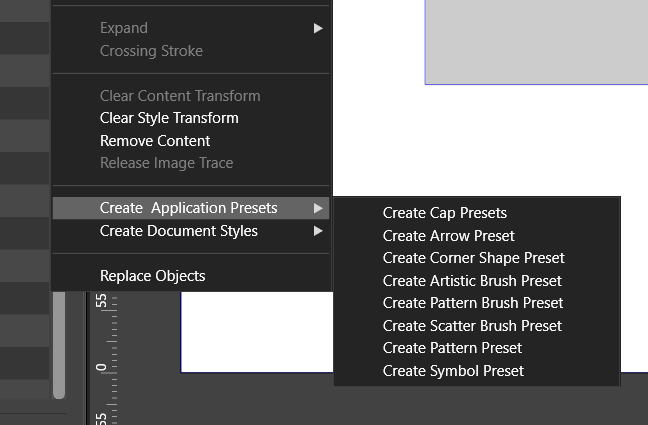
Windows 10 | 1920x1080 | 125%
-
is not that i am against changes
but they should make things clearer than beforeLike your idea with "Document Styles"
i am a little unshure about "Application Presets"
but could live with it -
@FastVector said in Organizing VS for easier understanding and use of styles and presets:
Maybe just a separate menu for styles and presets and adding only for the menus 'document' styles and 'application' presets.
This would help for sure. This is more what I envisioned instead of the long list of alternating types of styles and preset options
-
Well if VS needs a way to save preset attributes/configurations locally to a document and globally to the app, my only interest are names that are descriptive and easy to understand.
I think that would be far more effective than Subpath's user example of actually memorizing "what styles apply to individual documents and presets that can be used globally". That seems like a lot of work.So yes, call them something descriptive and short, give them an intuitive icon, and that would be great!

-
@Subpath Either 'Application Presets' or only 'Presets' would work for me. Because I'm not totally new and have already used the presets multiple times. I would go for only presets, because it is shorter and therefor looks cleaner. But for a total beginner or if you almost never have used this function the longer one is more descriptive.
-
Since I wrote that I can live with this “application preset”.
Is this term okay for me -
@Subpath Yes, I also can live with it. But I quess that I prefer 'Presets'.
-
I was trying to get these terms straight in my head, and I thought that a chart may help. I ask you to keep in mind that this is just brainstorming, I am not trying to force ideas, I am hopefully contributing to them.
So these definitions are rough, these ideas are conceptual.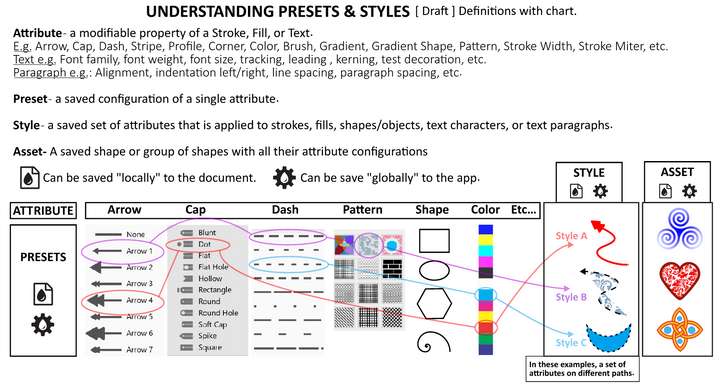
What got me excited about this chart was that it delineates the concept of Presets and the concept of Styles, and removes them from being associated with WHERE they can be SAVED.
So I used icons (they are placeholder, not set in stone) to represent a "local" document save and a "global" app save.
A Preset can be saved in BOTH ways.
A Style can be saved in BOTH ways.
This would simplify all of VectorStyler's menus. When a user goes to save a Preset or Style and they are in the window to name the item, there could be two checkboxes for each choice:
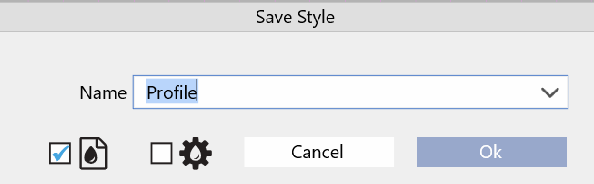
Hovering over the icons would reveal the tooltip explanation for them.So have a look at the definitions. I am sure they are close, but not exact. Please chime in and help shape them. My hope is this will help us get to a common understanding of these elements and then we can figure out how best to organize them simply and elegantly.
-
@Victor-Vector Just a suggestion — deciding which naming is better should come first,
then figuring out which icons fit the naming better comes second.It's not easy anyway — in the app we have the Fill concept (for which a droplet icon would
work best, IMO), then we have the Appearance concept and also the Style concept, which
are more difficult to describe with icons:
I would assign a painting roller icon for the 'Appearance' panel, but then which icon would
work for 'Style'? -
And… there's no need for icons in the 'Save Style' dialog — a checkbox with a
text label that says 'Global' (or anything descriptive) would work great, IMO.



