VectorStyler
    • Categories
    • Unread
    • Recent
    • Tags
    • Popular
    • Register
    • Login

    Creating a truchet tiles using Repeater
    Scheduled Pinned Locked Moved Tutorials
    6 Posts 3 Posters 9.8k Views 2 Watching
    Loading More Posts
    • Oldest to Newest
    • Newest to Oldest
    • Most Votes
    Reply
    • Reply as topic
    Log in to reply
    This topic has been deleted. Only users with topic management privileges can see it.
    • L Offline
      Li Xiao
      last edited by Li Xiao

      Last week, someone asked me how to create vector graphics similar to the ones on the website shown below using VS. I took some time to record the basic operation methods, and there are many variations possible.
      https://www.freepik.com/premium-vector/black-white-metaball-pattern_80832637.htm

      Video
      https://drive.google.com/file/d/1Foo19yu4Sp3ucW8j3lI3WPiLC4UdtV9x/view?usp=sharing

      File
      0_1705912945418_Tiles of Repeater.vstyler
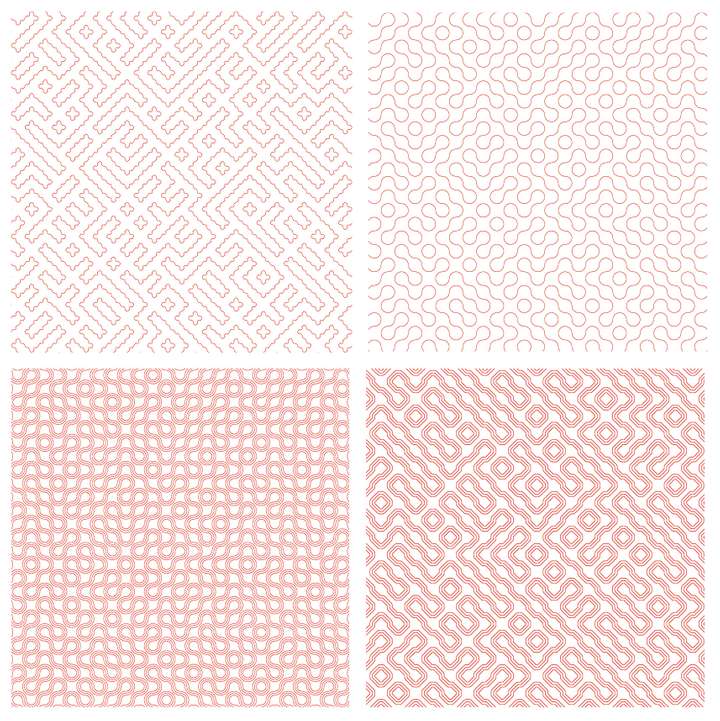
      0_1705913616147_Tiles of Repeater.jpg

      S 1 Reply Last reply Reply Quote 8
      • BoldlineB Offline
        Boldline
        last edited by Boldline

        @Li-Xiao said in Creating a truchet tiles using Repeater:

        https://drive.google.com/file/d/1Foo19yu4Sp3ucW8j3lI3WPiLC4UdtV9x/view?usp=sharing

        This is awesome! thank you for creating and sharing.

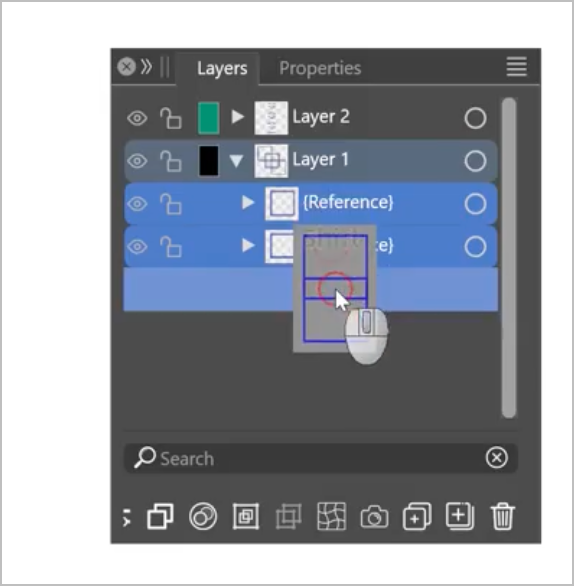
        I'm running into an issue trying to clip the three squares together as you did. Is there something I need to be doing extra that is not obvious on screen at the 46 sec mark when you've selected all three symbols and drag them down into the lowest of the three to create a clipping mask? You used shift to select all three. Any time I try this, nothing happens
        0_1705937075791_8e8216dc-1b81-4966-bd1e-5a3118b26329-BLD 2024-01-22 at 10.22.47@2x.png

        🍎 macOS Tahoe 26.2, Mac mini (M1, 2020), Chip Apple M1, Memory 16 GB
        Cintiq 27QHD Display and LG Ultra HD Display

        L 1 Reply Last reply Reply Quote 1
        • L Offline
          Li Xiao @Boldline
          last edited by

          @Boldline Select two symbols and move them into the rectangle (non-symbol).

          BoldlineB 1 Reply Last reply Reply Quote 1
          • BoldlineB Offline
            Boldline @Li Xiao
            last edited by

            @Li-Xiao ok thanks got it now. I didn't have the non-symbol in the middle in between the two symbols and then eventually I got rid of the non-smbol version and made three symbols and that didn't work either. I got it now - thank you

            🍎 macOS Tahoe 26.2, Mac mini (M1, 2020), Chip Apple M1, Memory 16 GB
            Cintiq 27QHD Display and LG Ultra HD Display

            1 Reply Last reply Reply Quote 1
            • S Offline
              Subpath @Li Xiao
              last edited by Subpath

              @Li-Xiao

              very well done, 👍 thanks for sharing this
              I love your creative way of using the corner tool for this and that you also
              show how to use self-made corners, which expands the possibilities even further

              and that Repeater is such a powerful thing to have

              Win 11
              CPU: AMD Ryzen 5 9600X, 6-core.
              GPU: Nvidia Geforce RTX 5070.

              L 1 Reply Last reply Reply Quote 2
              • L Offline
                Li Xiao @Subpath
                last edited by Li Xiao

                @Subpath Yes, Repeater is incredibly powerful. The earlier part can also be done using cloning, but unfortunately the bug related to refreshing hasn't been fixed yet. So I switched to using symbols instead, making everything non-destructive. VS is truly impressive!

                1 Reply Last reply Reply Quote 1
                • First post
                  Last post