Printer marks do not work correctly
-
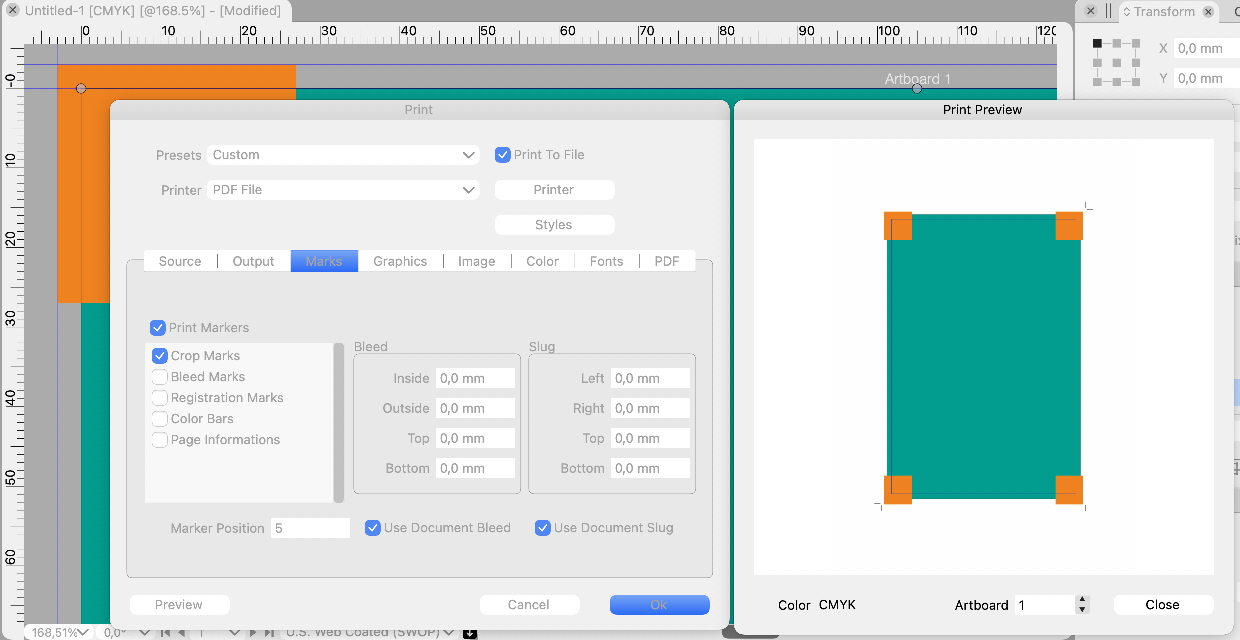
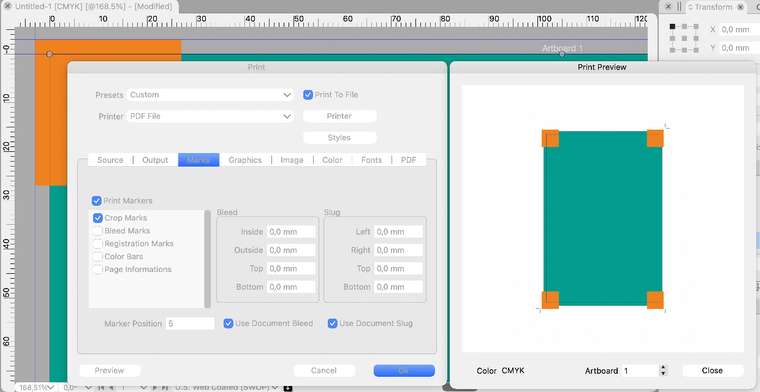
When I use crop marks and bleeds in Printer dialog box, the crop marks are drawn in incorrect positions, if there is a distance specified for marker position.
Crop marks are positioned at the distance specified, but the logic is wrong, and they no longer mark the document format but instead document format + marker distance.
In addition, bleed settings are not honored (that is, bleeds are drawn exceeding the limit specified, even when the value is zero, as below).
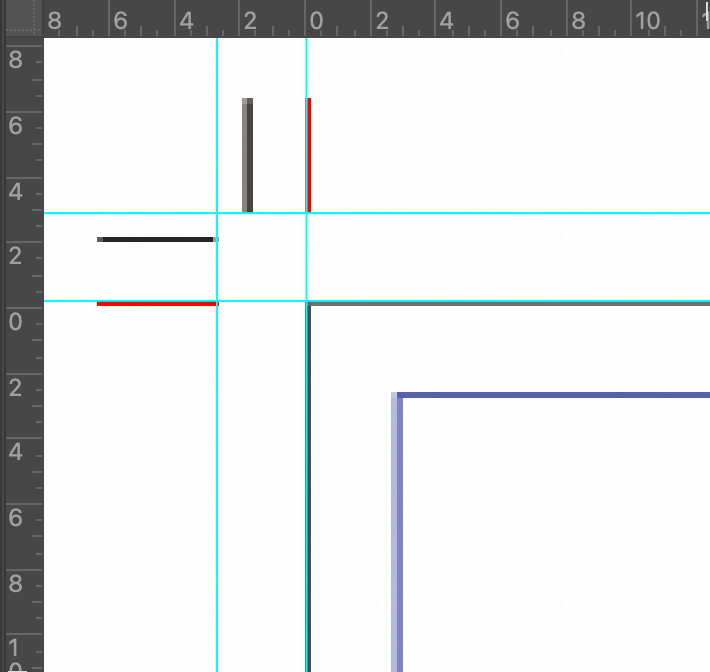
Here is a closer look on crop marks the position of which was specified at 3 mm distance. The red strokes show where the marks should have been drawn. VS has drawn the strokes at correct distance but in a silly way that no longer marks the document format.
-
@Arde Added as a bug to the backlog.
-
@vectoradmin
(1.0.033)
The print marks are hard to fix.
You may be in a maze. It is regrettable because it is an essential function as a product.I)
Here's an example of what hasn't been fixed.
Set the following document as an example.
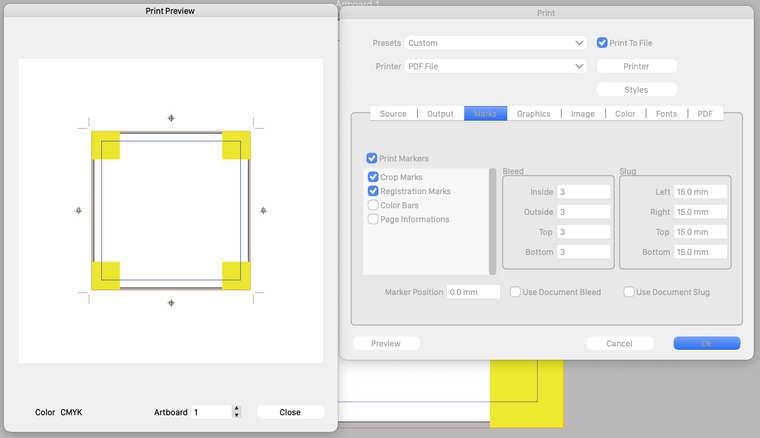
Document Setup: Margins = 0mm, Slug = 15mma) Output with settings
The crop mark is too outside. (Fig. a)
b) Bleed = 0
It's a Bleed mark, but not a Crop mark. (Fig. b)
The difference between Bleed mark and Crop mark will be described later. (II)
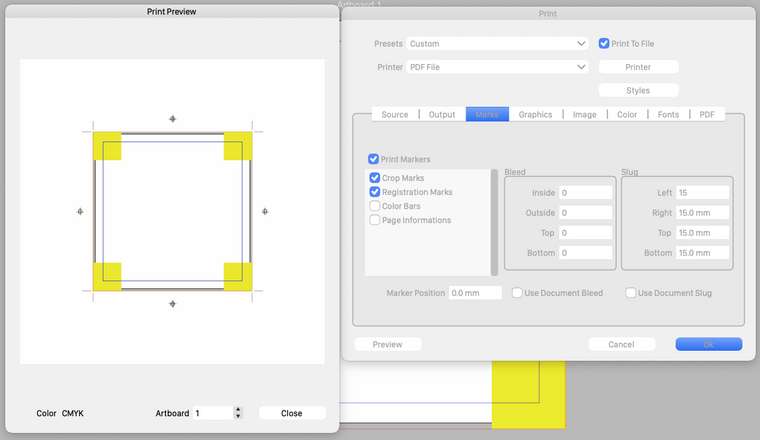
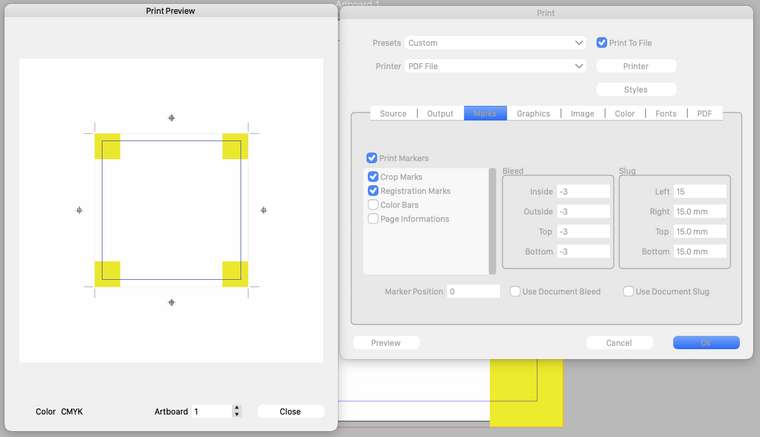
c) Bleed = -3mm
It becomes a Crop mark, but Bleed disappears. (Fig. c)
d) Set the value to Mark position
No change. (Fig. d)
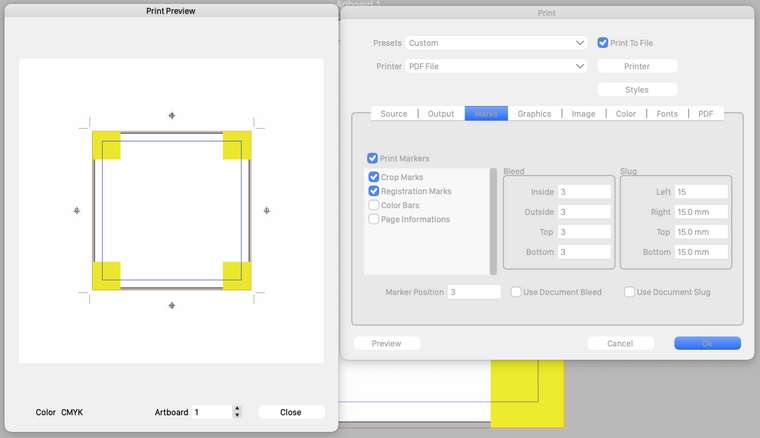
What is the reason why the mark is not in the specified position?
In my opinion, the cause may be the crosstalk of the program due to confusion with the print term, typesetting term, and postscript definition.
Especially, I have a problem in interpreting "crop" and "mrgin".
It is common in industry that specifications differ depending on the country, organization, and manufacturer.
I don't think so, but I'm worried that VS developers might have this confusion.
I can't draw any conclusions. I hope it gives you some hintsII) Crop
Adobe uses the following names:
Of course, the names are different, but the program works fine.Illustrator: Trim marks (fig.)
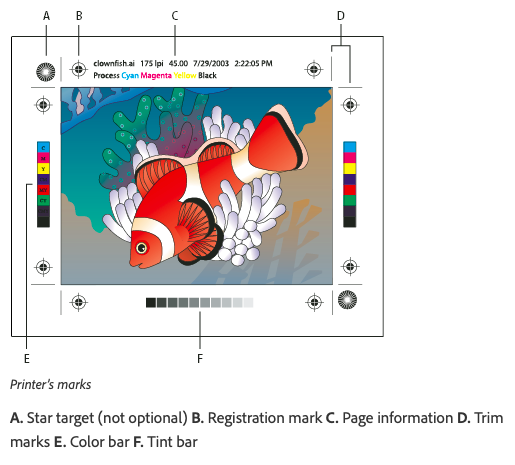
Description link
https://helpx.adobe.com/in/illustrator/user-guide.html/in/illustrator/using/printers-marks-bleeds.ug.htmlInDesign: Cropmarks (fig)
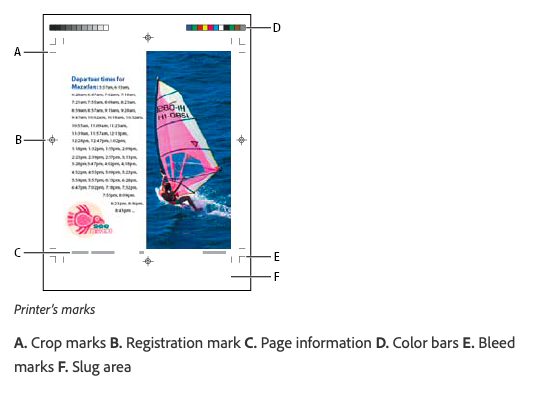
Description link
https://helpx.adobe.com/in/indesign/using/printers-marks-bleeds.htmlThe ID further defines the bleed cut-off marks as "Bleed marks". It seems that this is not necessary in Europe and the United States, but it is essential in Japan.
Unfortunately, the illustrations here lack clarity. The Bleed part of the photo is cut off, but it should be filled.
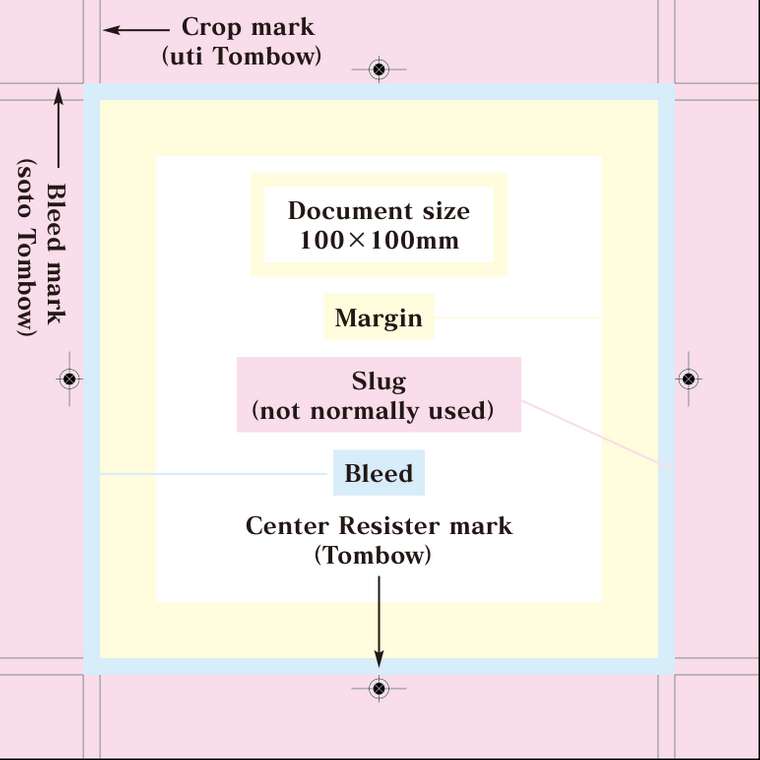
Other names and position settings are different here and there.This is a reference diagram of how they are used in the Japanese printing industry.
Reference figure (fig)
III) Margin
In VS there is a Margins setting in Document Setup. However, the content is Bleed and Slug settings. I don't understand why Bleed and Slug are elements of Margin.
On the other hand, there is Margins in Document Setup> Artbord> Format. This seems to be a margin. Why are the settings separated in different places?In Print> Marks
Still, the Bleed, Slug settings don't seem to work properly to me.There are so many things I don't understand, so I'll end here.
-
@vectoradmin
I have already reported that the print marks function has not been fixed in ver.1.0.033.
I guess it's difficult to combine the functionality of print marks with the print driver.Then, as an auxiliary function, is it possible to place print marks on the document (artwork) itself?
The Illustrator was so until ver.10.
I currently use the method of placing my own printmarks on Canvas. -
@861475_VctSt The print marks will be fixed. Meanwhile of course it is possible to draw them around the artboard.
-
@vectoradmin Print marks are still confused (possibly more than before) in the latest version (1.0.037):
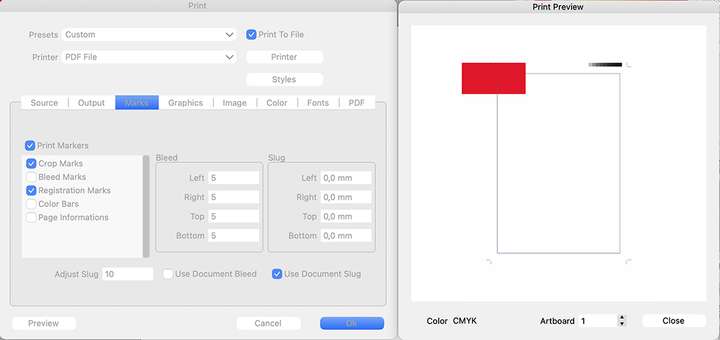
a) Crop marks still do not mark the document format. The distance is now controlled by a setting that is called "Bleed adjustment", but whatever else this setting possibly does, it still also determines the distance of crop marks, but the error that was there still exists, so when the distance of crop marks is increased, the document format also increases. The crop mark distance is an important setting but it must only determine the distance of the crop marks from the page edge, while the document format is retained.
b) The specified bleed still does not determine the point where bleeding elements are cropped. In the screenshot a 5 mm bleed is specified but the rectangle is not cut, at all.
c) "Registration marks" box activates the grayscale box, not the registrations marks. And bleed marks activate the registration marks. As far as I can see, bleed marks are not drawn, at all.
-
@Arde It looks like the old markers are still active in the document. This is what I get:
bleed marks are the outer lines (bleed is set to 18pt).
crop marks are the inner lines
registration marks are the crossed circles.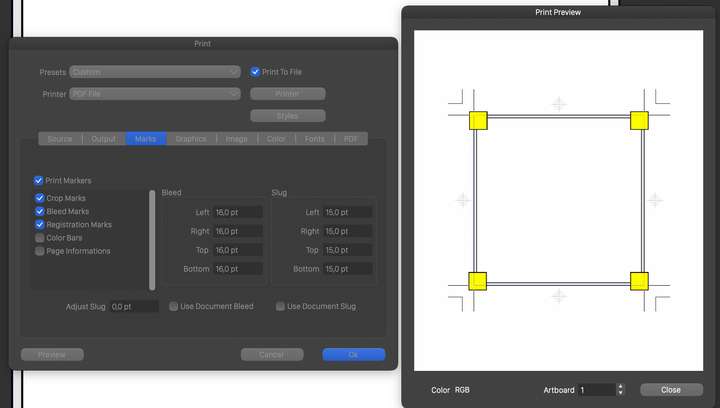
-
@Arde I think the issue could be with existing documents. The printer marks are stored with the printer settings in the document. The printer marks of the previous version are carried over when such a document is opened.
If this is the case, a workaround is to disable the printer marks, confirm the printer view, and then enable the printer marks when the printing is opened next time.
-
@vectoradmin said in Printer marks do not work correctly:
think the issue could be with existing documents.
No -- this happens with any new document, as well. I am running the M1 version on Big Sur 11.4. Is there a way to completely reset to factory settings? I cannot reproduce what you show above in the screenshot (bleeds are never cropped, and bleed marks are not drawn).
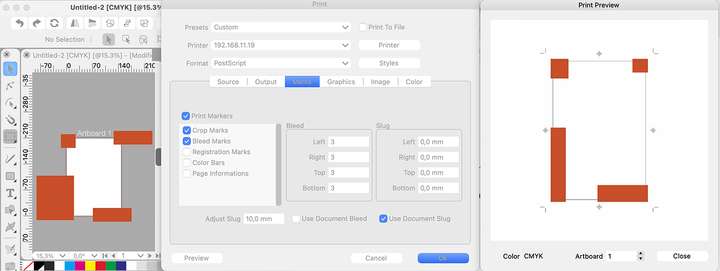
UPDATE: I noticed that the problem with bleeds not being cropped happens if PDF is chosen as the printer. The objects exceeding the bleed area are cropped if I choose a physical printer, but I still cannot have bleed marks drawn, and crop marks are drawn in wrong places (whenever the "slug adjustment" is specific). Also, the UI confuses registration marks and bleed marks (the former are drawn when bleed marks are checked, and grayscale ramp is drawn when registration marks are checked):
-
@vectoradmin
(1.0.037 intel mac)
It's almost fixed. I think it's nearing completion.
However, the crop mark is a little long. It penetrates the bleed boundary a little.
(Fig.)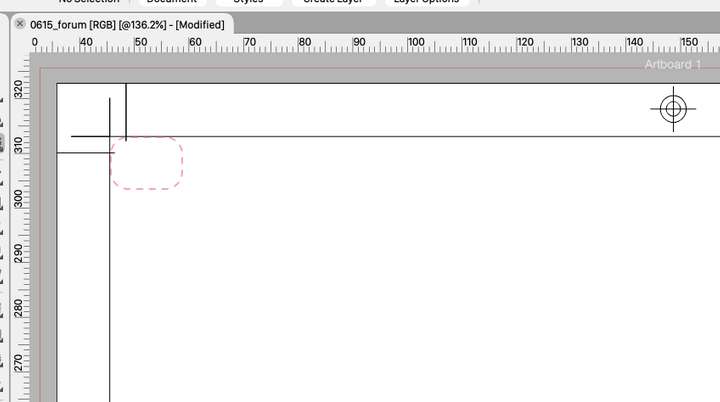
If possible, I would appreciate it if you could fix it.I try to do it naturally, but the settings are difficult to understand.
(Fig.)
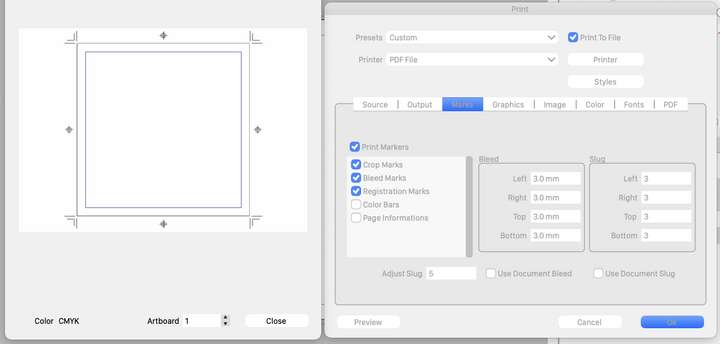

The interpretation of slug remains questionable.
According to the VS web manual:
Slug * --Select the slug margin around the artboards of the document.The slug is the part punched out by the bleed rectangle, isn't it?
In addition to print marks, we may place necessary information at the production site here. You should be able to place additional objects outside the artwork. But now I can't.
Currently the register mark works. But I don't think this behavior is correct. -
@Arde First thing to try is to start VS with Command+Option+Shift to reset the workspace and settings (may contain printer settings for new documents).
If this does not solve it, check the ~/Library/NumericPath/VectorStyler1.0/vector/data/presets/ folder if it contains a "printmarker.preset" file (it should not), and remove it.
And the last resort, if you have not create new presets that you want to keep, erase the ~/Library/NumericPath/VectorStyler1.0 folder (without VS running). If you have presets these can be backed up from the ~/Library/NumericPath/VectorStyler1.0/vector/data/presets/ folder.
-
@vectoradmin said in Printer marks do not work correctly:
First thing to try is to start VS with Command+Option+Shift to reset the workspace
Thanks, that did it.
Now the bleeds work (also when using PDF), and bleed marks are drawn, as well. Crop marks seem to be always drawn at the exact corner of the format, but isn't there a way to define the drawing distance of crop marks (the current "Adjust Slug" box seemed to earlier have this kind of effect on drawing distance of crop marks even if it did not work as expected)?
-
@Arde Crop mark positions cannot be adjusted. Slug only positions the registration, color bar and info text at some distance.
Maybe the slug should not be used to adjust crop marks (as it was originally). Do we need an adjustment for crop marks?
-
@vectoradmin said in Printer marks do not work correctly:
Do we need an adjustment for crop marks?
Yes, I think so. It can be user-defined (as most of the settings you have are), like it is e.g. in InDesign, or it can be automatically adjusted by the app (as e.g. in CorelDRAW).
But think about a scenario where you need e,g, a 17mm bleed (like with covers for a hard-bound book) -- you need to have all print marks (including crop marks) drawn off the bleed area to avoid having any print marks showing in print area (like printed color on the inner side of the cover paper of a hard-bound book when it is folded over the edge of the cover).
The default should also be more than zero, I think, to avoid problems with small registration misalignments, e.g. in InDesign the default offset for print marks is 2,117mm.
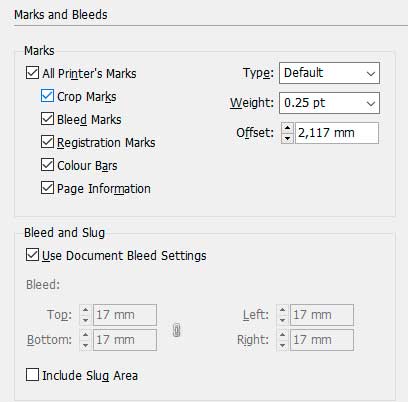
The result, when using the default offset, would be this when having a bleed area the width of which is 17mm:

Defining the offset at 17mm (the same as bleed area) would resolve the problem and would draw the print marks off the bleed area (a gap is not needed in this case as the edge of the bleed would be glued under end sheet so there is no danger that misaligned cover paper would show any print marks):

CorelDRAW would handle the same situaion without user intervention (and would also add the standard gap between the bleed and the marks):
I think that the label "Adjust Slug" for this setting, if it is meant to be used for adjusting the offset of print marks, should be changed to e.g. to "Mark offset" (or just "Offset", as in InDesign), and the default could be something like in InDesign, so that standard jobs that have a 3mm bleed would show the print marks with a small gap to avoid print marks showing in case of misaligned registration.
Note that if there is stuff to be printed in the slug area, as well, there is normally no need to adjust print mark offset for the slug area, as typically the slug area would be trimmed off from the final product so it can normally also contain print marks -- for this reason I would not call the setting "Adjust Slug" (if its operation is to offset print marks).
-
@vectoradmin said in Printer marks do not work correctly:
@Arde First thing to try is to start VS with Command+Option+Shift to reset the workspace and settings (may contain printer settings for new documents).
I just noticed there are new release versions. What would be the key combination for resetting the Windows version, or manually removing a print preview (I have a stuck print preview in the Windows version and cannot therefore test the bleed setting fixes in the Windows version)?
-
Btw, the grayed out values for custom bleeds and slug area could show the current document defined values, as in InDesign (instead of zero values), so that the user would immediately see whether there is need for custom settings!
-
@Arde Control+Alt+Shift can be used to reset Windows.
Maybe we should have a Reset button in the printer settings? -
@vectoradmin
Since the discussion was paused, I would like to give my personal opinion from the side.
As mentioned earlier, printmarks are now working.
But the setting is like a puzzle.
At this rate, it will bother printing workers in the future.
I expect VS to have smarter specs. Currently, the placement of objects in the slug is fuzzy, and I think it's difficult to operate as you wish.Which is VS aiming at, whether it is easy to process or finely detailed and manually set? Don't hurry, can you improve with the opinions of more professional users?
Output work is the final stage of art production. Depending on the industry, printmarks may not be so important. However, people in the printing industry are even more nervous about print than the creators.
VS is neither InDesign nor Affinity. I think it should be improved according to the development policy. -
@861475_VctSt If by "setting is like a puzzle" you mean they are unnecessary complex, write what can still be improved/streamlined.
@vectoradmin A couple of issues with printer marks:
-
the crosses of the registration marks are too large, overlapping the trim line;
-
the tint bar with the gray levels (part of the 'Color Bars' category) doesn't go in 10% steps, from white (0% black) to 10% black, then 20% up to 100% black;
-
also: the tint bar should be only on the blacK plate;
-
when 'Color bars' is checked, there is no actual color bar with the process colors (or any Pantones) and their usual combinations:
Blue ……………… [C100 M100 Y0 K0]
Red …….………… [C0 M100 Y100 K0]
Green …………… [C100 M0 Y100 K0]
Pure Black …… [C0 M0 Y0 K100]
Registration … [C100 M100 Y100 K100]
-
-
@b77 These will be fixed.


