Two tools selected at the same time
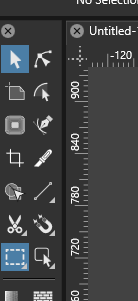
-
@maarten said in Two tools selected at the same time:
Perhaps I'm missing something, but to me this does make no sense compared to similar software programs I use, so i consider this a bug.
This is not a bug
 Yes it is different from other software, in VS you can have an active selection mode (box, lasso, magic wand) with an active tool (transform, node, etc).
But the highlight color should be different, I will look into that
-
But the highlight color should be different, I will look into that
I tested this on my m1 mac as one box was blue (transform tool) as the shape tool was a dark gray. This seemed to be correct
-
@maarten @VectorStyler I often get confused by this feature and keep checking in setting panels :). As mentioned possibly due to same highlight color.
-
@Kumr said in Two tools selected at the same time:
As mentioned possibly due to same highlight color.
I will fix the highlight color issue.
-
@VectorStyler Thanks for your quick response. I don't get the advantage of why this is though. So far it feels rather confusing to have two tools selected honestly
-
@maarten said in Two tools selected at the same time:
So far it feels rather confusing to have two tools selected honestly
It is not really two tools. There is one tool (transform or node) and the a selection mode.
The selection mode was place in the toolbox for familiarity (other apps have them there). But in VS these are not independent tools, as in other apps, but work in combination with other tools.
For example, we can have lasso selection mode to select nodes.
-
@VectorStyler said in Two tools selected at the same time:
@maarten said in Two tools selected at the same time:
So far it feels rather confusing to have two tools selected honestly
It is not really two tools. There is one tool (transform or node) and the a selection mode.
The selection mode was place in the toolbox for familiarity (other apps have them there). But in VS these are not independent tools, as in other apps, but work in combination with other tools.
For example, we can have lasso selection mode to select nodes.
Honestly this looks like a discussion between developers and users. I prefer the user way as those are the ones using the software. And honestly as a user it feels unintuitive and confusing. The fact that things need explanation, while being around for many years in other tools, says it all I think.
-
@maarten said in Two tools selected at the same time:
while being around for many years in other tools
Not sure how this is done in Affinity Designer, I checked it with Adobe Illustrator and here is the problem:
If I have the Node tool active, I can only select nodes with the box selection tool (or regular clicks).
I can select a separate lasso tool, select the nodes and then go back with to the Node tool to move these nodes. I have to repeat this tool changing steps if I want to select other nodes (with lasso) and then move them.What we have in VS is that the user can stay in the Node tool (to move nodes for example), while also using a lasso to select (and not a box), avoiding the repeated switching between two tools.
This was not an engineering decision but a usability one. -
@VectorStyler Thank you. I find this feature useful and its one of the power functions unique to VS.
-
@VectorStyler said in Two tools selected at the same time:
I prefer this selection method in VS. It took me a little while to get used to it when I first started using it, but now I can't imagine working without it.
The more I use VS, the more I admire its design. Not only does it offer many innovative features, but it also surpasses other software in terms of functionality, making it more powerful and user-friendly.
-
@maarten said in Two tools selected at the same time:
Honestly this looks like a discussion between developers and users. I prefer the user way as those are the ones using the software. And honestly as a user it feels unintuitive and confusing. The fact that things need explanation, while being around for many years in other tools, says it all I think.
For me, it is a very intuitive solution. Give VS some time to get used to it. Save your settings, workspace, and presets/styles.
BTW hold "Alt" key before making a selection to toggle between box and lasso.
Win 11, XP Pen Deco 01 V2 graphic tablet
-
I also have no problem with a tool and the selection mode being displayed
at the same time and don't feel particularly irritated by it.If I hadn't been open to new ideas and new and perhaps initially unfamiliar
approaches, I would have stayed with CorelDraw. -
@Harry said in Two tools selected at the same time:
it is a very intuitive solution. Give VS some time to get used to it.
@Li-Xiao said in Two tools selected at the same time:
The more I use VS, the more I admire its design. Not only does it offer many innovative features, but it also surpasses other software in terms of functionality, making it more powerful and user-friendly.
This has been the case for me with VS in many a situation, especially early on in my VS journey. Coming from years of Illustrator experience, I wanted VS to be like Illustrator in all the ways that were comfortable for me at the time. I made a number of suggestions early on to get VS more like Illustrator and now I'm glad that @VectorStyler did not implement all of them. He had more intuitive and better solutions in mind and once I started giving them a fair opportunity, I preferred them over what I knew and used in the past.
I still offer suggestions for improvement, but I am more open-minded than I was at first to the possibilities of better options.
-
I think I understand the confusion. Both are in the toolbox. So you would think that both are tools like in other programs.
I have no problem with the way it is. And I'm used to the way it is. But it would make sense to me to put those modes in the contextual menu.
-
@maarten Fix in the new build: the color of the highlight should stay gray, even if the toolbox was customized.
-
@VectorStyler Thanks. Not sure how to think of it atm, but I'll try to embrace it

