VectorStyler
    • Categories
    • Unread
    • Recent
    • Tags
    • Popular
    • Register
    • Login

    Still annoying problems with exported pdf's

    Scheduled Pinned Locked Moved Resolved 1.2 bugs
    9 Posts 2 Posters 13.4k Views 2 Watching
    Loading More Posts
    • Oldest to Newest
    • Newest to Oldest
    • Most Votes
    Reply
    • Reply as topic
    Log in to reply
    This topic has been deleted. Only users with topic management privileges can see it.
    • RaaskotR Offline
      Raaskot
      last edited by

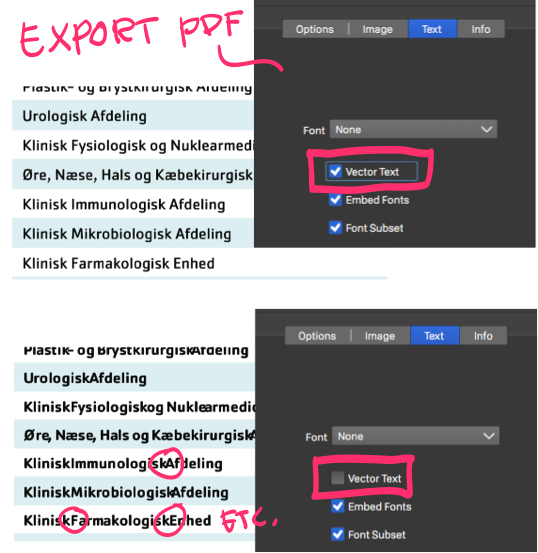
      VS has improved handling pdf-export (I feel), but there is still serious problems.

      It's not optimal – when exporting pdf's – selectable text information must be switched off (Vector Text selected) for acceptable typography.

      0_1710689456820_fejl-pdf-vektor-tekst.zip
      0_1710689443271_d4a59297-a0e2-446e-a50a-1a2c93b00814-billede.png

      VectorStylerV 2 Replies Last reply Reply Quote 1
      • VectorStylerV Offline
        VectorStyler @Raaskot
        last edited by

        @Raaskot I will try to improve this.

        1 Reply Last reply Reply Quote 0
        • VectorStylerV Offline
          VectorStyler @Raaskot
          last edited by

          @Raaskot Not sure what could happen here as I cannot replicate the problem.

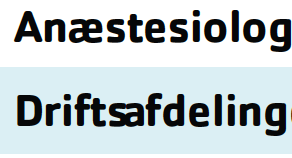
          I opened the attached PDF files in both Preview and Adobe Acrobat and it seems to render the glyphs correctly:
          0_1710747628559_exportfont1.png

          Here is a smaller text I exported (different Cachet font).
          0_1710747540045_exportfont1.pdf

          Are you using Preview or Acrobat in those screenshots?

          RaaskotR 1 Reply Last reply Reply Quote 0
          • RaaskotR Offline
            Raaskot @VectorStyler
            last edited by Raaskot

            @VectorStyler

            I have used both Mac Viewer and Acrobat Pro (and Google preview)
            "Driftsafdeling" (as you'll notice) does not at all seems to render acceptable ...

            Though "0_1710747540045_exportfont1.pdf" seems fine.

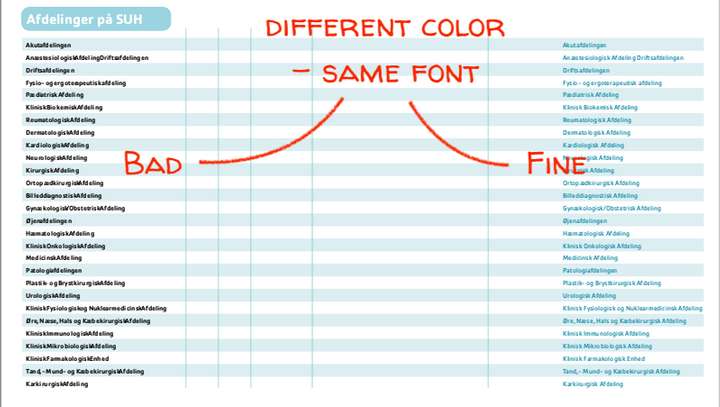
            Also I can't figure out why the difference (aside color) since it's identical font. Do you have any idea?
            0_1710877398382_ad27cd4f-de69-4353-bbfa-64a270f92440-billede.png

            VectorStylerV 2 Replies Last reply Reply Quote 1
            • VectorStylerV Offline
              VectorStyler @Raaskot
              last edited by

              @Raaskot I will try to find out what could cause this.

              1 Reply Last reply Reply Quote 0
              • VectorStylerV Offline
                VectorStyler @Raaskot
                last edited by

                @Raaskot Can you send me a PDF exported from VS where the different color with same font is broken.
                I think this might also be dependent on font type, and I do not have the exact same font.

                RaaskotR 1 Reply Last reply Reply Quote 1
                • RaaskotR Offline
                  Raaskot @VectorStyler
                  last edited by

                  @VectorStyler
                  I'll send files on email ...

                  VectorStylerV 1 Reply Last reply Reply Quote 1
                  • VectorStylerV Offline
                    VectorStyler @Raaskot
                    last edited by

                    @Raaskot The problem can be replicated here also. The fix will be in the next build.

                    1 Reply Last reply Reply Quote 0
                    • VectorStylerV Offline
                      VectorStyler
                      last edited by

                      This issue should be fixed in build 1.2.019

                      1 Reply Last reply Reply Quote 2
                      • First post
                        Last post
