VectorStyler
    • Categories
    • Unread
    • Recent
    • Tags
    • Popular
    • Register
    • Login

    Bucket Fill Tool issues with new update
    Scheduled Pinned Locked Moved Resolved 1.2 bugs
    5 Posts 2 Posters 4.6k Views 1 Watching
    Loading More Posts
    • Oldest to Newest
    • Newest to Oldest
    • Most Votes
    Reply
    • Reply as topic
    Log in to reply
    This topic has been deleted. Only users with topic management privileges can see it.
    • BoldlineB Offline
      Boldline
      last edited by

      I appreciate the new update and was testing out the bucket fill tool.

      I ran into issues right away because it did not fill the shapes with a fill color even though there was a default color in the fill box.
      After selecting a color and then clicking again on the negative shapes, it would often fill whole rows or sections. each time i tried to change the color, sections would change in sporadic ways.

      Here is the video made in the screen video in this post:
      0_1716798009133_bucket fill tool issue.vstyler
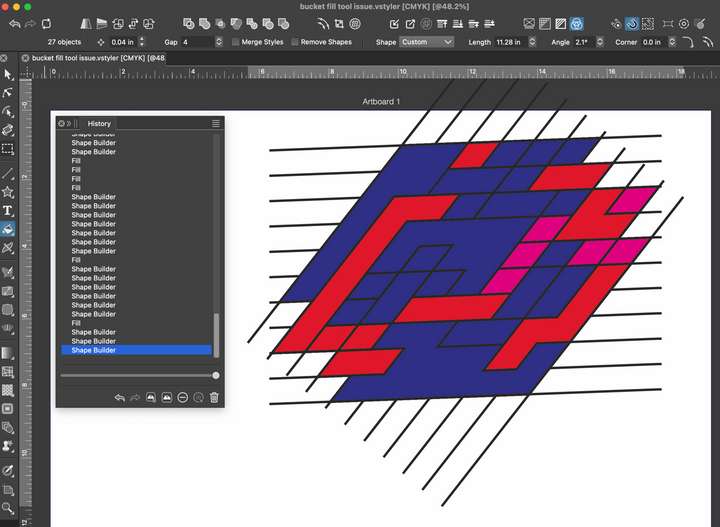
      0_1716798115127_81f84055-8738-4f6d-b8e5-625fa50ae231-CleanShot 2024-05-27 at 04.21.38.png

      If I have a setting wrong, let me know. thank you!

      🍎 macOS Tahoe 26.2, Mac mini (M1, 2020), Chip Apple M1, Memory 16 GB
      Cintiq 27QHD Display and LG Ultra HD Display

      VectorStylerV 1 Reply Last reply Reply Quote 0
      • VectorStylerV Offline
        VectorStyler @Boldline
        last edited by

        @Boldline I tried to replicate this, but it seems to be working here.
        Open the Color panel where you can see if there is a fill color selected, as one problem here is that these lines have no initial fill color.

        BoldlineB 1 Reply Last reply Reply Quote 0
        • BoldlineB Offline
          Boldline @VectorStyler
          last edited by

          @VectorStyler I tried it again today and it seems to now be working correctly. I think one issue I had was not fully understanding the shift modifier use at first. I was holding shift and accidentally selecting multiple colors from the extra color bar on my far right side of the screen instead of opening the color panel itself and confirming a color there first. I tried it all sorts of ways today and everything seems to be working now. I'll let you know if I run into an issue in the future with it. I love the added functionality!

          🍎 macOS Tahoe 26.2, Mac mini (M1, 2020), Chip Apple M1, Memory 16 GB
          Cintiq 27QHD Display and LG Ultra HD Display

          BoldlineB 1 Reply Last reply Reply Quote 0
          • BoldlineB Offline
            Boldline @Boldline
            last edited by

            @VectorStyler I seem to have been able to recreate some if the issue when I adjust the setting as the top for "merge styles". it seems to want to fill all shapes similar to the one first clicked on and then it goes a bit wonky. Here is a video of this

            🍎 macOS Tahoe 26.2, Mac mini (M1, 2020), Chip Apple M1, Memory 16 GB
            Cintiq 27QHD Display and LG Ultra HD Display

            VectorStylerV 1 Reply Last reply Reply Quote 0
            • VectorStylerV Offline
              VectorStyler @Boldline
              last edited by

              @Boldline Got it. I think the issue might be caused by undo. I will try to fix this.

              1 Reply Last reply Reply Quote 1
              • First post
                Last post
