Dragging to highlight numeric field for W,H in New Dialog is treated like scrolling behavior
-
This has become a nuisance when making new documents. It does not occur 100% of the time, but usually happens when I pull up New Dialog after a fresh start up. When I drag mouse to select the field, sometimes the numbers will shift as I'm trying to drag to highlight so I can erase and input another value. This may not be the only field that does it.
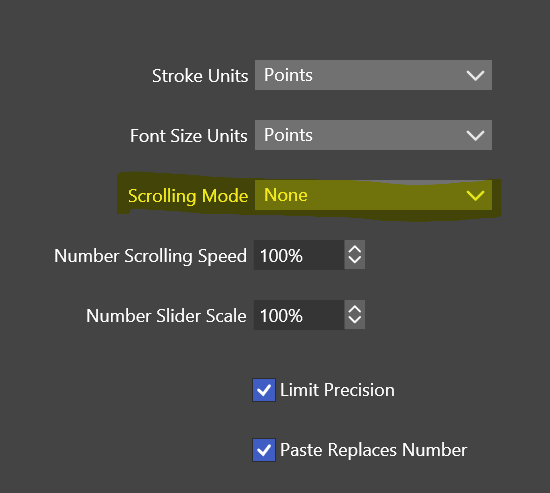
I had to turn off Settings>Number Editors>"Scrolling Mode" because other fields seemed to be misbehave more with it enabled. I seem to remember it would also behave similarly where it seemed to treat dragging as scrolling behavior.
Video: https://1drv.ms/v/s!AuWHX0h5bAoRifxjdWiy26RXwLmEyQ?e=QxMM1b
Windows 11 Build 26200.7171 (25H2)
AMD Ryzen 7 9700X with Gigabyte X870E Aorus Pro Ice
32GB RAM @ 6000MHz
PNY NVIDIA RTX 5070 Ti 16GB; Display 1: 4K @150%; Display 2: 4K @150%
Wacom Intuos Pro L (2025); Wacom Intuos Pro M; Epson ET-8550; Siser Romeo -
@debraspicher I had mentioned this in the past but I don't know if it had ever been addressed. I wasn't sure if it was meant to be a feature or a bug. Sometimes I like that I can highlight the number and as I drag left, it goes down and if I drag right, it goes up. Other times I just want to make a quick edit and the number suddenly changes - so I'm not sure what is best with this
-
@Boldline Most of the time when I boot up VS, it only takes activating the field to cause an update aka change (as if it I were dragging). That can mean just clicking once to place the caret. It's very touchy. I can almost never highlight on the first try. I suspect it's a bug because to get the behavior to happen, usually it has to be on first start.
For me, it would be preferable when we click the field that it automatically highlights to make erasing easier since by clicking we are stating our intent to update the field... then clicking to place caret if needed. I can't see where dragging to scroll numerical is desirable, it's too imprecise.
I personally like how Affinity does it. The user has to drag the mouse left/right on the field label itself rather than the input field. That way it won't conflict with any attempts to update the field manually or by caret placement..
-
@debraspicher said in Dragging to highlight numeric field for W,H in New Dialog is treated like scrolling behavior:
I personally like how Affinity does it. The user has to drag the mouse left/right on the field label itself rather than the input field. That way it won't conflict with any attempts to update the field manually or by caret placement..
I agree with this solution - it is a smart way of handling it in Affinity and would work well here also
-
@debraspicher Can be replicated here also (Width field only). I will fix this ASAP.
-
Thanks for this update. I can still easily drag to change the values on both fields if working too quickly, but single-clicking and general highlight is much more available to activate the field, so that's good. I can work with this much more easily.
Question: Is it supposed to drag to modify the field? Is the "Scrolling Mode" related? I have this set to off. I don't see a drag setting here:
It does seem much easier to drag backwards than forward at various points. Can't see the reason for it.
Video of new dragging behavior on this end.:
https://1drv.ms/v/s!AuWHX0h5bAoRio4hBcqxp_HIpOiGeQ?e=VCpSVz -
@debraspicher The "Scrolling Mode" settings determines how to handle swipes (scroll wheel) when hovering over a text field.


