Flip error in shape text transformation tool

-
@vectoradmin said in Flip error in shape text transformation tool:
Looks like it does not allow negative scaling. I open a bug on this one, but I'm not yet sure what are the implications of negative scaling.
Thanks, it would be great feature even if just allowing in-place mirroring (both vertical and horizontal), so that the bounding box would basically be always retained.
-
When flipping vertically it might also be interesting to have an option to flip along the baseline rather than maintaining the bounding box. I can see potential use cases for doing this both ways.
-
@Arde Build 1.0.025 allows negative scaling of characters.
-
@vectoradmin said in Flip error in shape text transformation tool:
@Arde Build 1.0.025 allows negative scaling of characters
Thanks, this will be a great feature, but it does not seem to be working in a way that I expected: currently a glyph is flipped horizontally in relation e.g. to its bounding box left edge and it also drags along neighbouring glyphs.
I would expect the flip to always just happen within the center x and y of the glyph bounding box as that would keep the current position no matter in what other way the glyph has been transformed (rotated, moved). That would keep it simple in relation to whole text string.
In the current state the transformations now also allow horizontal and vertical stretching -- distorions would of course be potentially a useful feature, as well, but if they make control of the partially transformed text object too complex, it would be just perfect to exclude them and just keep rotation, proportional scaling and center-aligned mirroring, along with positioning, as available transformations. Those "alone" would make this a great tool not available in any other apps that I know!
-
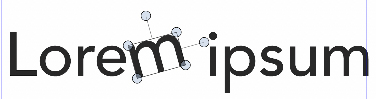
In the latest build the horizontal flip works within the center of the bounding box, but causes confused selection of glyphs afterwards:

E.g., in the image above "Lo" are also a group, and the flipped "e" can be selected on the left of the "r". The text string can be further manipulated and reset despite of the confused grouping but it makes editing quirky.
Vertical flips also still happen according to bottom edge, it would be good if they, too, would happen according to the center of the glyph bounding box.
On Windows (but not on macOS) flipping color glyphs requires redrawing (the initial flip is rendered black).
-
The glyph selection tool and all its functionality seem to be totally broken in the latest RC, both on mac and Windows.
-
@Arde Yes, this happened in a recent build. It is already fixed for the next build, and will be released soon (probably by the end of this week).
The new build is ready, but there will be some delay this time, due to some Mac App Store preparations (I'm temporarily unable to notarize the app).EDIT: and I apologise for this regression, it was a simple resource flag that I forgot to update

-
@vectoradmin said in Flip error in shape text transformation tool:
EDIT: and I apologise for this regression, it was a simple resource flag that I forgot to update
No problem. The feature works much better now but the vertical flip still happens in relation to bottom edge of the bounding box -- it would be nice if it happened within the center of the bounding box (similarly as horizontal flip) so that the glyph position would not change. However the position can easily be changed so this is not so important.
-
@Arde The vertical flipping has been postponed for now. Flipping around the glyph center will not work with multiple glyphs, they will not be aligned correctly to a common (flipped) baseline.
I have to figure out a scheme where this flipping is consistent with multiple glyphs also.Meanwhile, it is possible to offset the flipped glyph.
-
@vectoradmin said in Flip error in shape text transformation tool:
I have to figure out a scheme where this flipping is consistent with multiple glyphs also
Ok, thanks. I did not realize that it can be applied to multipe glyphs! (One possibiiity could perhaps be just supporting one glyph and then flip either by the center or honoring the regular 9-point reference point control.)
