Duplicating a group/Layer results in an offset
-
I'm not 100% sure whether this is a bug or not, but when Duplicating a group or Layer in menus, it is offset to the top right away from the original item.
This makes it very difficult to create backup copies for when I need to do something destructive.
-
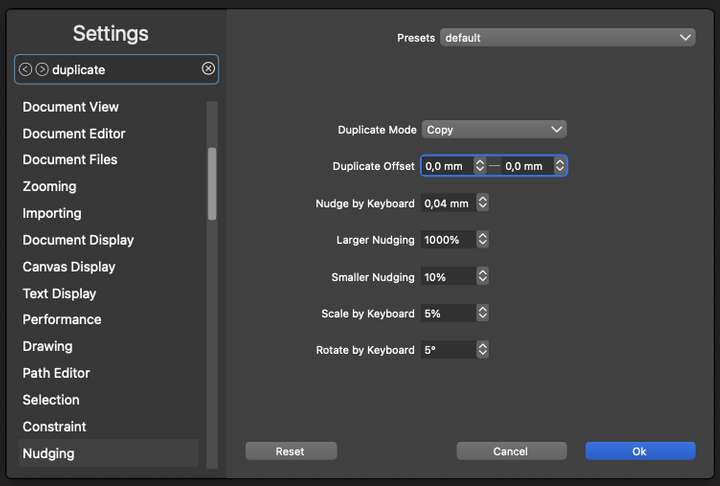
-
@Ingolf Seriously, thank you! I have no idea how that got changed. Might've moved when I was checking through options on the above setting.
Windows 11 Build 26200.7171 (25H2)
AMD Ryzen 7 9700X with Gigabyte X870E Aorus Pro Ice
32GB RAM @ 6000MHz
PNY NVIDIA RTX 5070 Ti 16GB; Display 1: 4K @150%; Display 2: 4K @150%
Wacom Intuos Pro L (2025); Wacom Intuos Pro M; Epson ET-8550; Siser Romeo -
So, interestingly enough, I reset the WS as requested in another thread. That same offset returned (.278in), in this instance.
So I'm wondering is there someplace in settings or on our Windows machine where leftovers might remain when uninstalling/reinstalling the program? Especially since we had some duplicate install issues from before. There's been a few instances where I've wiped the program and come back only to find recent items and other things still remaining the program. I would've expected that to be wiped, but they appear to be tied to the WS folder and perhaps that still remains in-between reinstalls? Just guessing.
-
@debraspicher said in Duplicating a group/Layer results in an offset:
That same offset returned (.278in), in this instance.
There is a default offset in the app configuration file that is part of the VS install.
-
@debraspicher said in Duplicating a group/Layer results in an offset:
@Ingolf Seriously, thank you! I have no idea how that got changed. Might've moved when I was checking through options on the above setting.
As he says, this is the default in VectorStyler, likely inspired (perhaps a bit too much) by Adobe Illustrator. The intention is probably to make it easier to see and select the new object in relation to the original. It disrupts my workflow significantly, and I find this behavior outdated, likely stemming from a bygone era. The world has duplicated billions of objects since this "helpful" feature was conceived. It is clearly evident in the layers panel on our high-resolution screens that we have added extra objects.
In any case, I use duplicate most of the time to create an object I need to move horizontally or vertically a certain distance aligned precisely with the original, so I quickly disabled this behavior. The idea of duplicate is to create a copy faster than copy-paste, so placing objects somewhere I have to move them away from creates more work than copy-paste. For me.
Personally, I think this is a behavior and setting that could be removed entirely to make the program easier to use and the preferences slightly less cluttered.


