VectorStyler
    • Categories
    • Unread
    • Recent
    • Tags
    • Popular
    • Register
    • Login

    Offset between a cloned object and contour after blending

    Scheduled Pinned Locked Moved Resolved 1.2 bugs
    6 Posts 2 Posters 5.7k Views 2 Watching
    Loading More Posts
    • Oldest to Newest
    • Newest to Oldest
    • Most Votes
    Reply
    • Reply as topic
    Log in to reply
    This topic has been deleted. Only users with topic management privileges can see it.
    • B Offline
      B-Vs-V
      last edited by

      Just a test: a simple shape is copied into a clone (Transform object) and a blend is applied between these two objects.
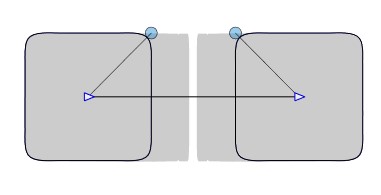
      0_1718957979557_b1.jpg

      By moving the cloned object with the Node tool:
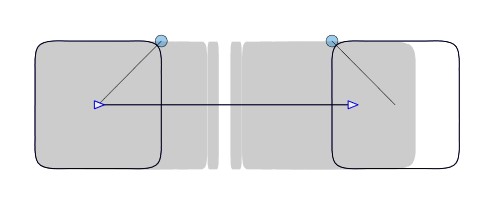
      0_1718957993342_b2.jpg

      W11 Pro 25H2 - 12th Gen Intel(R) i7-12700K 3.61 GHz - RAM 64 Go - NVIDIA GF GTX 4070 Ti - Intuos - Dell UP3216Q / Eizo ColorEdge
      W11 Pro 25H2 - 12th Gen Intel(R) i7-12700KF 3.60 GHz -RAM 64 Go - NVIDIA GF GTX 3080 - IntuosPro- ProArt PA329C

      VectorStylerV 2 Replies Last reply Reply Quote 1
      • VectorStylerV Offline
        VectorStyler @B-Vs-V
        last edited by

        @Pat I opened a bug on this.

        B 1 Reply Last reply Reply Quote 1
        • B Offline
          B-Vs-V @VectorStyler
          last edited by

          @VectorStyler There could also be a problem with the Smooth feature? I get nothing when selected.
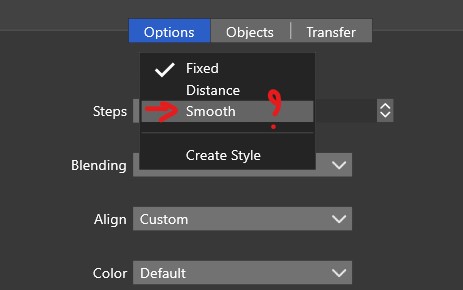
          0_1718964285173_b3.jpg

          W11 Pro 25H2 - 12th Gen Intel(R) i7-12700K 3.61 GHz - RAM 64 Go - NVIDIA GF GTX 4070 Ti - Intuos - Dell UP3216Q / Eizo ColorEdge
          W11 Pro 25H2 - 12th Gen Intel(R) i7-12700KF 3.60 GHz -RAM 64 Go - NVIDIA GF GTX 3080 - IntuosPro- ProArt PA329C

          VectorStylerV 1 Reply Last reply Reply Quote 0
          • VectorStylerV Offline
            VectorStyler @B-Vs-V
            last edited by

            @Pat This should create a smooth transition between different colors, or (if the colors match) a single intermediary object.
            I tested this here and it seems to be working.

            If there is a file where the Smooth option is not working, please send it to me and I will try to replicate it.

            1 Reply Last reply Reply Quote 0
            • VectorStylerV Offline
              VectorStyler @B-Vs-V
              last edited by

              @Pat This can be replicated, but I have to postpone it a bit. This is a general problem with the blend spine path, that when changed the end object frames are not fully positioned. This is an issue with any kind of shape, not just clones.

              B 1 Reply Last reply Reply Quote 1
              • B Offline
                B-Vs-V @VectorStyler
                last edited by

                @VectorStyler Thanks for the feedback. No hurry for me. I report anything that can be considered a bug ☺

                W11 Pro 25H2 - 12th Gen Intel(R) i7-12700K 3.61 GHz - RAM 64 Go - NVIDIA GF GTX 4070 Ti - Intuos - Dell UP3216Q / Eizo ColorEdge
                W11 Pro 25H2 - 12th Gen Intel(R) i7-12700KF 3.60 GHz -RAM 64 Go - NVIDIA GF GTX 3080 - IntuosPro- ProArt PA329C

                1 Reply Last reply Reply Quote 1
                • First post
                  Last post
