Navigator View Presets are not working as expected
-
Navigator View Presets are not working as expected, at least when it is set to the Document:
-Reloading a View sometimes takes me out of zone completely someplace outside of the document.
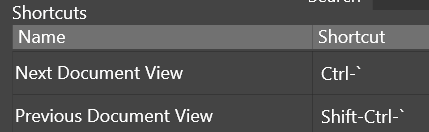
-The shortcut, or at least I suspect it is the shortcut, for Switch Document View doesn't appear to work. Or at least I can't tell what that specific set of shortcuts is meant to do. This one is the one I am trying in video (you can see keyboard feedback in the bottom left as I hit keys...):
-When removing a Preset, it stays up as the currently selected View.
-Note when adding "Test 4", "Test 3" starts working correctly. Then Test 3 stops working, Test 4 works. Very odd.
-I just tested normal View Presets and it also has the same problems as above.
*If my typing seems off, I'm attempting to use a keyboard across a dog and a large Wacom. So there's that.
Video: https://1drv.ms/v/s!AuWHX0h5bAoRipMcm5_A-DEv8gVkYg?e=B7EmAO
I do not know why Clipchamp is suddenly making my videos larger, but they were smaller before I cut the file. Anyway...I will send the file from this state directly.
Windows 11 Build 26200.7171 (25H2)
AMD Ryzen 7 9700X with Gigabyte X870E Aorus Pro Ice
32GB RAM @ 6000MHz
PNY NVIDIA RTX 5070 Ti 16GB; Display 1: 4K @150%; Display 2: 4K @150%
Wacom Intuos Pro L (2025); Wacom Intuos Pro M; Epson ET-8550; Siser Romeo -
I noticed if I select the same Preset twice, it'll load things correctly.
-
@debraspicher I will try to replicate this.
-
@debraspicher said in Navigator View Presets are not working as expected:
The shortcut, or at least I suspect it is the shortcut, for Switch Document View doesn't appear to work
The shortcut is to switch between different views created with the View -> New View command.

