VectorStyler
    • Categories
    • Unread
    • Recent
    • Tags
    • Popular
    • Register
    • Login

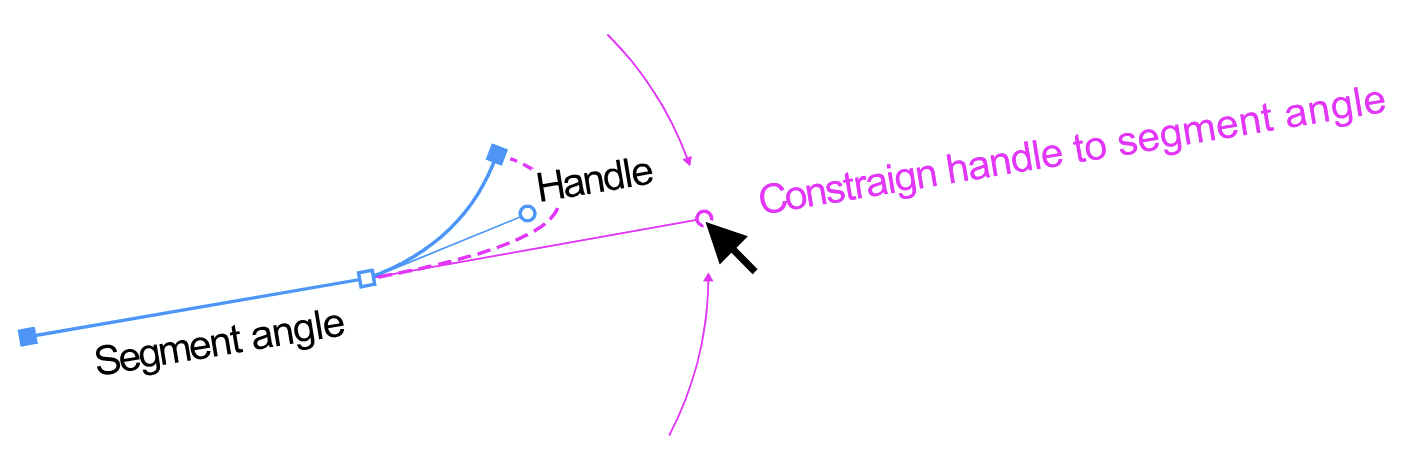
    Constraign handle to previous segment angle
    Scheduled Pinned Locked Moved Questions and Support
    16 Posts 5 Posters 13.8k Views 4 Watching
    Loading More Posts
    • Oldest to Newest
    • Newest to Oldest
    • Most Votes
    Reply
    • Reply as topic
    Log in to reply
    This topic has been deleted. Only users with topic management privileges can see it.
    • BoldlineB Offline
      Boldline @Ayo
      last edited by

      @Ayo @larsherold

      The "Anchor Point Tool" is a lot like it's Illustrator counterpart. You can use to to pull out handles from a cusp node or to immediately retract handles on a non-cusp node.

      0_1720704662500_cfa3dd33-9665-44d6-977c-9e871f1aa0b5-BLD 2024-07-11 at 09.30.25.png

      Also, double clicking a node handle will auto-retract that handle.

      🍎 macOS Sequoia 15.3, Mac mini (M1, 2020), Chip Apple M1, Memory 16 GB
      Cintiq 27QHD Display and LG Ultra HD Display

      AyoA 1 Reply Last reply Reply Quote 0
      • AyoA Offline
        Ayo @Boldline
        last edited by

        @Boldline said in Constraign handle to previous segment angle:

        retract handles on a non-cusp

        Another tool...🙄 Using the Anchor point tool turns a cusp node instantly into a smooth node. Normal?

        BoldlineB 1 Reply Last reply Reply Quote 1
        • BoldlineB Offline
          Boldline @Ayo
          last edited by

          @Ayo said in Constraign handle to previous segment angle:

          @Boldline said in Constraign handle to previous segment angle:

          retract handles on a non-cusp

          Using the Anchor point tool turns a cusp node instantly into a smooth node. Normal?

          As opposed to leaving it a cusp node but making handles available?

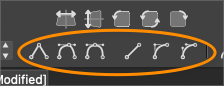
          Another option is to use the shortcuts at the top of the screen and their keyboard shortcuts to convert a cusp node (L) to a smooth node (U) or a symmetric node (Y)
          or the (1) key to change a path to a line or using the (3) key to make it a cubic segment

          The cubic segment option will allow a cusp node to remain as such but also give handles that allow an individual side of the node to be edited
          0_1720706796677_4641bef2-de67-4f9f-89ab-f042919cb79d-BLD 2024-07-11 at 10.06.15.png

          🍎 macOS Sequoia 15.3, Mac mini (M1, 2020), Chip Apple M1, Memory 16 GB
          Cintiq 27QHD Display and LG Ultra HD Display

          L AyoA 2 Replies Last reply Reply Quote 0
          • L Offline
            larsherold @Boldline
            last edited by

            @Boldline @Ayo

            @Boldline said in Constraign handle to previous segment angle:

            leaving it a cusp node but making handles available

            Yes exactly. We can alway convert to smooth or symmetric.
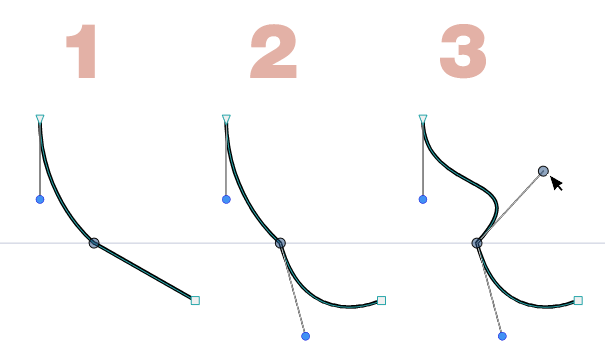
            Leaving it cusp and affecting only the side(s) of the curve that the pulled handle(s) control(s). Like this:

            1. Middle node is Cusp with retracted handles
            2. Outgoing handle pulled to affect lower part of curve
            3. Ingoing handle pulled to affect upper part of curve
            0_1720710138709_pull-handles.png

            1 Reply Last reply Reply Quote 0
            • VectorStylerV Offline
              VectorStyler @Ayo
              last edited by

              @Ayo Unfortunately, there are not enough modifiers for all these features. You need to enable "Constrain Line Angle" in Settings -> Constraint to have the angle restricted by Shift

              AyoA 1 Reply Last reply Reply Quote 1
              • AyoA Offline
                Ayo @Boldline
                last edited by

                @Boldline

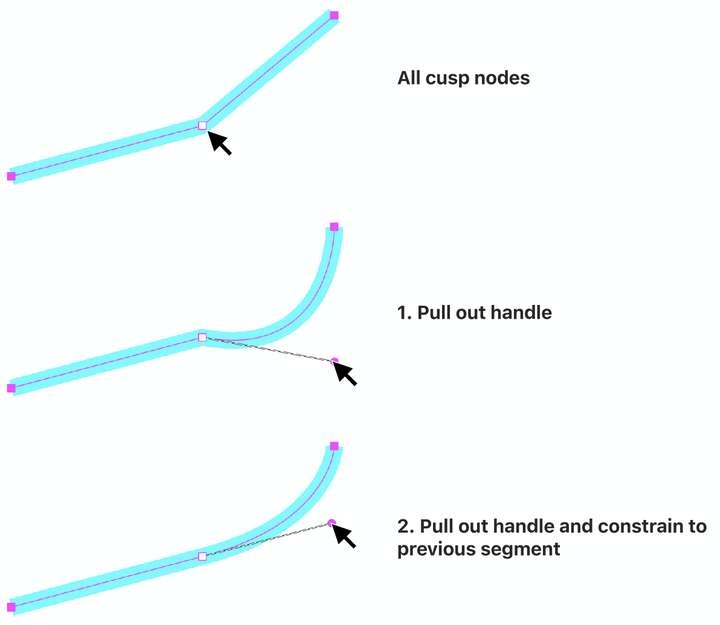
                Lots of advanced buttons but...
                may I ask summarising my question below how to realise this simple action?
                0_1720710895735_4037541d-0e92-4375-b4b3-b205e34eee89-image.png

                1 Reply Last reply Reply Quote 0
                • AyoA Offline
                  Ayo @VectorStyler
                  last edited by

                  @VectorStyler said in Constraign handle to previous segment angle:

                  You need to enable "Constrain Line Angle"

                  Thanks! When I disable "Constrain Line Angle" it works. Left me how to pull out a handle.

                  VectorStylerV 2 Replies Last reply Reply Quote 0
                  • VectorStylerV Offline
                    VectorStyler @Ayo
                    last edited by

                    @Ayo To convert a line to cubic segment without the buttons, just drag the line, not from the node but from some location along the line.

                    AyoA 1 Reply Last reply Reply Quote 0
                    • VectorStylerV Offline
                      VectorStyler @Ayo
                      last edited by

                      @Ayo But case (2) of handle pull out is not possible directly.

                      1 Reply Last reply Reply Quote 1
                      • AyoA Offline
                        Ayo @VectorStyler
                        last edited by

                        @VectorStyler said in Constraign handle to previous segment angle:

                        just drag the line, not from the node but from some location along the line

                        Yes, but then you still have to push the other back

                        1 Reply Last reply Reply Quote 1
                        • First post
                          Last post
