VectorStyler
    • Categories
    • Unread
    • Recent
    • Tags
    • Popular
    • Register
    • Login

    Scaled stroke gets pseudo value
    Scheduled Pinned Locked Moved Questions and Support
    29 Posts 3 Posters 41.4k Views 2 Watching
    Loading More Posts
    • Oldest to Newest
    • Newest to Oldest
    • Most Votes
    Reply
    • Reply as topic
    Log in to reply
    This topic has been deleted. Only users with topic management privileges can see it.
    • VectorStylerV Offline
      VectorStyler @Ayo
      last edited by

      @Ayo Yes, this is by design. The main reason for this is the nondestructive nature of transformations in VS.
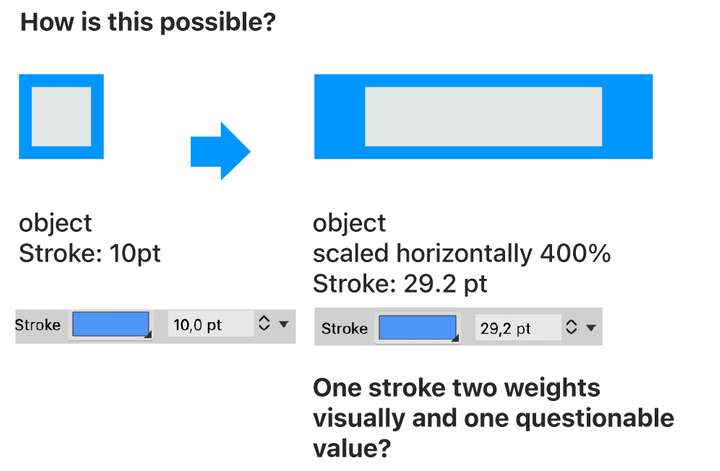
      The stroke width is not actually changed, but it is "transformed live" with the rest of the object. This can also result in some calligraphic strokes in case of stretching.

      AyoA 1 Reply Last reply Reply Quote 0
      • AyoA Offline
        Ayo @VectorStyler
        last edited by

        @VectorStyler
        This is completely against my expectations and is very worrying. The stretching thing was indeed my next question (illustration see below) in the sense that what happens is confusing and inexplicable. But I'm starting to understand. Line becomes a kind of illustration in your approach in favor of effects probably. I wouldn't expect that from a true vector app.
        0_1720712993466_b2d69921-6010-493d-86fa-68b653090a5f-image.png

        VectorStylerV 1 Reply Last reply Reply Quote 2
        • VectorStylerV Offline
          VectorStyler @Ayo
          last edited by

          @Ayo

          Line becomes a kind of illustration in your approach in favor of effects probably

          yes, this is what happens and it is vectors. It is also possible to do this using effects like mesh or envelope, by enabling it with a button in the stroke panel.

          AyoA 1 Reply Last reply Reply Quote 0
          • AyoA Offline
            Ayo @VectorStyler
            last edited by

            @VectorStyler said in Scaled stroke gets pseudo value:

            It is also possible to do this using effects like mesh or envelope,

            I can imagine this as a property possibility for effects, but should it also happen with basic drawing and transformations?
            I'm concerned about composite artwork. Scaled as a total. Then decompsed into parts for example. Won't that be a mess of loosing object corresponding line weights?

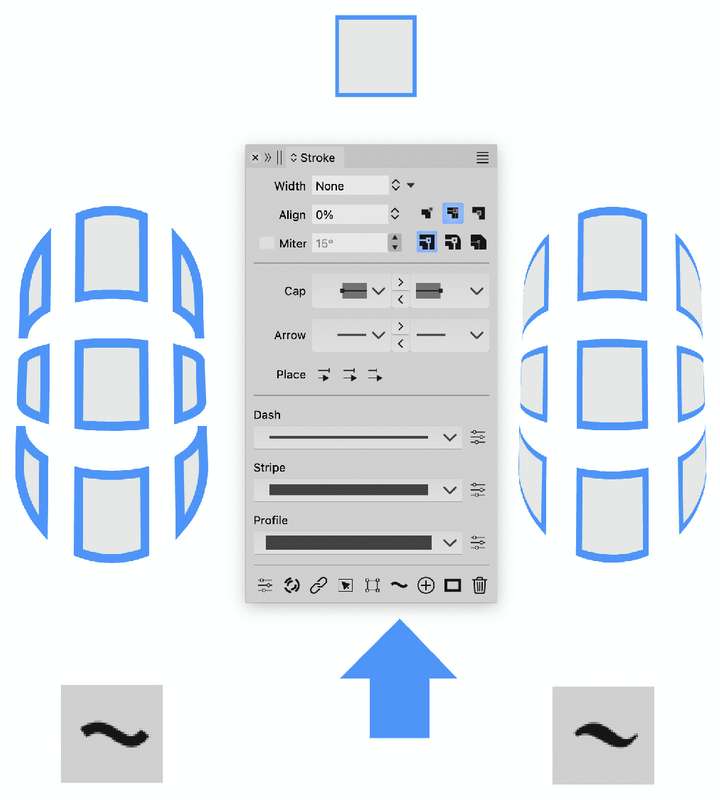
            Do you mean this button, pointed below?
            0_1720726282060_85ca2121-2907-4741-b798-371467910d52-image.png

            VectorStylerV 1 Reply Last reply Reply Quote 0
            • VectorStylerV Offline
              VectorStyler @Ayo
              last edited by

              @Ayo said in Scaled stroke gets pseudo value:

              Scaled as a total. Then decompsed into parts for example.

              When ungrouping, the transformations are applied separately on objects.

              Do you mean this button, pointed below?

              yes.

              AyoA 1 Reply Last reply Reply Quote 0
              • AyoA Offline
                Ayo @VectorStyler
                last edited by

                @VectorStyler said in Scaled stroke gets pseudo value:

                Gonna test it

                Strange tooltip function description then for this button:
                "Check to convert outline to paths when applying shape effects"

                Is that correct?

                VectorStylerV 1 Reply Last reply Reply Quote 0
                • VectorStylerV Offline
                  VectorStyler @Ayo
                  last edited by

                  @Ayo said in Scaled stroke gets pseudo value:

                  Is that correct?

                  Yes, it is correct, could be formulated better. Basically the outline (stroke) is expanded into paths when shape effects are applied, but it is "live", meaning that it still behaves as a stroke.

                  AyoA 1 Reply Last reply Reply Quote 0
                  • AyoA Offline
                    Ayo @VectorStyler
                    last edited by

                    @VectorStyler
                    Indeed. In preview mode it looks and acts still like a single stroke.

                    A few tooltip ideas:

                    • Distort stroke width
                    • Deform stroke width
                    • Stretch stroke width
                    • Transform stroke width

                    shorter:

                    • Distort stroke
                    • Deform stroke
                    • Stretch stroke
                    • Transform stroke (known)
                    VectorStylerV 1 Reply Last reply Reply Quote 1
                    • VectorStylerV Offline
                      VectorStyler @Ayo
                      last edited by

                      @Ayo said in Scaled stroke gets pseudo value:

                      Distort stroke width
                      Deform stroke width

                      Maybe one of these.

                      AyoA 1 Reply Last reply Reply Quote 0
                      • AyoA Offline
                        Ayo @VectorStyler
                        last edited by

                        @VectorStyler
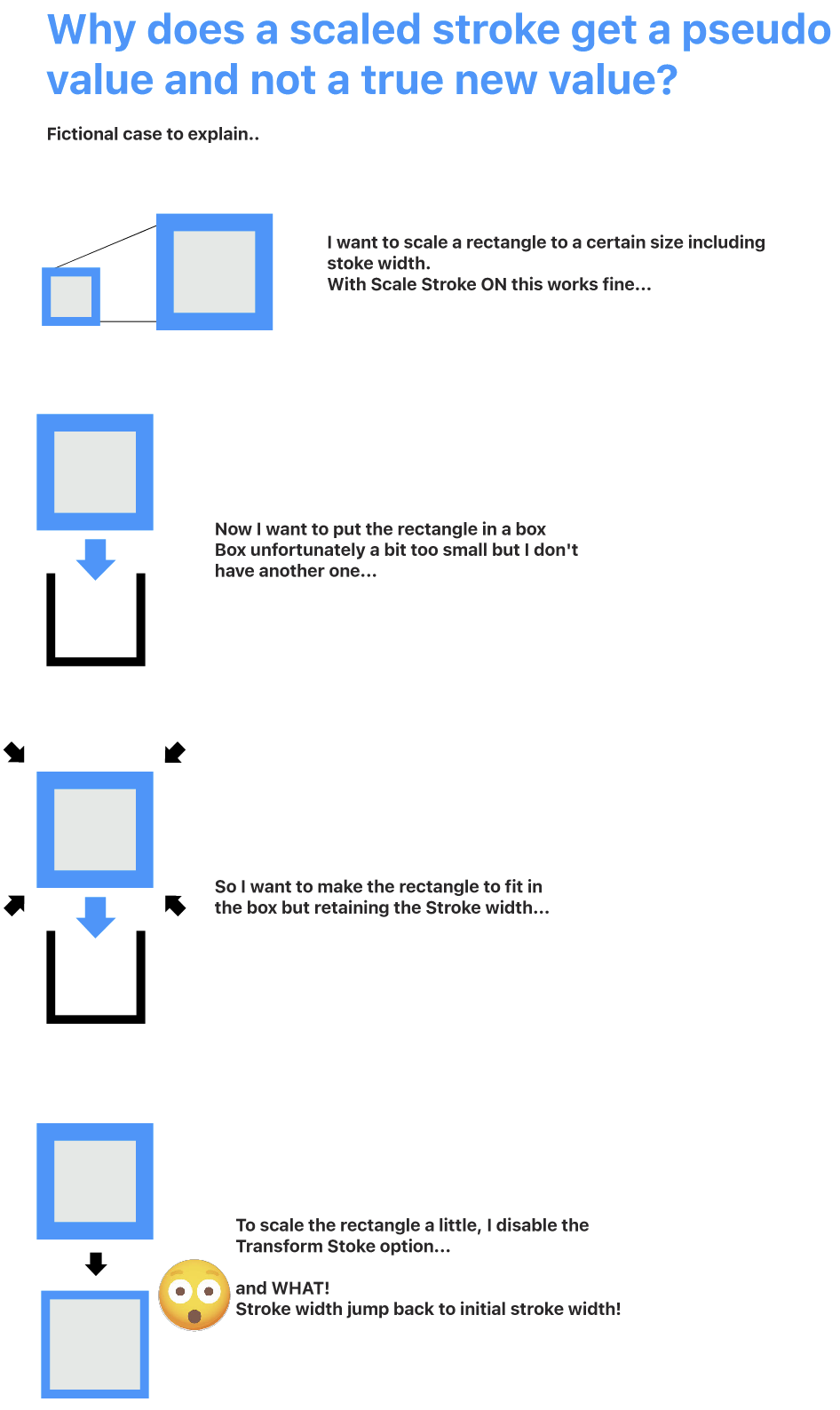
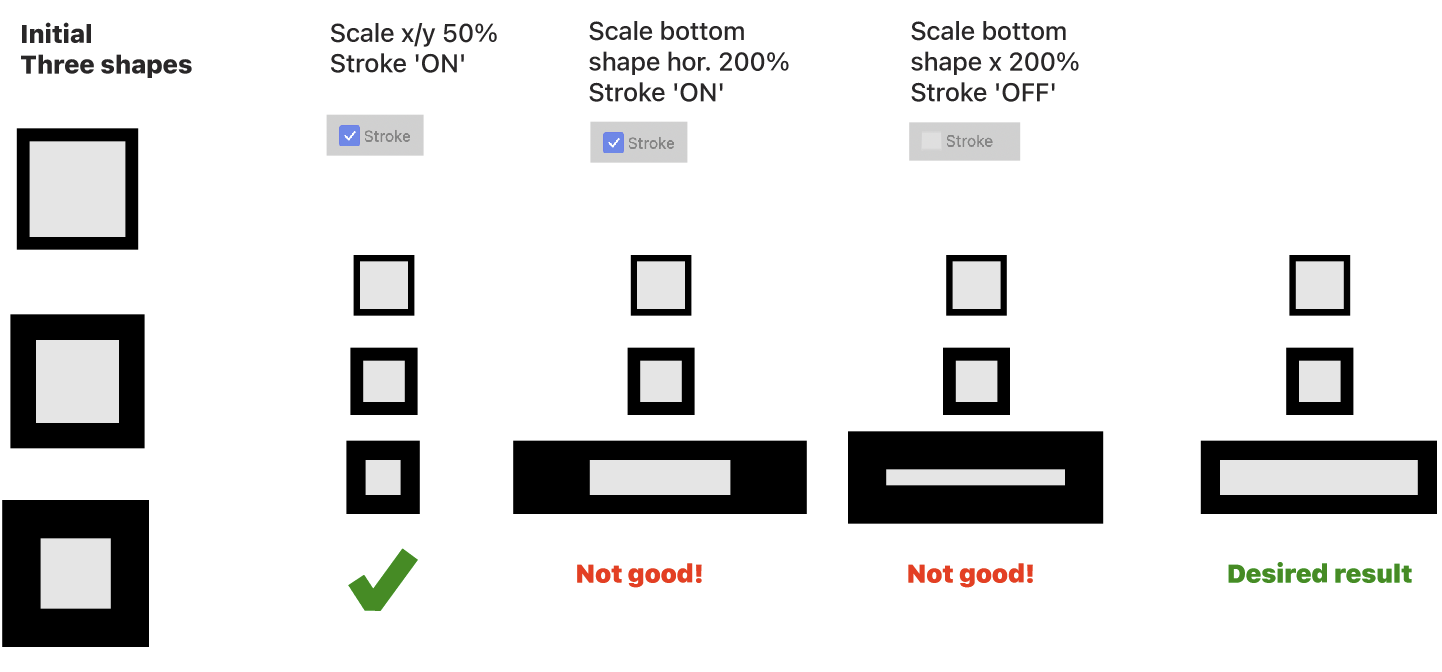
                        Yet again whining about the 'transform stroke' oddity. To understand it and have peace with it.

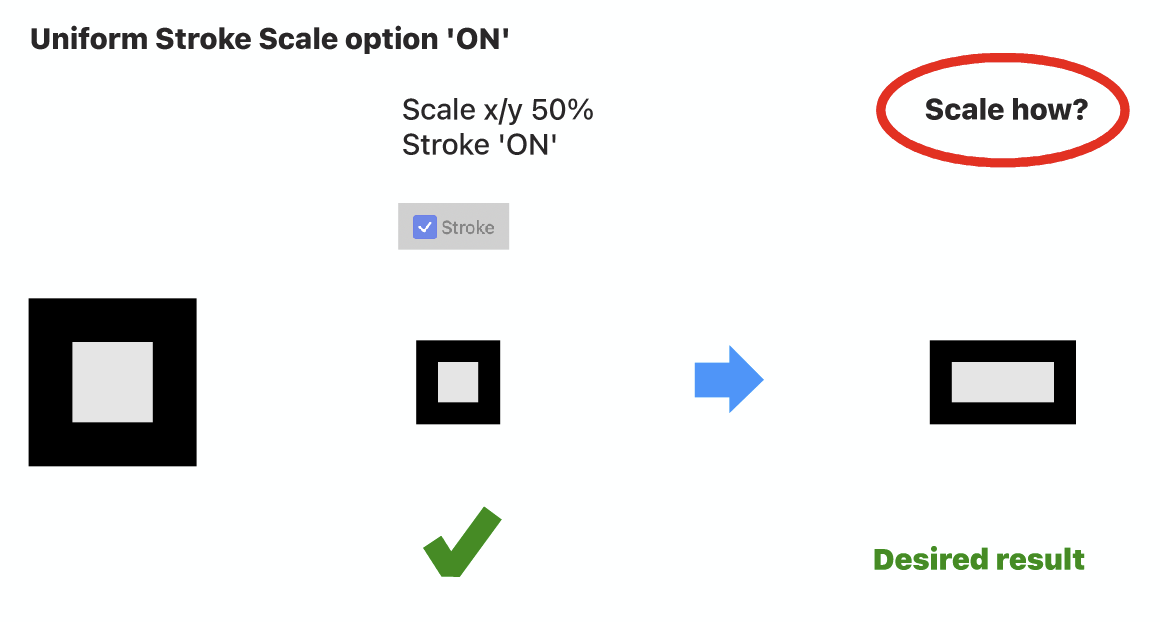
                        Attached is a simplified example of a not unusual action where I do not achieve the desired result. Here, imagine a more complex illustration.

                        What would your workflow advice be without ending up in numerical actions/corrections.
                        0_1720771933487_b4157611-2b80-4dfb-8d65-0c4c89964347-image.png

                        VectorStylerV 1 Reply Last reply Reply Quote 2
                        • VectorStylerV Offline
                          VectorStyler @Ayo
                          last edited by

                          @Ayo There is a Uniform Stroke Scale option in the Transform panel menu. The same option is also available document wide in the Document Setup view General tab, or as a Layer option

                          AyoA 1 Reply Last reply Reply Quote 0
                          • AyoA Offline
                            Ayo @VectorStyler
                            last edited by

                            @VectorStyler said in Scaled stroke gets pseudo value:

                            Uniform Stroke Scale option

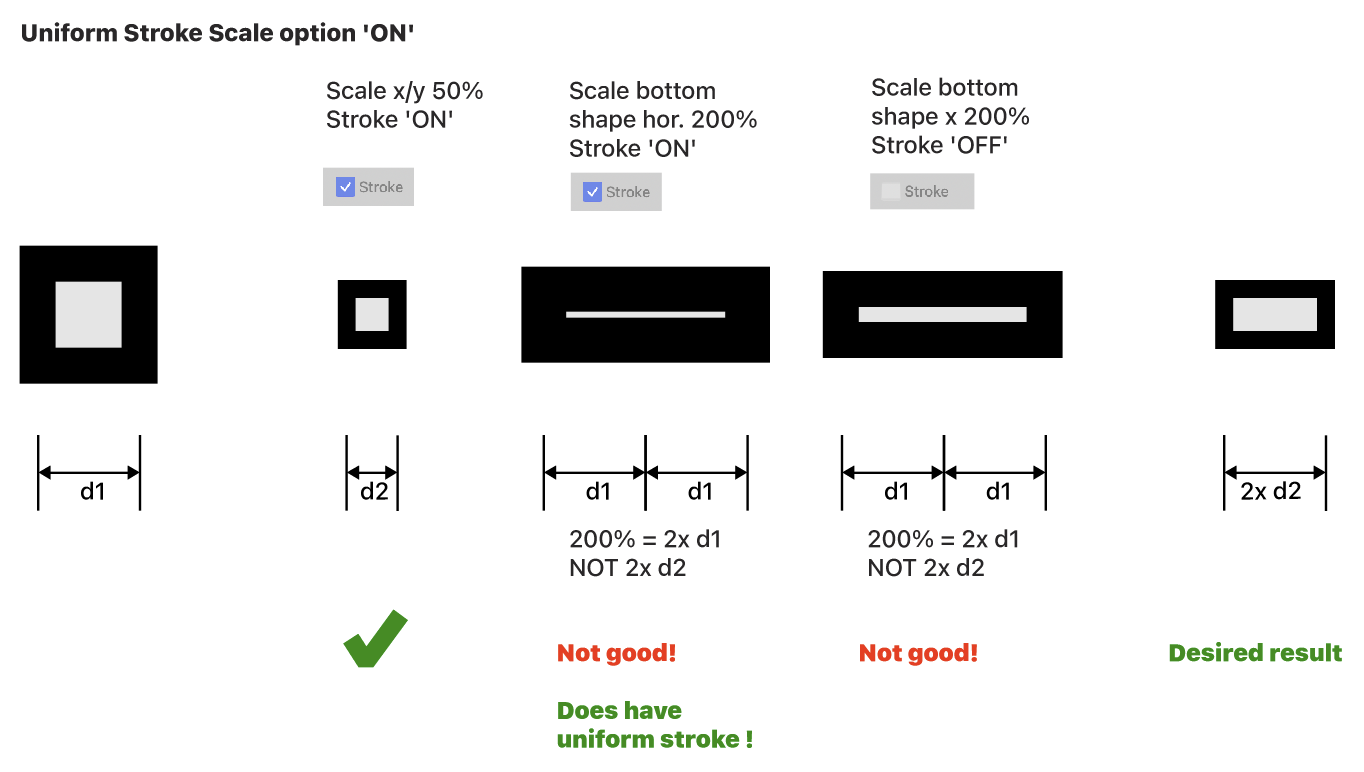
                            Sounds good and does work. But only a partial solution for initial problem.

                            Accumulating scaling problems
                            What I only noticed now (a bit late) is that the object also remembers previous scaling. So you cannot enter a new scaling value a second time without complex calculations.
                            In my opinion, 200% d2 should be 2x d2.
                            0_1720777924834_4173b5c9-8836-493f-9864-c0760b67bed3-image.png

                            VectorStylerV 1 Reply Last reply Reply Quote 2
                            • VectorStylerV Offline
                              VectorStyler @Ayo
                              last edited by

                              @Ayo In VS you edit the current scaling value, that instead of scaling the existing object will just change the current scaling amount. Same with rotation and skewing.

                              But you can reset the transform with the "Reset Box" of the transform panel.

                              AyoA 1 Reply Last reply Reply Quote 0
                              • AyoA Offline
                                Ayo @VectorStyler
                                last edited by

                                @VectorStyler said in Scaled stroke gets pseudo value:

                                But you can reset the transform with the "Reset Box" of the transform panel.

                                I did not know that.
                                Then, in retrospect, 'Reset Transform' was a good name after all. You should have said this here!

                                Just a thought: you should be able to split transformation into visual box and values ​​(scale, rotate, skew). Resulting in the options 'Reset Box' and 'Reset Transformation'. A global setting option like 'Reset Transformation after transformation' or 'Instant Reset Transformation' could then be an option to set this by default. Means rotating 2 times 15 degrees results in 30 degrees, no calculation.

                                Anyway, with or without Transform Box, there is still no solution to achieve my desired result.

                                I don't see a solution emerging. I think it's the nature of VS, by design. I don't want to hold you up any further with my whining, so I propose end of discussion and I have to leave or live with it.

                                VectorStylerV 1 Reply Last reply Reply Quote 0
                                • VectorStylerV Offline
                                  VectorStyler @Ayo
                                  last edited by

                                  @Ayo said in Scaled stroke gets pseudo value:

                                  there is still no solution to achieve my desired result.

                                  Is this referring to the uniform stroke scaling, or the scaling relative to the current size?

                                  AyoA 1 Reply Last reply Reply Quote 0
                                  • AyoA Offline
                                    Ayo @VectorStyler
                                    last edited by

                                    @VectorStyler
                                    Uniform stroke scaling is solved by the Uniform Stroke Scale option in the Transform panel menu. I think scaling relative to the current size is then the issue.

                                    Visually summarized...

                                    0_1720783616718_1190ad0a-6f31-4f3a-a8b5-0f59ec81be38-image.png

                                    VectorStylerV 1 Reply Last reply Reply Quote 1
                                    • VectorStylerV Offline
                                      VectorStyler @Ayo
                                      last edited by

                                      @Ayo You either 2x the horizontal scaling value, or reset the transform and then scale 200%

                                      AyoA 1 Reply Last reply Reply Quote 0
                                      • AyoA Offline
                                        Ayo @VectorStyler
                                        last edited by

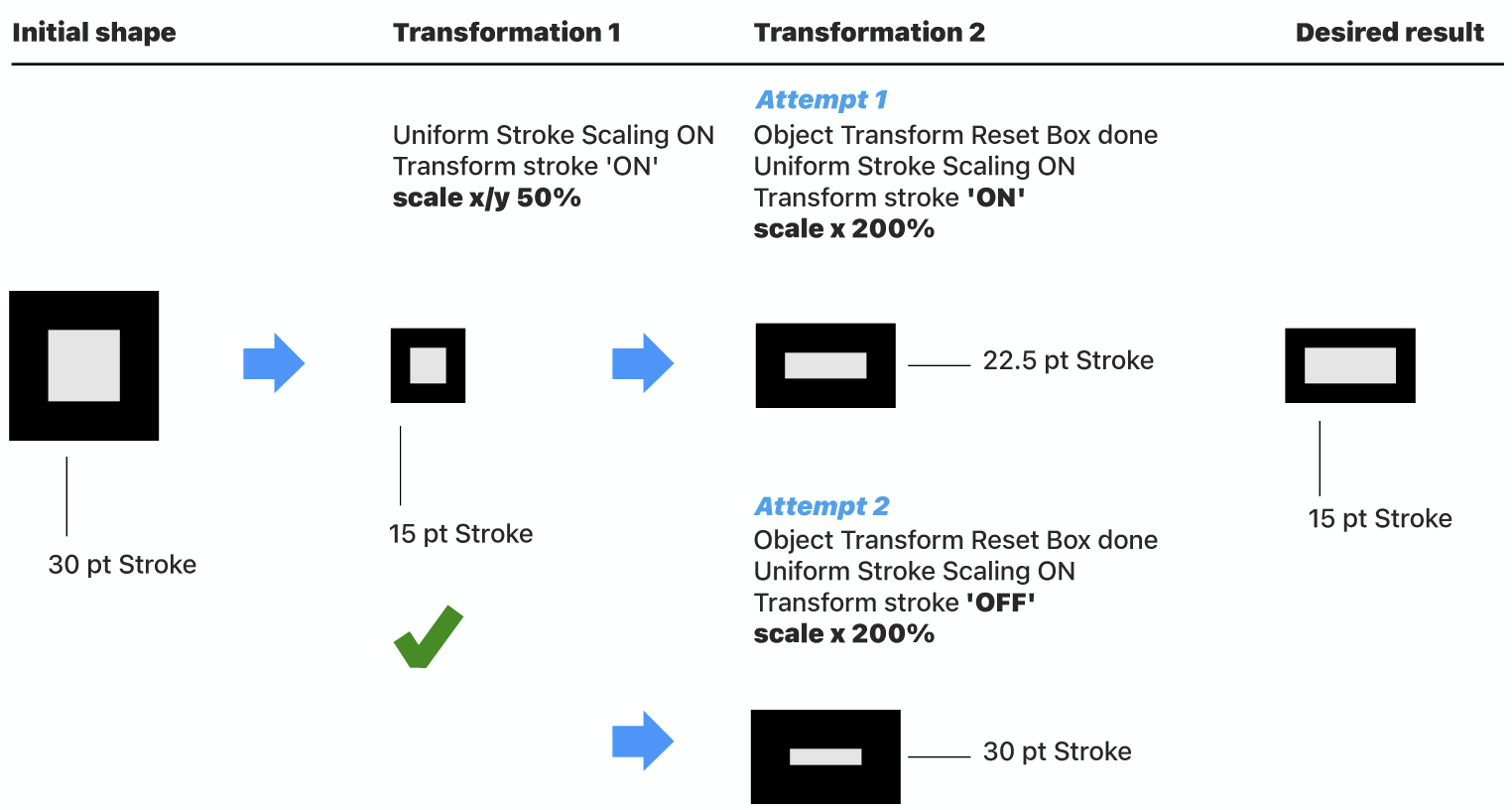
                                        @VectorStyler Don't get it. Another try...
                                        0_1720788209359_5beb1e6e-3f1a-4ac8-8099-048953a7a7b0-image.png

                                        VectorStylerV 1 Reply Last reply Reply Quote 1
                                        • VectorStylerV Offline
                                          VectorStyler @Ayo
                                          last edited by VectorStyler

                                          @Ayo I tried to replicate this, but I get different results at the Transformation 2 step.

                                          For example, when Uniform Scale if off, the stroke width should not be uniform.

                                          Can you save a file just after those steps, separate file for Attempt 1 and Attempt 2? and send me those files.

                                          AyoA 1 Reply Last reply Reply Quote 0
                                          • AyoA Offline
                                            Ayo @VectorStyler
                                            last edited by

                                            @VectorStyler
                                            I just had a moment of clarity.. 💡 to summarize it in words:

                                            Step one, transform object and stroke property.
                                            Step two, take the result of step one and transform the object, not the stroke property.

                                            Not too difficult...

                                            Send you the files

                                            VectorStylerV 1 Reply Last reply Reply Quote 0
                                            • First post
                                              Last post