Scaled stroke gets pseudo value
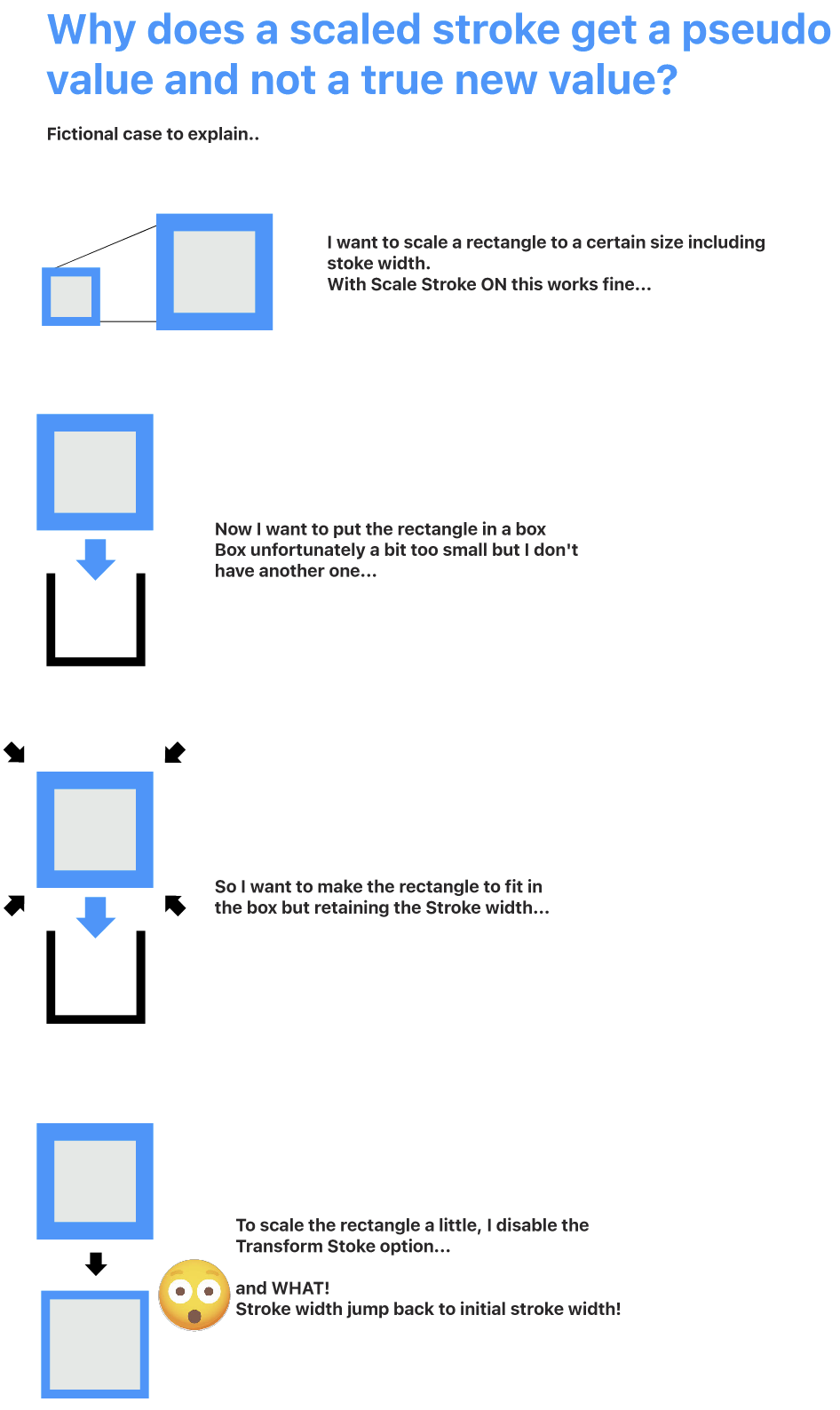
-
@Ayo I tried to replicate this, but I get different results at the Transformation 2 step.
For example, when Uniform Scale if off, the stroke width should not be uniform.
Can you save a file just after those steps, separate file for Attempt 1 and Attempt 2? and send me those files.
-
@VectorStyler
I just had a moment of clarity.. to summarize it in words:
Step one, transform object and stroke property.
Step two, take the result of step one and transform the object, not the stroke property.Not too difficult...
Send you the files
-
@Ayo Got the files, some things need to be clarified:
First, when the Uniform Stroke Scale is active, the scaling is done uniformly using the average scaling, so for 2x horizontal and 1x vertical, this will be 1.5 stroke scaling.
This can be changed if needed, should it be the closer to 1x scaling if the x/y scaling are different?Also: in the "attempt-2" case (file), the "Transform Stroke" option was disabled, which means that the Uniform Stroke Scaling is ignored and the stroke is not transformed, resulting in the 30 pt width.
The best mental model for this is to think of all attributes as non-destructive, including scaling and width.
-
@VectorStyler said in Scaled stroke gets pseudo value:
when the Uniform Stroke Scale is active, should it be the closer to 1x scaling if the x/y scaling are different?
If the Uniform Stroke Scale is active (and the Stroke Scale of course) the scaling for the stroke should not be zero (obviously), but an average or highest value.
However, using the average scaling for an uneven x/y scaling seems fine to me. I don't know what the formula behind this is. I consulted AI and for a 100pt line scaling x/y 200/100 returns a line value of 141.421 pt.To be clear, attempt 1 was the least expected option (also not logical for what my desired outcome is) but done for checking all options and outcomes. My hopes are somewhat pinned on attempt 2.
attempt-2 "Transform Stroke" option disabled, the Uniform Stroke Scaling is ignored and the stroke is not transformed, resulting in the 30 pt width
That's where my problem lies. The result of step one gives a stroke readout 15 pt width. That is consistent with the previous action. Fine, but how can a 15 pt's width stroke result in a 30 pt width stroke with the setting "not transformed stroke"?
The best mental model for this is to think of all attributes as non-destructive, including scaling and width.
Designing on the computer relies heavily on making variations. Copy paste and duplicate are great tools. Easily scaling compositions is part of this. Sometimes with sometimes without stroke scaling. Endless variations, construct, duplicating, copying, pasting, deconstruct, etc. until you like it. Falling back to an initial value does not fit this model.
-
@VectorStyler said in Scaled stroke gets pseudo value:
The best mental model for this is to think of all attributes as non-destructive, including scaling and width.
I would like to add that good design is essentially a destructive activity.
This should not be the case with applying effects. -
Just wanted to chime in and say that discussions like this are really helpful in understanding how things work and are intended to work. Thank you @Ayo for digging so deep, and thank you @VectorStyler for patiently explaining how things work. Bookmarked for future reference

-
@syllie said in Scaled stroke gets pseudo value:
Thank you
Thank you for nice words. These types of topics concern very simple actions but largely determine the general concept and usability of the app. This discussion seems to end in a stalemate between the visions and needs of the artist and the constructor. Sometimes I think to myself, stop whining now. At least that's how it feels. Like I don't understand the concept and make me feel a dummy. But having such support encourages me to hang on. Thank you and share your opinions...
-
@Ayo
Just an idea.
Could a global or may be better a transform setting option (and function of course) described below be possible to tailor the needs of the artist or engineer?Name...
Validate values after transformation
Validate transformed values
Validate transformed
Validate transformed as true
Confirm transformed...or something like that.
With the result that;
a pseudo 15 pt stroke becomes a true 15 pt
a 200% scale becomes a new 100%
a 15 degrees rotation becomes a new zero
etc. -
@Ayo Yes, I think this type of "convert to actual" actions could be added later.
-
@VectorStyler said in Scaled stroke gets pseudo value:
"convert to actual"
Good name!
If this becomes a reality in the future, we have ultimately found a solution that meets both needs


