VectorStyler
    • Categories
    • Unread
    • Recent
    • Tags
    • Popular
    • Register
    • Login

    Style picker tool not working as epected on windows

    Scheduled Pinned Locked Moved Resolved 1.2 bugs
    13 Posts 4 Posters 15.9k Views 3 Watching
    Loading More Posts
    • Oldest to Newest
    • Newest to Oldest
    • Most Votes
    Reply
    • Reply as topic
    Log in to reply
    This topic has been deleted. Only users with topic management privileges can see it.
    • VectorStylerV Offline
      VectorStyler @LoginError
      last edited by

      @LoginError You can enable an alternate style picker mode by checking the Select -> Options -> Alternate Style Picker option.

      If this is enabled, with Shift+Click you pick the style and then with clicking you can apply the picked style.

      LoginErrorL 1 Reply Last reply Reply Quote 1
      • LoginErrorL Offline
        LoginError @VectorStyler
        last edited by

        @VectorStyler Ah excellent thanks, that seems to be what I'm looking for.

        However when I try to use the Style Picker in Alternative Style Picker mode, it seems to only be applying the color of the stroke, not the brush. Additionally, it applies the color of the picked object to either the stroke or fill of the clicked object, depending on which is active in the Color Panel.

        When I'm Default Style Picker mode it applies the brush and color as expected. Here I am attempting to apply the style of the left object onto the right.

        The two test objects:
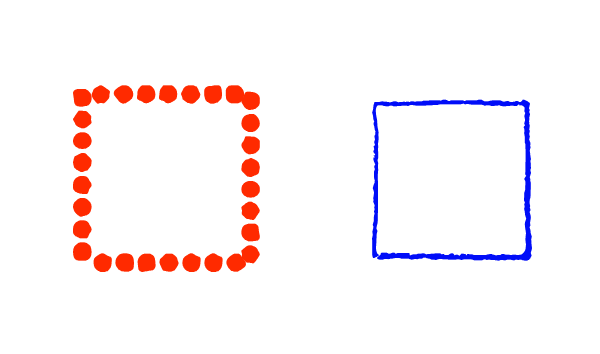
        0_1724630053060_picker 1.png

        The result in Alternate Style Picker Mode:

        0_1724630069463_picker 2.png

        The Result in Default Style Picker Mode:

        0_1724630153353_picker 4.png

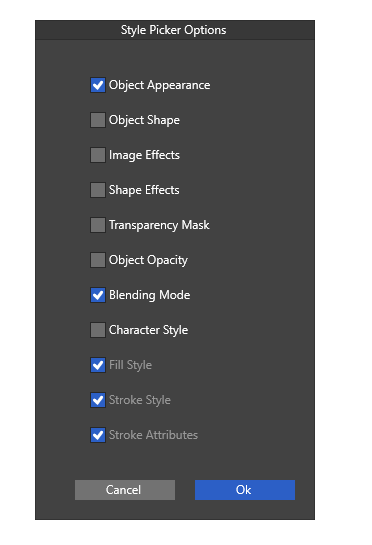
        My style picker settings:
        0_1724630291085_picker 3.png

        VectorStylerV 2 Replies Last reply Reply Quote 1
        • VectorStylerV Offline
          VectorStyler @LoginError
          last edited by

          @LoginError I opened a bug on this and will try to replicate. Just a note: there is a separate color picker tool and style picker tool. The color picker tool behaves as you described.

          LoginErrorL S 2 Replies Last reply Reply Quote 0
          • LoginErrorL Offline
            LoginError @VectorStyler
            last edited by

            @VectorStyler Understood. I made sure that I was using the Style Picker tool and not the color picker tool.

            1 Reply Last reply Reply Quote 0
            • S Offline
              Subpath @VectorStyler
              last edited by

              @VectorStyler

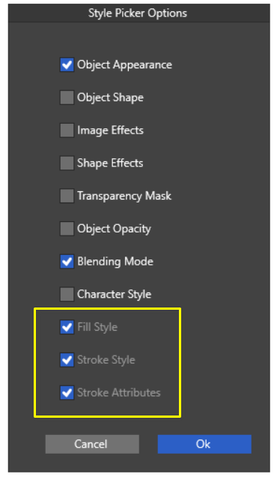
              I'm a bit surprised by the settings in the yellow frame

              Because you can only set these if "Object Appearance"
              is deselected

              So they are inactive, but still selected?
              0_1724707459886_Picker Settings.png

              Win 11
              CPU: AMD Ryzen 5 9600X, 6-core.
              GPU: Nvidia Geforce RTX 5070.

              VectorStylerV 1 Reply Last reply Reply Quote 0
              • VectorStylerV Offline
                VectorStyler @Subpath
                last edited by

                @Subpath said in Style picker tool not working as epected on windows:

                Because you can only set these if "Object Appearance" is deselected

                the "Object Appearance" includes these.

                F 1 Reply Last reply Reply Quote 1
                • VectorStylerV Offline
                  VectorStyler @LoginError
                  last edited by

                  @LoginError Is that a brush in the test image first column?

                  1 Reply Last reply Reply Quote 0
                  • LoginErrorL Offline
                    LoginError
                    last edited by

                    Both of the objects in the test image have brushes. The first has a scatter brush, the second has an artistic brush. The type of brush does not appear to change the behavior.

                    VectorStylerV 1 Reply Last reply Reply Quote 1
                    • VectorStylerV Offline
                      VectorStyler @LoginError
                      last edited by

                      @LoginError I replicated (at least parts) of this error, and a fix will be in the next build.

                      1 Reply Last reply Reply Quote 0
                      • F Offline
                        fde101 Global Moderator @VectorStyler
                        last edited by

                        @VectorStyler said in Style picker tool not working as epected on windows:

                        the "Object Appearance" includes these.

                        In that case I would recommend placing them directly underneath the "Object Appearance" checkbox and perhaps indenting them to make the connection between the items a bit more clear?

                        1 Reply Last reply Reply Quote 2
                        • VectorStylerV Offline
                          VectorStyler @LoginError
                          last edited by

                          @LoginError The alternate mode style picker tool issues should be fixed in build 1.2.038

                          1 Reply Last reply Reply Quote 0
                          • First post
                            Last post