Weirdness with History, Locked States, Input Lock
-
I may have run into a cause for some cases of "input lock":
S: https://1drv.ms/u/s!AuWHX0h5bAoRipwy3XU_rxWPdtwsKg?e=rKrDNdWatch History in top right and where it is highlighting...
@:10 Suddenly Anchor Point Tool input is not being read.
@:37 Layer locks itself...
@:41 I click something outside of the window on my top screen (above the one I am recording) and notice the Layer unlocks itself... Notice blue highlight in History changes @:43 at the same time. Mouse comes back into VS around same time.
@:52 Layer locks again with an Undo (expected)
@:56 I Unlocked the Layer again but note I'm no longer able to keep working. Also, a mysterious <-> mouse cursor suddenly appears
I'm not sure what the "blue highlight" actually does in the History, so it may or may not be a problem.
S:https://1drv.ms/u/s!AuWHX0h5bAoRipwzvMPdM4hJ9g1Tbg?e=lpb4Pn
In this video,
@:18 everything starts working normally. I lock the Parent Layer @:38 to see how it behaves and it sort of allows manipulating with the Anchor point tool but the changes don't take. However, it is recording steps in History.
I have been able to manipulate those points completely though in a "Locked" state. I didn't catch it as it had happened just before I started to record. In fact, noticing that is why I started to record in the first place.
Other related issue: I have had this happen a few times, but I haven't had an opportunity to document it yet. I suspect something is going on with History and some steps may not recording or resetting accurately. I've lost portions of documents and it's usually on items I am currently working on, but other items have "went missing" without my realizing it. It's very occasional, but they are always lost after an Undo command and it tends to happen after lots of reworking of things (with Undo being used a lot). It does seem to take the document "back in time" some, but it's mostly recent activity, but other recent items might be still be fine. It's almost always things I am working on directly, so maybe the memory of those Objects specifically, maybe even specific to the Layer structure if that matters in History, seems to be the most immediately effected (but hard to say). No amount of Undo restores them and I have to go back to an older revision I've saved of the file. I also feel that if I choose to keep History stored with the file as an option, the above issue is much more likely to occur for obvious reasons.
Another thought: I would consider leaving "Locked" out of History entirely to reduce some of the confusion as to what Layer is/isn't active. It's not unnatural to work dynamically in and around locked states when working on major changes, so perhaps treating this as a user control rather than a document condition would be more helpful. Just a thought.
I will email a copy of the document in its current state.
Windows 11 Build 26200.7171 (25H2)
AMD Ryzen 7 9700X with Gigabyte X870E Aorus Pro Ice
32GB RAM @ 6000MHz
PNY NVIDIA RTX 5070 Ti 16GB; Display 1: 4K @150%; Display 2: 4K @150%
Wacom Intuos Pro L (2025); Wacom Intuos Pro M; Epson ET-8550; Siser Romeo -
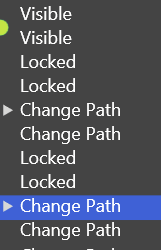
Noting also, it always reads as "Locked" in History regardless of whether something is being Locked or Unlocked. I get this might be related to how states are handled, but it does read like a bug:
Same for Layer Visible/Invisible, there is only "Visible". Also it doesn't always register the "Visible" event. It has very similar issues with "taking" and occasionally does not record in History at all. Sometimes the icon will show invisible and yet the Layer will still be visible ('activating it with the node on the right brings it back to its real state). It takes multiple clicks (clicks shown with red circle active) to actually work in this session:
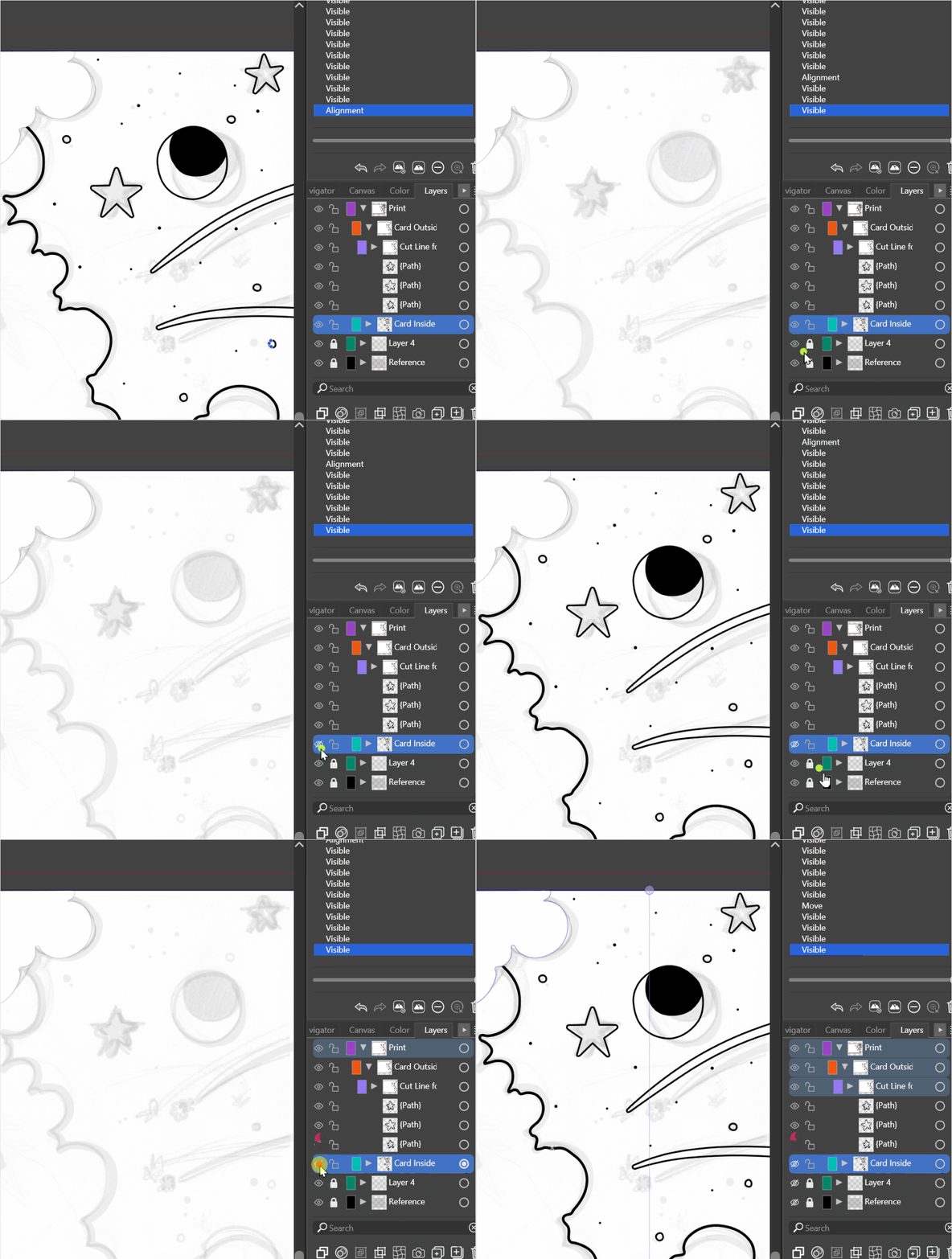
Another thing worth noting, I'm having trouble working with this document using Anchor Point Tool at all in this session. But locking/unlocking the Layer at least seems to get me working for a bit before it shuts itself off again and doesn't allow me to make any selections...
-
@debraspicher Thanks for the detailed description. Yes, there seems to be an error here with the Anchor tool.
EDIT: got the documents by email. Thanks!

