Unable to Delete Contour layer proper
-
(as a side note: I'm sorry if I'm reporting things that may have been covered in your bugs, or if I seem unclear about the functionality. I'm making sure to try multiple methods to make sure I'm not overlooking the differences in how this software behaves vs. what I've been used to for the last few years.)
I'm just randomly playing with the Contour tool, and even though I'm not 100% sure as to how it works compared to what I'm used to. But I see that it created a few separate Contour layers that I was unable to delete with the trash can icon in the layers panel, nor with the delete button. I had to go into Edit > Delete. Again, my apologies if this is just my lack of understanding of how these contour layers work. However, I would say that it would be a good idea to implement the ability to delete these types of layers in a similar manner as regularly layers (assuming the contour layers are somehow different)
-
@buckycore Here is how I delete a Contour effect: https://recordit.co/qQyBy35Bin
If it's something else that doesn't work, you could use Recordit to record the screen so the developer can see the issue.
(Btw, a layer can hold objects — paths, shapes, text, images — so if you apply the Contour effect, it is applied to an object on the current layer, not to a layer).
-
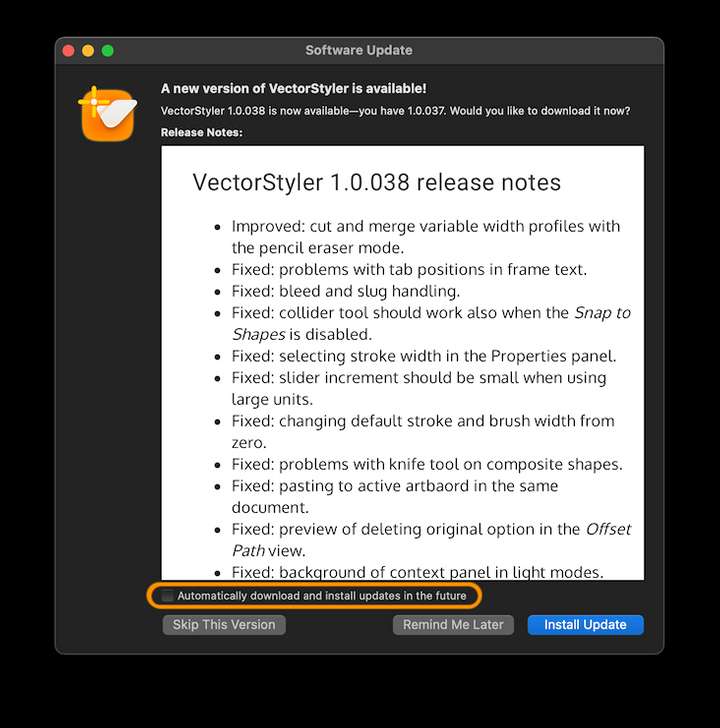
Fantastic, thank you. I will watch this in a bit. BTW, I realized some of the issues I was reporting earlier may have been resolved had I updated the software to the latest build sooner. Will there be automatic updates implemented in later builds?
-
@buckycore You can enable automatic updates here when checking for an update:
-
@b77 oh cool!!!
-
@buckycore It is important to distinguish between the original object and the contour object.
These are separate objects.
To delete the contour, you must select it by clicking on one of its shapes (probably outside of the original). Then the trashcan should work.

