VectorStyler
    • Categories
    • Unread
    • Recent
    • Tags
    • Popular
    • Register
    • Login

    Color picker in gradient palette doesn't seem to work

    Scheduled Pinned Locked Moved Bugs in VectorStyler
    3 Posts 3 Posters 3.4k Views 3 Watching
    Loading More Posts
    • Oldest to Newest
    • Newest to Oldest
    • Most Votes
    Reply
    • Reply as topic
    Log in to reply
    This topic has been deleted. Only users with topic management privileges can see it.
    • P Offline
      pentool
      last edited by pentool

      1. Select an open path
      2. Assign a gradient stroke
      3. Bring up the gradient palette
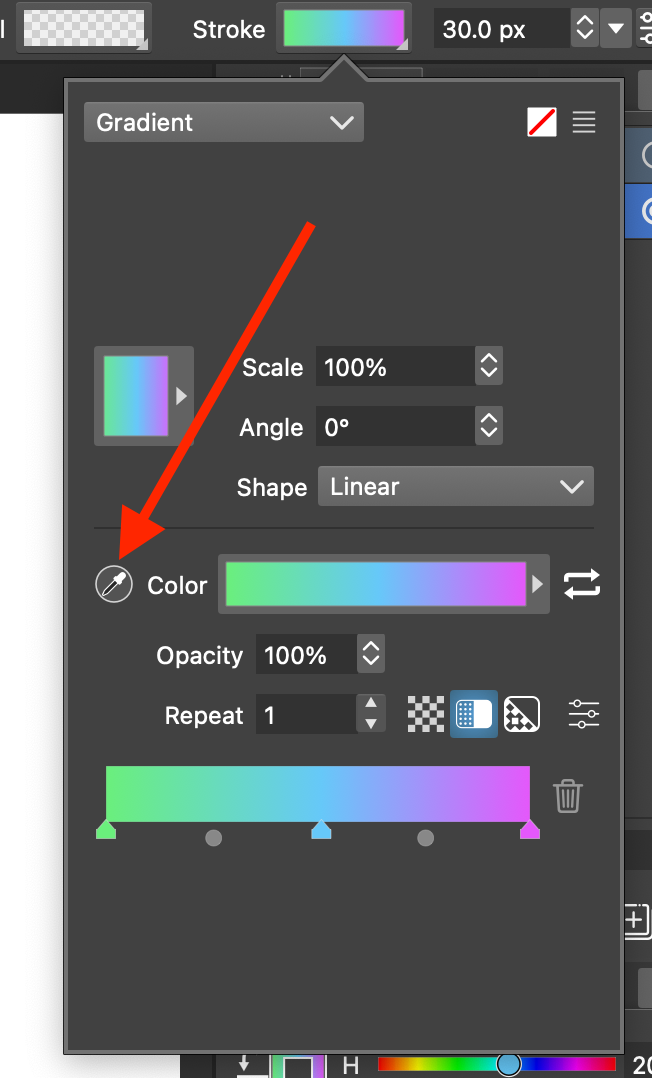
      4. Select a gradient stop and try to pick a color for it using the eye dropper inside the gradient palette.

      Video:
      https://rumble.com/v5gakqh-vectorstyler-gradient-color-picker-doesnt-work.html

      VS 1.2.039

      0_1727271037025_Screen Shot 2024-09-25 at 3.30.10 PM.png

      MacBook Pro 13" early 2015 8G | Intel Iris Graphics 6100 1536 MB | macOS Monterey 12.7.6

      S VectorStylerV 2 Replies Last reply Reply Quote 1
      • S Offline
        Subpath @pentool
        last edited by

        @pentool

        isnt working here too

        but the color picker from the Gradient Panel is working
        Menu > Panels > Gradients

        Win 11
        CPU: AMD Ryzen 5 9600X, 6-core.
        GPU: Nvidia Geforce RTX 5070.

        1 Reply Last reply Reply Quote 0
        • VectorStylerV Offline
          VectorStyler @pentool
          last edited by

          @pentool Yes, it can be replicated. I will try to find a solution for this. The problem is with the popup being closed before picking the color.

          1 Reply Last reply Reply Quote 0
          • First post
            Last post