VectorStyler
    • Categories
    • Unread
    • Recent
    • Tags
    • Popular
    • Register
    • Login

    Cannot use the cursor/arrow keys layers names

    Scheduled Pinned Locked Moved Bugs in VectorStyler
    8 Posts 3 Posters 9.5k Views 3 Watching
    Loading More Posts
    • Oldest to Newest
    • Newest to Oldest
    • Most Votes
    Reply
    • Reply as topic
    Log in to reply
    This topic has been deleted. Only users with topic management privileges can see it.
    • RaaskotR Offline
      Raaskot
      last edited by

      It's annoying that I cannot use the cursor/arrow key when editing the name fields in layers.
      If arrows keys are hit the edit mode is terminated.

      This behavior opposes normal, universal UI interaction

      alt text

      VectorStylerV 1 Reply Last reply Reply Quote 1
      • VectorStylerV Offline
        VectorStyler @Raaskot
        last edited by

        @Raaskot I could not replicate this here with a based example. is the arrow key pressed with a modifier key?
        Please send me a file where this error occurs.

        RaaskotR 1 Reply Last reply Reply Quote 0
        • RaaskotR Offline
          Raaskot @VectorStyler
          last edited by

          @VectorStyler
          Sure, file attached
          If you try to change the name "Loremipsum" to "Lorem-ipsum" by inserting cursor anywhere in string (in my settings by clicking twice) and then hitting arrow key (no modifier key) to navigate between "m" and "i" you'll terminate the active editing

          0_1728047630788_cursor-close-namefield.vstyler

          VectorStylerV 1 Reply Last reply Reply Quote 1
          • VectorStylerV Offline
            VectorStyler @Raaskot
            last edited by

            @Raaskot Still no luck in replicating.

            Is this on Windows or Mac? is the panel docked?

            One thing to try is to remove (with backup) all workspace and settings files and start VS with defaults.

            RaaskotR 1 Reply Last reply Reply Quote 0
            • RaaskotR Offline
              Raaskot @VectorStyler
              last edited by Raaskot

              @VectorStyler
              Mac used. Docked or undocked is the same.

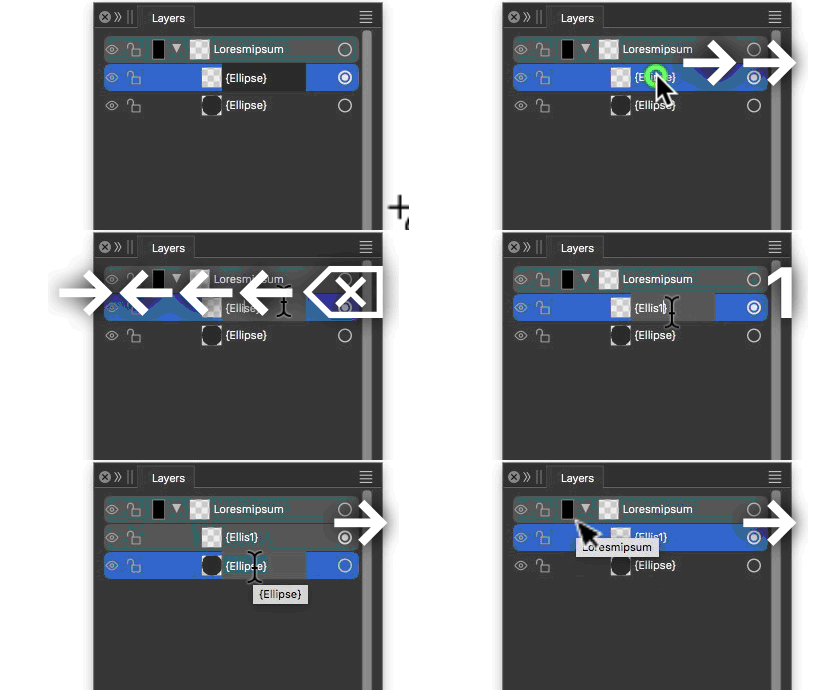
              Animation shows inconsistence: It fails in layer name (jumps to shape layer 1), then works in shape layer 1, but fails in shape layer 2.
              alt text

              Attempt to remove (with backup) all workspace cannot be performed in the moment.

              1 Reply Last reply Reply Quote 0
              • P Offline
                pentool
                last edited by pentool

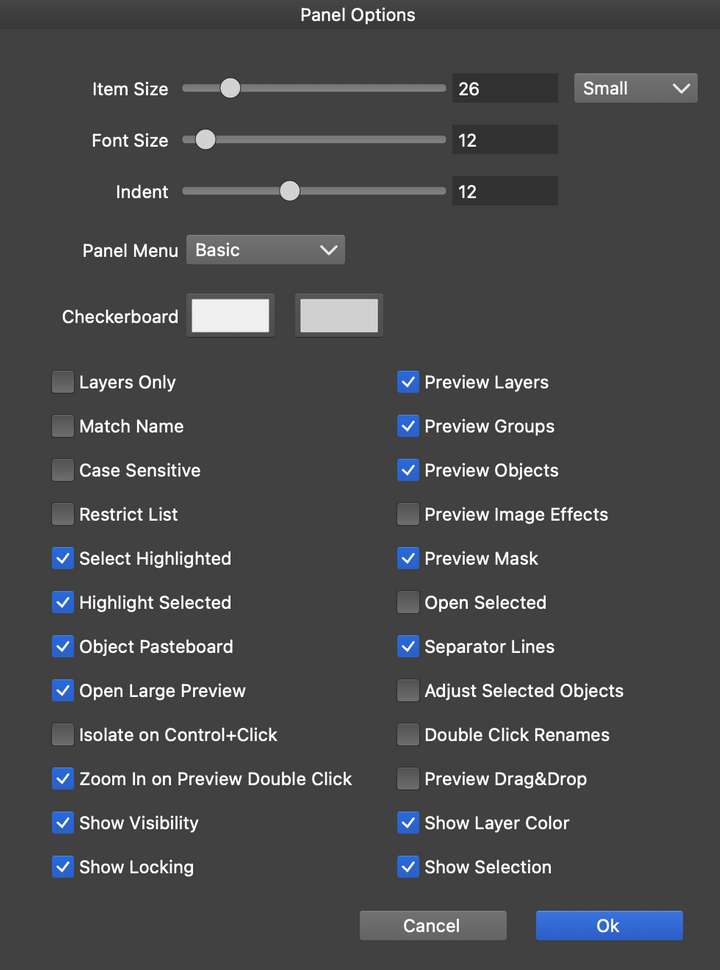
                I cannot reproduce this. I think this might have to do with how your Panel Options is set - but I could B wrong. Go to the Layers Panel and from the panel menu select Panel Options. Mine is set like this and renaming, moving cursor with arrow keys works fine.
                0_1728057804010_Screen Shot 2024-10-04 at 6.02.58 PM.png

                MacBook Pro 13" early 2015 8G | Intel Iris Graphics 6100 1536 MB | macOS Monterey 12.7.6

                RaaskotR 1 Reply Last reply Reply Quote 1
                • RaaskotR Offline
                  Raaskot @pentool
                  last edited by Raaskot

                  @pentool
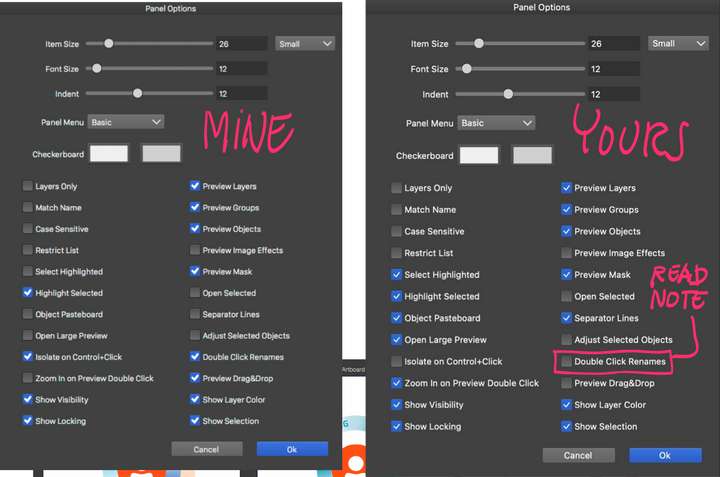
                  Your settings removed the arrow key phenomenon.

                  I observe that the issue is related to how VS receive input from tablet/pen devices – in my case a Wacom Intuos Pro Medium. In generel pen input appears erratic and sometimes non responsive. It very inconsistent: Sometimes it acts expected sometimes it don’t.

                  This is not the case with mouse or touch pad input: No issues to report.

                  If I replicate your settings with the tablet and try to rename a layer the Object Options modal immediately pops up. Only way to somewhat avoid this is adding "double click" option. I think there are several parameters that interfere, which I can’t figure out.
                  0_1728111868147_cfd399d6-fb1b-410d-a763-6df32e423eff-billede.png

                  VectorStylerV 1 Reply Last reply Reply Quote 1
                  • VectorStylerV Offline
                    VectorStyler @Raaskot
                    last edited by

                    @Raaskot I will test these options.

                    1 Reply Last reply Reply Quote 0
                    • First post
                      Last post
