VectorStyler
    • Categories
    • Unread
    • Recent
    • Tags
    • Popular
    • Register
    • Login

    Panels stop extending all the way to the end of the screen
    Scheduled Pinned Locked Moved Bugs in VectorStyler
    5 Posts 3 Posters 3.8k Views 3 Watching
    Loading More Posts
    • Oldest to Newest
    • Newest to Oldest
    • Most Votes
    Reply
    • Reply as topic
    Log in to reply
    This topic has been deleted. Only users with topic management privileges can see it.
    • J Offline
      JuurGroove
      last edited by

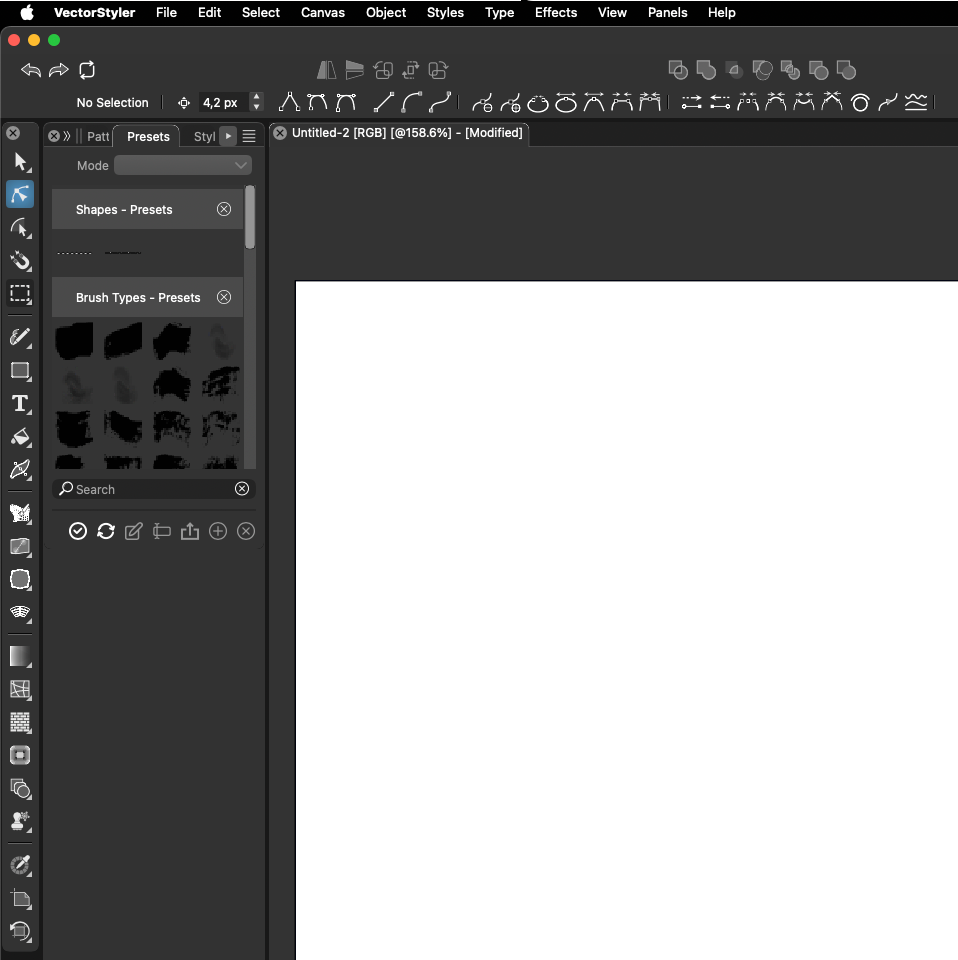
      Sometimes panels stop extending all the way to the end of the screen for no apparent reason. This happens more often with longer panels with scroll bars when switching from the longer panel to another and the switching back, after which the panel does not extend to full height. Also there is no way to extend the panel manually. Would be able to send a screen recording but the forum apparently does not support those.
      0_1732183197617_Screenshot 2024-11-21 at 15.28.48.png

      VectorStyler 1.2.057 | macOS Sequoia 15.2 | MacBook Pro 14" M1 Pro/16GB (2021) | XPPen Artist Pro 16 (Gen 2)

      VectorStylerV 1 Reply Last reply Reply Quote 0
      • VectorStylerV Offline
        VectorStyler @JuurGroove
        last edited by

        @JuurGroove What are the other panels in that stack?
        Docking a single preset panel should extend (I tested it now).

        J 1 Reply Last reply Reply Quote 0
        • H Offline
          hbalcic
          last edited by

          This also applies to toolbars. We can't add a bottom toolbar next to the top one. Or add anything below a vertical toolbar.


          0_1732185810006_Screen Shot 2024-11-21 at 13.39.28.png

          0_1732185858742_Screen Shot 2024-11-21 at 13.38.13.png

          1 Reply Last reply Reply Quote 1
          • J Offline
            JuurGroove @VectorStyler
            last edited by

            @VectorStyler The other panels are Pattern and Styles in my particular case. And yes, if the Presets panel sits on its own it does extend fully, which is why I wrote switching away from it to some other panel and then back again makes it not extend to the bottom. If I then reset my workspace, it again starts working, but only till i click to some other panel again etc. Furthermore there is also no grab handle at the bottom to manually drag it down. But this appears as soon as I dock some other panel underneath it, like Guidelines.

            VectorStyler 1.2.057 | macOS Sequoia 15.2 | MacBook Pro 14" M1 Pro/16GB (2021) | XPPen Artist Pro 16 (Gen 2)

            VectorStylerV 1 Reply Last reply Reply Quote 1
            • VectorStylerV Offline
              VectorStyler @JuurGroove
              last edited by

              @JuurGroove I will try to replicate these issues.

              1 Reply Last reply Reply Quote 1
              • First post
                Last post