VectorStyler
    • Categories
    • Unread
    • Recent
    • Tags
    • Popular
    • Register
    • Login

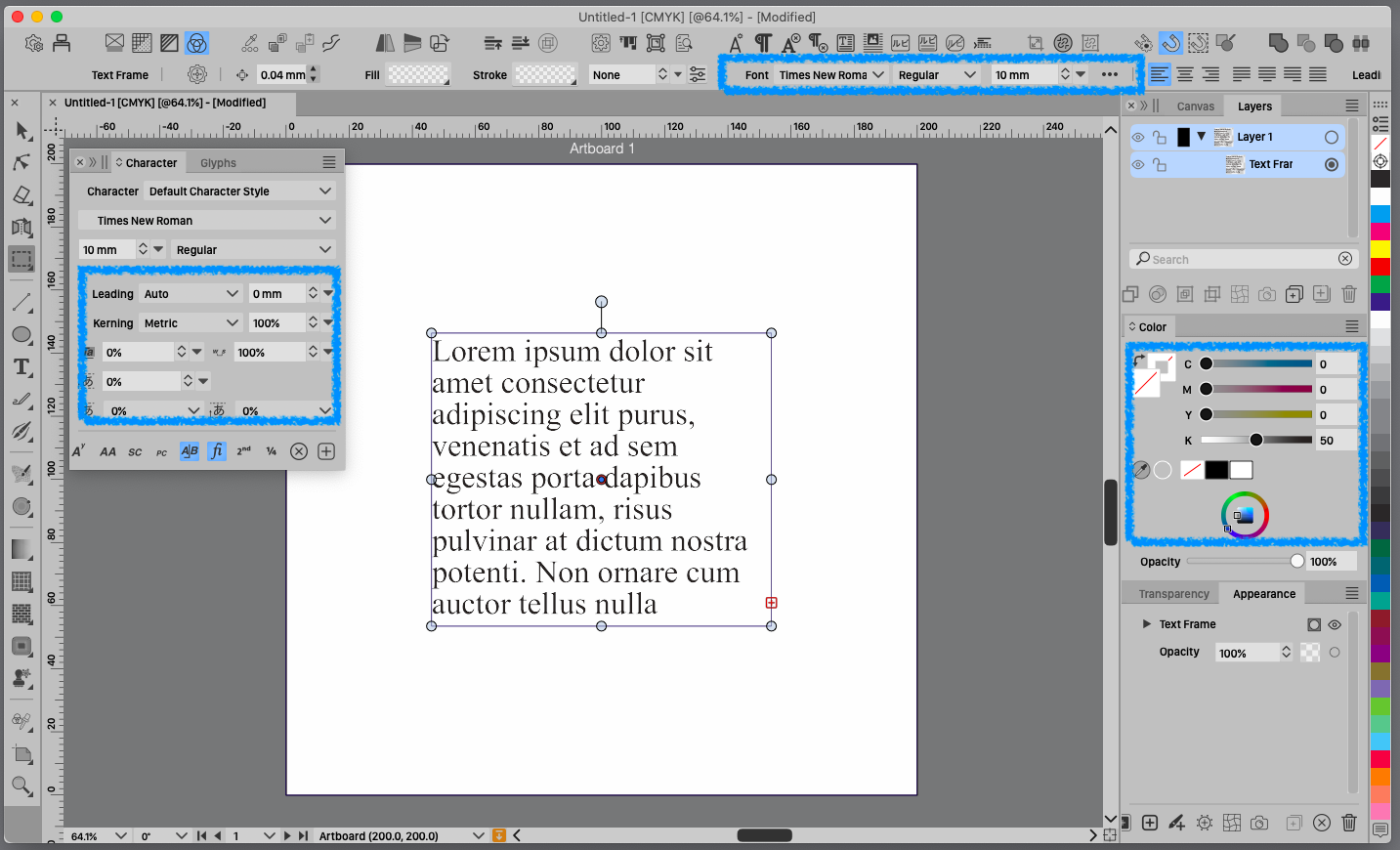
    text color indicator
    Scheduled Pinned Locked Moved Features and Ideas
    15 Posts 3 Posters 12.8k Views 2 Watching
    Loading More Posts
    • Oldest to Newest
    • Newest to Oldest
    • Most Votes
    Reply
    • Reply as topic
    Log in to reply
    This topic has been deleted. Only users with topic management privileges can see it.
    • 861475_VctSt8 Away
      861475_VctSt @VectorStyler
      last edited by

      @VectorStyler

      I have a few suggestions for improvement.
      I think it would be more useful if it looks like the image.
      It would be nice if opacity has a popup and a slider.
      If you think it would be good, please consider it.
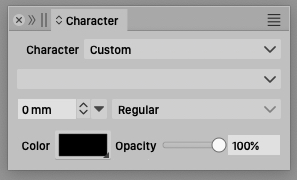
      0_1732755311376_plus_opa.jpg

      LIc. 0 OS10.15.8
      MacBook Air (13-inch, Mid 2012) / Intel Core i5, 8GB / Intel HD Graphics 4000
      LIc. 1 OS15.7.4
      MacBook Pro (14-inch, 2023) / Apple M2 Pro, 16GB / Apple GPU

      VectorStylerV 1 Reply Last reply Reply Quote 2
      • VectorStylerV Offline
        VectorStyler @861475_VctSt
        last edited by

        @861475_VctSt I will add the opacity.

        861475_VctSt8 3 Replies Last reply Reply Quote 2
        • 861475_VctSt8 Away
          861475_VctSt @VectorStyler
          last edited by

          @VectorStyler

          Thanks for agreeing to the suggestion.
          😄
          I've thought it over and it might be confusing to have opacity here. I would rather have a popup for screen density, which QuarkXpress does.
          Because text is more likely to KNOCK OUT than OVER PRINT. (Just my opinion).
          Please consider.

          LIc. 0 OS10.15.8
          MacBook Air (13-inch, Mid 2012) / Intel Core i5, 8GB / Intel HD Graphics 4000
          LIc. 1 OS15.7.4
          MacBook Pro (14-inch, 2023) / Apple M2 Pro, 16GB / Apple GPU

          1 Reply Last reply Reply Quote 1
          • BoldlineB Offline
            Boldline
            last edited by Boldline

            Can someone explain in basic terms what the value of the color box is? I can see how it affects the text color but there type is also affected by the stroke and fill tools.
            The color square in the contextual menu adds some confusion. The name “Color” does not explain its purpose.
            Thanks in advance!

            🍎 macOS Tahoe 26.2, Mac mini (M1, 2020), Chip Apple M1, Memory 16 GB
            Cintiq 27QHD Display and LG Ultra HD Display

            861475_VctSt8 1 Reply Last reply Reply Quote 0
            • 861475_VctSt8 Away
              861475_VctSt @Boldline
              last edited by

              @Boldline
              Do you need an explanation from “screen density” (or screen percentage) of printing technology?

              LIc. 0 OS10.15.8
              MacBook Air (13-inch, Mid 2012) / Intel Core i5, 8GB / Intel HD Graphics 4000
              LIc. 1 OS15.7.4
              MacBook Pro (14-inch, 2023) / Apple M2 Pro, 16GB / Apple GPU

              BoldlineB 1 Reply Last reply Reply Quote 1
              • BoldlineB Offline
                Boldline @861475_VctSt
                last edited by

                @861475_VctSt apparently! lol Maybe point me in the right direction 🙂

                🍎 macOS Tahoe 26.2, Mac mini (M1, 2020), Chip Apple M1, Memory 16 GB
                Cintiq 27QHD Display and LG Ultra HD Display

                861475_VctSt8 1 Reply Last reply Reply Quote 0
                • 861475_VctSt8 Away
                  861475_VctSt @Boldline
                  last edited by

                  @Boldline

                  My language skills do not allow me to explain it, so please use the following search for clues.
                  Sorry.😅

                  https://en.wikipedia.org/wiki/Halftone

                  LIc. 0 OS10.15.8
                  MacBook Air (13-inch, Mid 2012) / Intel Core i5, 8GB / Intel HD Graphics 4000
                  LIc. 1 OS15.7.4
                  MacBook Pro (14-inch, 2023) / Apple M2 Pro, 16GB / Apple GPU

                  1 Reply Last reply Reply Quote 0
                  • 861475_VctSt8 Away
                    861475_VctSt @VectorStyler
                    last edited by 861475_VctSt

                    @VectorStyler

                    I am familiar with the Tint operation and prefer to use Tint even today when Opacity processing is more common.
                    (Note: I previously described it as 'screen density'.

                    Tint was placed in the same easy-to-operate position as Opacity in QuarkXpress, which I have used for many years. (See [image above].)

                    In the days of film plate making, it was common to use Tint to adjust the shading of solid colors, rather than transparency effects.
                    Designers' instructions such as, “Reduce the density of that color by about 20%,” were often heard in the field at that time.

                    However, software has evolved over time, and more and more Tint operations are not directly supported. For example, in VS, I found the functionality in the ChororTheme palette.
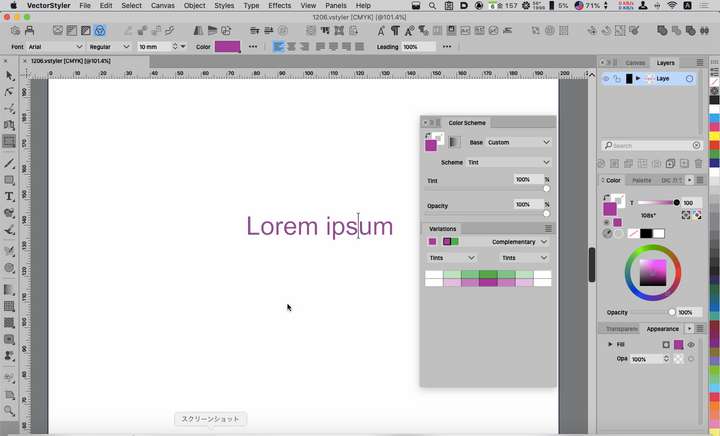
                    0_1733461136307_2024-12-06.png

                    I will continue to use Tint because I am accustomed to the intuitive nature of Tint operations, but I will also use Opacity in some situations.

                    LIc. 0 OS10.15.8
                    MacBook Air (13-inch, Mid 2012) / Intel Core i5, 8GB / Intel HD Graphics 4000
                    LIc. 1 OS15.7.4
                    MacBook Pro (14-inch, 2023) / Apple M2 Pro, 16GB / Apple GPU

                    VectorStylerV 1 Reply Last reply Reply Quote 1
                    • VectorStylerV Offline
                      VectorStyler @861475_VctSt
                      last edited by

                      @861475_VctSt said in text color indicator:

                      I will continue to use Tint because I am accustomed to the intuitive nature of Tint operations

                      Tint is available with spot or global colors.

                      861475_VctSt8 1 Reply Last reply Reply Quote 0
                      • 861475_VctSt8 Away
                        861475_VctSt @VectorStyler
                        last edited by

                        @VectorStyler

                        Thanks for the advice
                        I see, it is convenient to register a spot color as a global color in the palette and use it. (A, B) Moreover, I can do CMYK conversion on the color palette. (C)
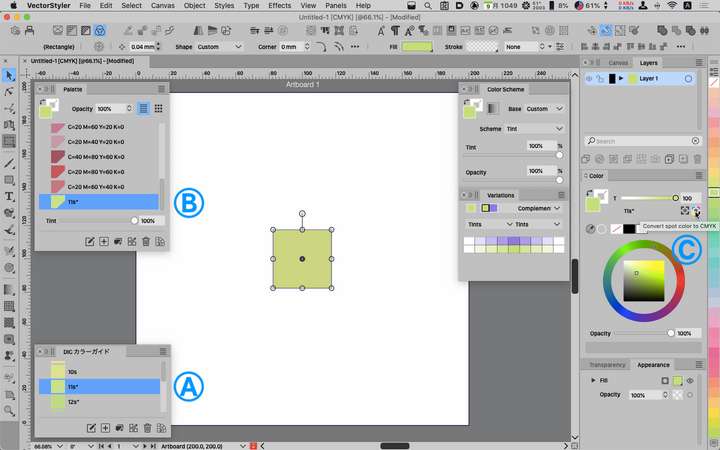
                        0_1733709744033_2024-12-09.png

                        The concept of tint processing was an important method when film plate making was the mainstream, but in today's highly digitalized environment, the need for such processing may have diminished. The younger generation may be confused by the expression “color tint 20%. It may be more common to use transparency adjustment to dilute colors.

                        LIc. 0 OS10.15.8
                        MacBook Air (13-inch, Mid 2012) / Intel Core i5, 8GB / Intel HD Graphics 4000
                        LIc. 1 OS15.7.4
                        MacBook Pro (14-inch, 2023) / Apple M2 Pro, 16GB / Apple GPU

                        1 Reply Last reply Reply Quote 1
                        • 861475_VctSt8 Away
                          861475_VctSt @VectorStyler
                          last edited by

                          @VectorStyler

                          Thanks.
                          😃
                          ver. 1.2.052.
                          The charactor palete now has a slider bar to set the opacity of the text color.

                          LIc. 0 OS10.15.8
                          MacBook Air (13-inch, Mid 2012) / Intel Core i5, 8GB / Intel HD Graphics 4000
                          LIc. 1 OS15.7.4
                          MacBook Pro (14-inch, 2023) / Apple M2 Pro, 16GB / Apple GPU

                          1 Reply Last reply Reply Quote 1
                          • First post
                            Last post
