VectorStyler
    • Categories
    • Unread
    • Recent
    • Tags
    • Popular
    • Register
    • Login

    Node tool, drag select - short key: How do I select and activate every nodes in same shape?

    Scheduled Pinned Locked Moved Questions and Support
    11 Posts 2 Posters 8.7k Views 2 Watching
    Loading More Posts
    • Oldest to Newest
    • Newest to Oldest
    • Most Votes
    Reply
    • Reply as topic
    Log in to reply
    This topic has been deleted. Only users with topic management privileges can see it.
    • RaaskotR Offline
      Raaskot
      last edited by

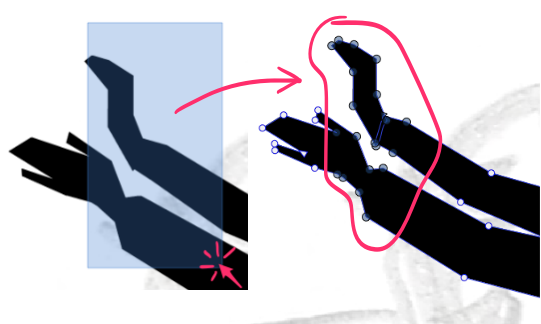
      VS’ Node tool: Drag-LM selects nodes and make them active. Same thing with Adobe Ill but here you select and activate every nodes in same shape by pressing option.

      How does this works in VS?
      0_1734003445133_13e8e7d4-1fd9-468a-9630-bf9b6cf4a4ef-billede.png

      S 1 Reply Last reply Reply Quote 1
      • S Offline
        Subpath @Raaskot
        last edited by Subpath

        @Raaskot

        To select all nodes of a Shape
        use the Note Tool do a left click on
        the shape and press Ctrl+A on Windows

        instead of left click, hovering over a shape
        and press Ctrl+A works also

        Win 11
        CPU: AMD Ryzen 5 9600X, 6-core.
        GPU: Nvidia Geforce RTX 5070.

        RaaskotR 1 Reply Last reply Reply Quote 2
        • RaaskotR Offline
          Raaskot @Subpath
          last edited by

          @Subpath
          So cool, thanks!

          S 1 Reply Last reply Reply Quote 1
          • S Offline
            Subpath @Raaskot
            last edited by Subpath

            @Raaskot

            indeed 🙂

            but I have to correct myself a little
            select at least one node of that shape
            and then press Ctrl+A
            this will work better if you have many shapes

            Win 11
            CPU: AMD Ryzen 5 9600X, 6-core.
            GPU: Nvidia Geforce RTX 5070.

            RaaskotR 1 Reply Last reply Reply Quote 2
            • RaaskotR Offline
              Raaskot @Subpath
              last edited by

              @Subpath
              Thanks. Noticed the same when I tried it out, very useful. Like VS procedure better than in AI

              S 1 Reply Last reply Reply Quote 1
              • S Offline
                Subpath @Raaskot
                last edited by Subpath

                @Raaskot

                Had some trouble with my free video provider
                seems solved

                i like to add that using Ctrl + A for selecting all
                Nodes of a Shape has an additional Effect

                see this video here

                Win 11
                CPU: AMD Ryzen 5 9600X, 6-core.
                GPU: Nvidia Geforce RTX 5070.

                RaaskotR 1 Reply Last reply Reply Quote 1
                • RaaskotR Offline
                  Raaskot @Subpath
                  last edited by

                  @Subpath

                  Very nice, thanks.
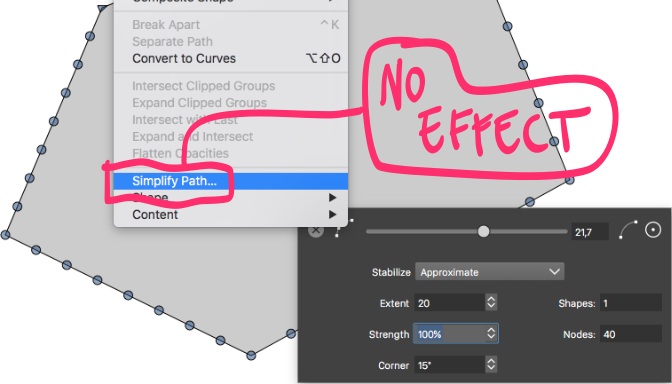
                  Cool tip with adding nodes. Off topic: How do you reduce nodes again?

                  The Simplify Path has no effect.
                  0_1734080774577_f1cd2cae-960c-4616-9a14-3229abb8ecc8-billede.png

                  S 1 Reply Last reply Reply Quote 1
                  • S Offline
                    Subpath @Raaskot
                    last edited by

                    @Raaskot

                    good question

                    of course undo

                    the only other ways i found was via History Panel
                    ( Menu > Panels > Edit > History )

                    or via a Lasso selection

                    Win 11
                    CPU: AMD Ryzen 5 9600X, 6-core.
                    GPU: Nvidia Geforce RTX 5070.

                    RaaskotR 1 Reply Last reply Reply Quote 1
                    • RaaskotR Offline
                      Raaskot @Subpath
                      last edited by

                      @Subpath
                      Guess I'll report a bug ...

                      S 1 Reply Last reply Reply Quote 0
                      • S Offline
                        Subpath @Raaskot
                        last edited by

                        @Raaskot

                        I was thinking about using the " - " (Minus) Key
                        for delete nodes was inserted via plus key ?

                        Win 11
                        CPU: AMD Ryzen 5 9600X, 6-core.
                        GPU: Nvidia Geforce RTX 5070.

                        RaaskotR 1 Reply Last reply Reply Quote 1
                        • RaaskotR Offline
                          Raaskot @Subpath
                          last edited by

                          @Subpath
                          Would make sense with "-" --> node reduction, but it doesn't seems work.

                          And odd: It appears the reduce node function actually works yet on and off only. As if you must deselect and reselect the shape everytime.

                          Strange ...

                          1 Reply Last reply Reply Quote 0
                          • First post
                            Last post