VectorStyler
    • Categories
    • Unread
    • Recent
    • Tags
    • Popular
    • Register
    • Login

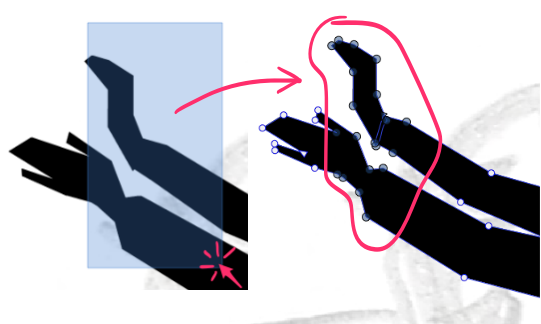
    Node tool, drag select - short key: How do I select and activate every nodes in same shape?
    Scheduled Pinned Locked Moved Questions and Support
    11 Posts 2 Posters 8.7k Views 2 Watching
    Loading More Posts
    • Oldest to Newest
    • Newest to Oldest
    • Most Votes
    Reply
    • Reply as topic
    Log in to reply
    This topic has been deleted. Only users with topic management privileges can see it.
    • S Offline
      Subpath @Raaskot
      last edited by Subpath

      @Raaskot

      To select all nodes of a Shape
      use the Note Tool do a left click on
      the shape and press Ctrl+A on Windows

      instead of left click, hovering over a shape
      and press Ctrl+A works also

      Win 11
      CPU: AMD Ryzen 5 9600X, 6-core.
      GPU: Nvidia Geforce RTX 5070.

      RaaskotR 1 Reply Last reply Reply Quote 2
      • RaaskotR Offline
        Raaskot @Subpath
        last edited by

        @Subpath
        So cool, thanks!

        S 1 Reply Last reply Reply Quote 1
        • S Offline
          Subpath @Raaskot
          last edited by Subpath

          @Raaskot

          indeed 🙂

          but I have to correct myself a little
          select at least one node of that shape
          and then press Ctrl+A
          this will work better if you have many shapes

          Win 11
          CPU: AMD Ryzen 5 9600X, 6-core.
          GPU: Nvidia Geforce RTX 5070.

          RaaskotR 1 Reply Last reply Reply Quote 2
          • RaaskotR Offline
            Raaskot @Subpath
            last edited by

            @Subpath
            Thanks. Noticed the same when I tried it out, very useful. Like VS procedure better than in AI

            S 1 Reply Last reply Reply Quote 1
            • S Offline
              Subpath @Raaskot
              last edited by Subpath

              @Raaskot

              Had some trouble with my free video provider
              seems solved

              i like to add that using Ctrl + A for selecting all
              Nodes of a Shape has an additional Effect

              see this video here

              Win 11
              CPU: AMD Ryzen 5 9600X, 6-core.
              GPU: Nvidia Geforce RTX 5070.

              RaaskotR 1 Reply Last reply Reply Quote 1
              • RaaskotR Offline
                Raaskot @Subpath
                last edited by

                @Subpath

                Very nice, thanks.
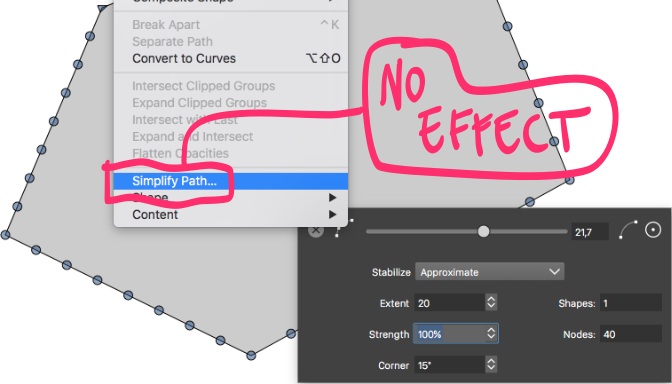
                Cool tip with adding nodes. Off topic: How do you reduce nodes again?

                The Simplify Path has no effect.
                0_1734080774577_f1cd2cae-960c-4616-9a14-3229abb8ecc8-billede.png

                S 1 Reply Last reply Reply Quote 1
                • S Offline
                  Subpath @Raaskot
                  last edited by

                  @Raaskot

                  good question

                  of course undo

                  the only other ways i found was via History Panel
                  ( Menu > Panels > Edit > History )

                  or via a Lasso selection

                  Win 11
                  CPU: AMD Ryzen 5 9600X, 6-core.
                  GPU: Nvidia Geforce RTX 5070.

                  RaaskotR 1 Reply Last reply Reply Quote 1
                  • RaaskotR Offline
                    Raaskot @Subpath
                    last edited by

                    @Subpath
                    Guess I'll report a bug ...

                    S 1 Reply Last reply Reply Quote 0
                    • S Offline
                      Subpath @Raaskot
                      last edited by

                      @Raaskot

                      I was thinking about using the " - " (Minus) Key
                      for delete nodes was inserted via plus key ?

                      Win 11
                      CPU: AMD Ryzen 5 9600X, 6-core.
                      GPU: Nvidia Geforce RTX 5070.

                      RaaskotR 1 Reply Last reply Reply Quote 1
                      • RaaskotR Offline
                        Raaskot @Subpath
                        last edited by

                        @Subpath
                        Would make sense with "-" --> node reduction, but it doesn't seems work.

                        And odd: It appears the reduce node function actually works yet on and off only. As if you must deselect and reselect the shape everytime.

                        Strange ...

                        1 Reply Last reply Reply Quote 0
                        • First post
                          Last post