VectorStyler
    • Categories
    • Unread
    • Recent
    • Tags
    • Popular
    • Register
    • Login

    Break text into lines/words/letters

    Scheduled Pinned Locked Moved Implemented Features
    9 Posts 4 Posters 9.4k Views 1 Watching
    Loading More Posts
    • Oldest to Newest
    • Newest to Oldest
    • Most Votes
    Reply
    • Reply as topic
    Log in to reply
    This topic has been deleted. Only users with topic management privileges can see it.
    • encartE Offline
      encart
      last edited by

      What do you think about adding that feature?
      I'm personally using that often in other software.
      I'm just typing each word/sentence in a new line, and than break it into lines. After that I'm styling and positioning each block.
      It is a more convenient method than typing each phrase into a new field.
      If it is possible now, I apologize. I couldn't find it.

      MacBook Air M4 24Gb, Tahoe 26.2

      VectorStylerV b77B 2 Replies Last reply Reply Quote 1
      • VectorStylerV Offline
        VectorStyler @encart
        last edited by

        @encart Just to clarify: would this mean creating separate text shape objects from a single text shape, and placing each line / word / letter into a separate object?
        If so, there is no such feature at this time. Is there in other software?

        1 Reply Last reply Reply Quote 0
        • b77B Offline
          b77 @encart
          last edited by b77

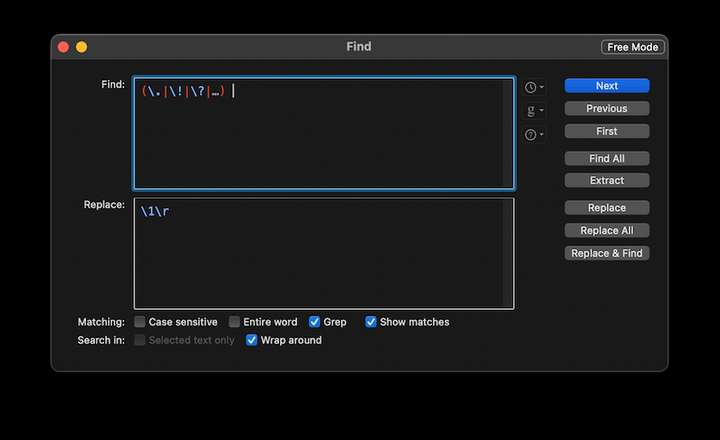
          @encart As a workaround, you can write or paste the text in BBEdit and use Search > Find > Replace All to split the text into sentences, like this:

          0_1625047060857_Captură de ecran din 2021-06-30 la 12.54.52.png

          Then copy the text from BBEdit and paste it in VS.

          MacBook Pro (Intel) running Monterey 12.6.4

          1 Reply Last reply Reply Quote 0
          • BoldlineB Offline
            Boldline
            last edited by

            This is a great suggestion @encart. I deal with this often doing t-shirt designs with rosters for example. When I copy the text from an email, I would have to highlight each name from within the text box and make a new text line for each so I could move them around individually and align and space apart. I was working in illustrator and a solution found there was saving out the text box file as a PDF with a certain setting adjusted (i'll have to go check and refresh my memory as to which one) and when you reopened the PDF, each line would be a separate entity.
            VS having the ability to do this natively would be awesome!

            🍎 macOS Tahoe 26.2, Mac mini (M1, 2020), Chip Apple M1, Memory 16 GB
            Cintiq 27QHD Display and LG Ultra HD Display

            1 Reply Last reply Reply Quote 0
            • encartE Offline
              encart
              last edited by

              @vectoradmin @b77

              Video from Inkscape

              In Cricut Design that feature works perfect. Video
              Easy to acces by icon/ top menu/ context menu

              It's not a big feature, but assuming this thread I knew that although there are relatively few of us here on the forum, @Boldline would be interested in it, because we create similar things.

              I guess you have a lot of work, but if you have a moment and think it's a good idea it will be nice

              MacBook Air M4 24Gb, Tahoe 26.2

              b77B VectorStylerV 2 Replies Last reply Reply Quote 0
              • b77B Offline
                b77 @encart
                last edited by b77

                @encart My workaround doesn't result in separate text objects, it just inserts returns after each period, ellipsis, exclamation and question mark + space character. Sorry for misunderstanding your suggestion.

                MacBook Pro (Intel) running Monterey 12.6.4

                encartE 1 Reply Last reply Reply Quote 0
                • encartE Offline
                  encart @b77
                  last edited by

                  @b77 No problem. Probably the fault is in my English which can be difficult to understand☺

                  MacBook Air M4 24Gb, Tahoe 26.2

                  1 Reply Last reply Reply Quote 0
                  • VectorStylerV Offline
                    VectorStyler @encart
                    last edited by

                    @encart Got it!

                    BoldlineB 1 Reply Last reply Reply Quote 0
                    • BoldlineB Offline
                      Boldline @VectorStyler
                      last edited by

                      Maybe an option to break text apart into either individual words or by lines?

                      🍎 macOS Tahoe 26.2, Mac mini (M1, 2020), Chip Apple M1, Memory 16 GB
                      Cintiq 27QHD Display and LG Ultra HD Display

                      1 Reply Last reply Reply Quote 0
                      • First post
                        Last post